

Data-driven organizations outperform intuition-driven ones. Yet raw data alone does not create clarity. What changes outcomes is how data is displayed, explored, and turned into actionable insights. This is where visualization boards in Odoo become a game changer.
As a modular ERP, Odoo provides native tools to visualize data across sales, inventory, manufacturing, accounting, CRM, and operations. With custom dashboards, interactive charts, and real-time reporting, Odoo allows companies to move from static reports to living decision systems.
Key Takeaways
- Visualization boards in Odoo transform raw data into actionable insights
- Odoo dashboards support charts, kanban boards, and real-time reporting
- Custom dashboards align metrics with business needs and workflows
- Kanban boards visualize processes, not just numbers
- Real-time data improves speed and quality of decision making
- Visualization is integrated directly into ERP operations
- Odoo enables scalable, role-based analytics without external tools
Key Takeaways
Understanding Data Visualization in Business
Why Visualization Boards in Odoo Matter
Odoo Dashboards: Core Capabilities
1. Custom Dashboards for Business Needs
2. Supported Chart Types
Visualization Boards and Odoo Kanban Boards
1. Odoo Kanban Boards Explained
2. Kanban View as a Visualization Tool
Creating Visualization Boards in Odoo: Step-by-Step
Real-Time Visualization and Decision Making
Practical Visualization Board Examples
1. Sales Performance Dashboard
2. Inventory Management Dashboard
3. CRM and Lead Model Dashboard
Advanced Features and Integrations
Benefits of Visualization Boards in Odoo
Conclusion
FAQs
Understanding Data Visualization in Business
What Is Data Visualization?
Data visualization is the process of transforming structured data into visual formats such as bar charts, line charts, pie charts, kanban boards, and dashboards. The goal is not decoration, but sense-making.
Well-designed visualization boards help users:
- Display data clearly
- Identify patterns and anomalies
- Compare performance against goals
- Support faster and more informed decisions
In an ERP context, visualization must be accurate, real time, and contextual. Odoo excels here by connecting visualization directly to live operational data.
Why Visualization Boards in Odoo Matter
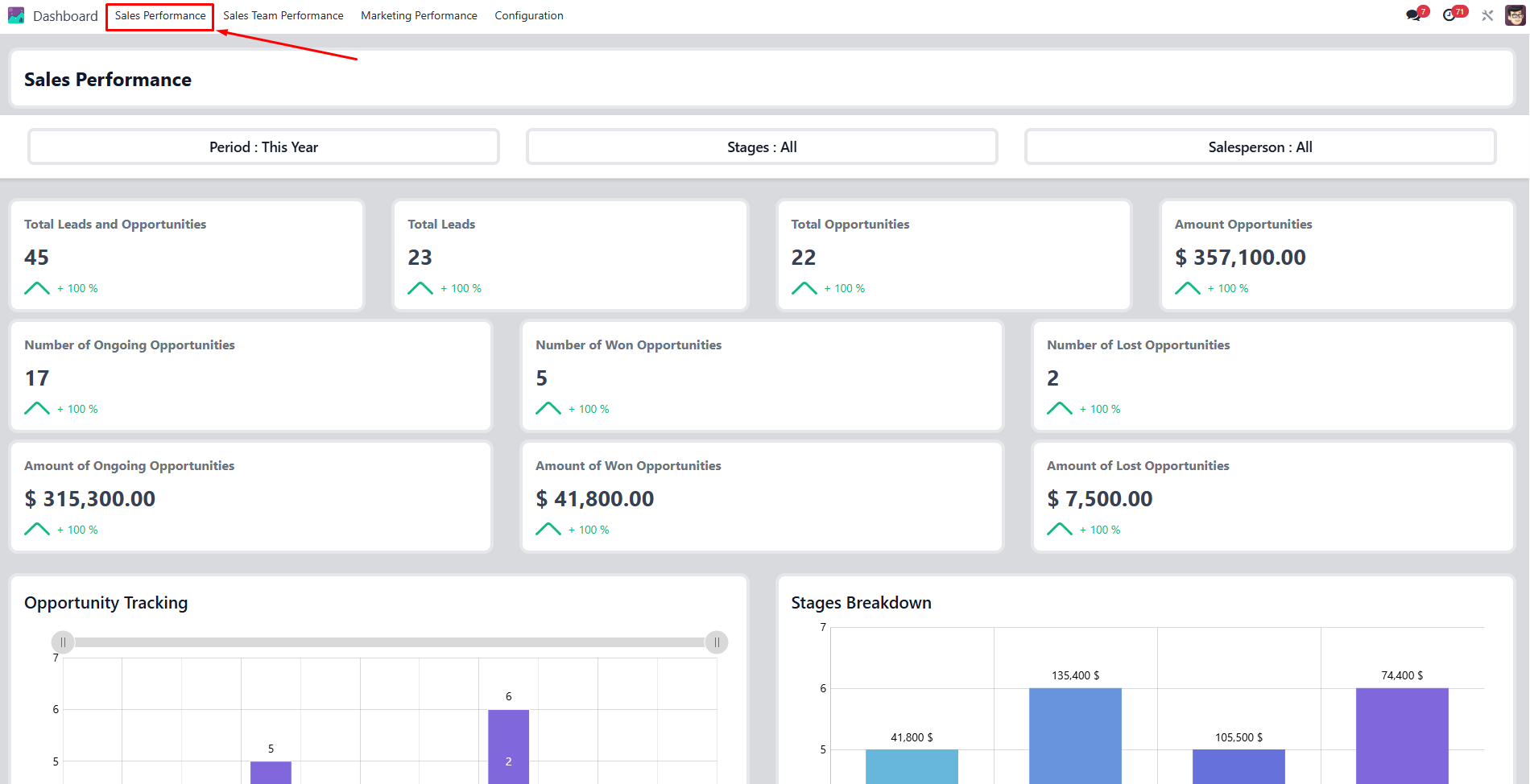
Odoo visualization board centralizing real-time sales data to support faster business decisions
Many companies still rely on Excel exports, disconnected BI tools, or manual reports. These approaches introduce delay, inconsistency, and interpretation risk.
Visualization boards in Odoo solve this by:
- Centralizing data inside one system
- Updating dashboards in real time
- Aligning metrics with business workflows
- Giving users role-based access to insights
Instead of asking “Where is the report?”, teams ask “What decision should we take now?”
Odoo Dashboards: Core Capabilities
1. Custom Dashboards for Business Needs
Odoo dashboards are fully customizable. Each dashboard item can be configured to reflect specific metrics, layouts, and objectives.
Users can:
- Define titles and layouts
- Add widgets and charts
- Apply filters and domains
- Adjust visualization per role or department
A CEO dashboard looks very different from a sales team dashboard or an inventory manager overview.
2. Supported Chart Types
Odoo supports multiple chart types, each serving a distinct analytical purpose:
- Bar charts for comparisons (monthly sales, stock levels)
- Line charts for trends over time
- Pie charts for distribution (revenue by product, leads by source)
- Graphs combining multiple metrics
- Kanban boards for workflow visualization
Choosing the right chart type is critical for effective decision making.
Design the Right Dashboards
Consult with Odoo experts to align visualization with real business decisions
Visualization Boards and Odoo Kanban Boards
1. Odoo Kanban Boards Explained
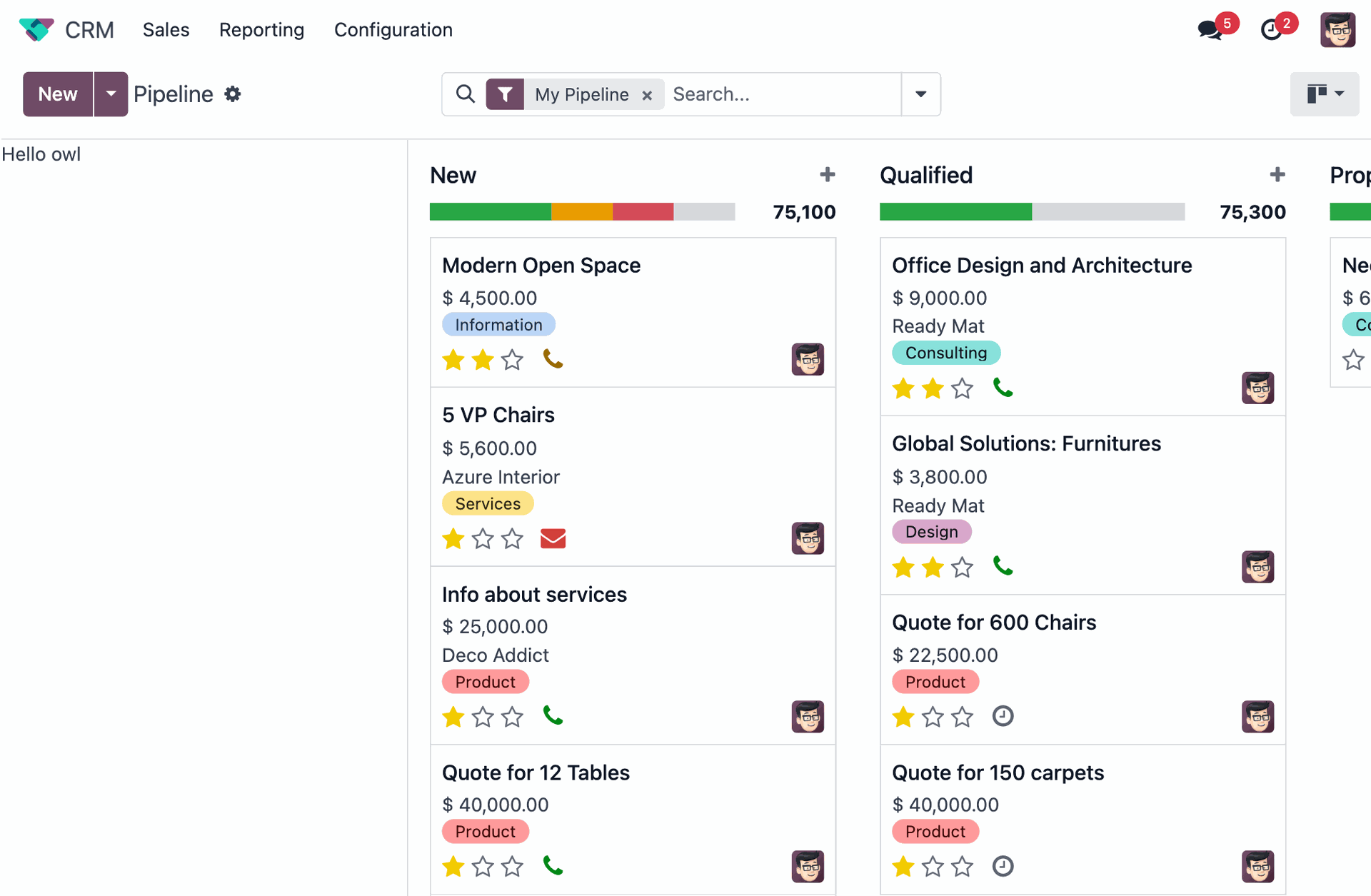
Odoo CRM kanban visualization board showing real-time sales pipeline stages and opportunities
Odoo kanban boards visualize records as cards moving through stages. Unlike static charts, kanban boards show process flow in real time.
Common kanban use cases include:
- Sales pipeline stages
- Lead model qualification
- Specific tasks in project management
- Inventory workflows
- Manufacturing steps
2. Kanban View as a Visualization Tool
The kanban view is more than task tracking. It displays:
- Status
- Priority
- Responsible users
- Deadlines
- Bottlenecks
For operational teams, kanban boards are often more actionable than traditional charts.
Creating Visualization Boards in Odoo: Step-by-Step
Step 1: Access the Reporting Module
Navigate to the relevant module (Sales, Inventory, CRM, Accounting). Most Odoo apps include a reporting or dashboard page accessible from the top menu or top right corner.
Step 2: Select and Define Data
Choose the data model you want to visualize:
- Sales orders
- Invoices
- Inventory moves
- Leads
- Products
Apply domains and filters to limit data to what matters.
Step 3: Choose the Chart Type
Select the chart type that best fits your objective:
- Trend analysis → line charts
- Comparison → bar charts
- Distribution → pie charts
- Workflow → kanban boards
This choice directly affects clarity and insight.
Step 4: Customize Dashboard Items
Each dashboard item can be customized:
- Metrics displayed
- Time range
- Grouping logic
- Labels and titles
- Thresholds and targets
Customization ensures dashboards align with real business needs, not generic KPIs.
Step 5: Save, Share, and Maintain
Dashboards can be saved, duplicated, or shared with other users. Access rights ensure data security while maintaining transparency.
Real-Time Visualization and Decision Making
One of Odoo’s strongest advantages is real-time data visualization.
As transactions occur:
- Sales dashboards update instantly
- Inventory levels refresh automatically
- Kanban boards reflect workflow changes
- Reports remain consistent across users
This real-time capability reduces reaction time and improves productivity across teams.
Practical Visualization Board Examples
1. Sales Performance Dashboard
A sales visualization board may include:
- Monthly revenue (bar chart)
- Sales trend (line chart)
- Top products (pie chart)
- Sales team kanban board
- Conversion rate metrics
This enables sales teams to adjust strategy quickly.
2. Inventory Management Dashboard
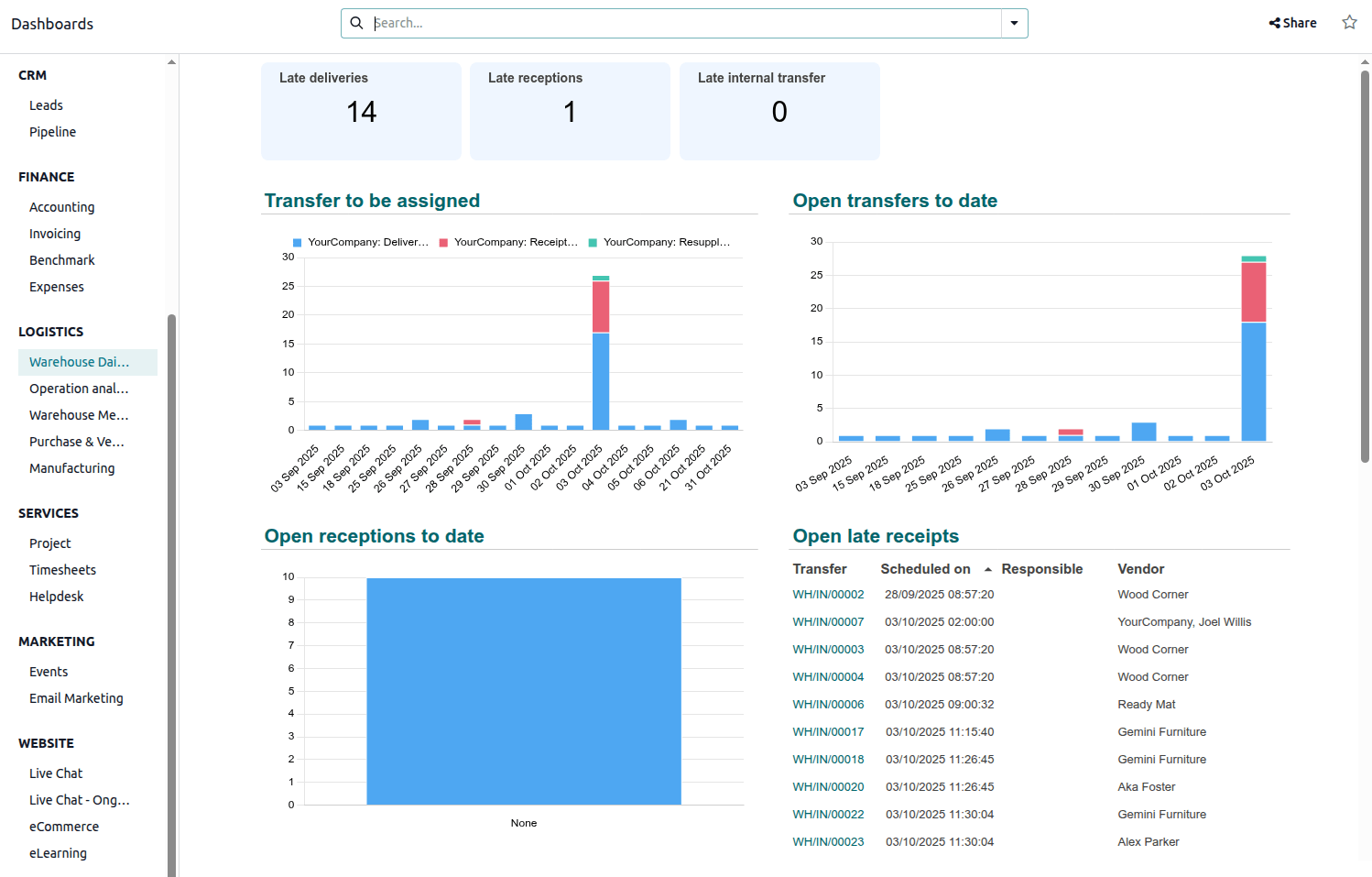
Inventory visualization board in Odoo centralizing logistics performance and transfer status
Inventory visualization boards support:
- Stock levels by location
- Fast- vs slow-moving products
- Reorder alerts
- Incoming vs outgoing flows
Inventory managers gain a clear operational overview without exporting data.
3. CRM and Lead Model Dashboard
CRM dashboards display:
- Leads by stage
- Lead source performance
- Sales cycle duration
- Kanban view of opportunities
This helps sales teams prioritize actions and improve conversion.
✨Pro Tip
Build dashboards around decisions, not data
Start from the question teams need to answer, then design the visualization to support it.
Dashboards work best when every chart clearly signals what to act on next, not just what happened.
Better questions → clearer dashboards → better decisions
Advanced Features and Integrations
Odoo dashboards can integrate with external Business Intelligence tools such as Power BI or Tableau for advanced analytics. However, many companies find native Odoo dashboards sufficient due to tight system integration.
Advanced features include:
- Drill-down navigation
- Cross-module metrics
- Predictive indicators
- Role-based dashboard access
- Server-level performance optimization
Benefits of Visualization Boards in Odoo
Accessibility
All data lives in one system. No manual imports, no version conflicts.
Customization
Dashboards adapt to company size, industry, and workflows.
Interactivity
Users can filter, explore, and test hypotheses directly.
Integration
Visualization is connected to operational processes, not isolated reports.
Focus
Teams focus on actions, not data collection.
Make Visualization Operational
Bring Odoo dashboards and kanban boards into production with expert implementation
Conclusion
Visualization boards are no longer optional. They are essential tools for modern business management. By combining data visualization, real-time reporting, kanban boards, and custom dashboards, Odoo turns ERP data into a strategic asset.
Whether your goal is improving sales performance, optimizing inventory management, or gaining executive-level visibility, visualization boards in Odoo provide tailored solutions that evolve with your business.
By embedding visualization directly into daily workflows, Odoo helps companies move from reporting the past to shaping the future.
FAQs
They are customizable dashboards that display data using charts, kanban boards, and reports inside Odoo.
Yes. Most dashboards can be created and customized using Odoo’s interface and settings.
Yes. Dashboards update automatically as data changes in the system.
Bar charts, line charts, pie charts, graphs, and kanban views.
Yes. Access rights allow dashboards to be shared securely with users or groups.
Yes. Kanban boards are a key visualization tool for workflows and processes.
Yes. Odoo can integrate with tools like Power BI or Tableau if needed.