

Managing inventory efficiently is one of the most critical aspects of running a successful business. Poor inventory control can lead to stockouts, excess inventory, rising operational costs, and dissatisfied customers. Businesses operating in competitive markets need a reliable inventory management system that delivers real-time visibility, automation, and seamless integration across departments. Odoo's modular design allows businesses to adopt only the features they need, reducing total costs compared to legacy ERP systems.
This is where Odoo inventory management stands out. As part of the Odoo ERP ecosystem, Odoo inventory helps businesses manage warehouses efficiently, streamline warehouse operations, track products accurately, and gain full control over stock movements. Recognized around the world, Odoo ERP is a globally trusted business management tool used by companies in many countries and markets. This guide explains how Odoo inventory works, its key features, benefits, and best practices for implementation.
Key Takeaways
- Odoo Inventory Management is a powerful and flexible inventory management system
- It provides real-time inventory tracking and full stock control
- Supports multiple warehouses, barcode scanning, and automation
- Offers advanced inventory reporting and valuation methods
- Integrates seamlessly with sales, manufacturing, CRM, and accounting
- Helps businesses save time, reduce costs, and improve customer satisfaction
Key Takeaways
What Is Odoo Inventory Management?
Importance of Inventory Management System
How the Odoo Inventory Management System Works
Key Features of Odoo Inventory Management
Inventory Reporting and Inventory Performance Analysis
Valuation Methods and Stock Level Accuracy
Integration with Other Odoo Apps
Best Practices for Inventory Management
How to Implement Odoo Inventory Management Successfully
Odoo Inventory Management for Different Business Types
Software Consulting Services
FAQs
What Is Odoo Inventory Management?
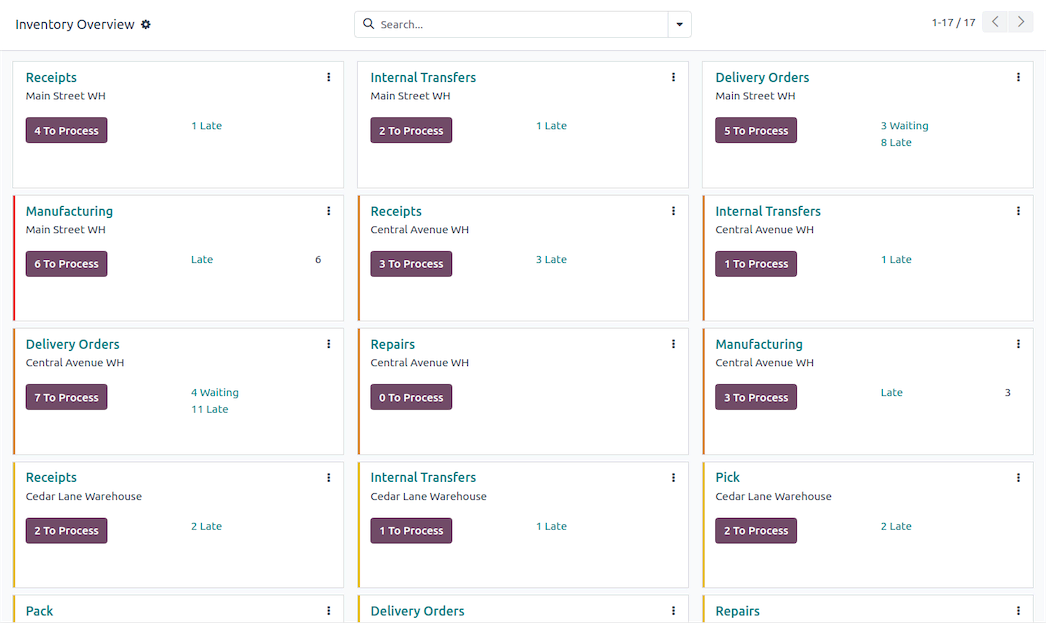 Optimize Warehouse with Odoo Inventory Management
Odoo inventory management is a powerful module within the Odoo ERP platform designed to help businesses manage stock, warehouses, and inventory-related operations in one centralized system. As an open-source and modular ERP solution, Odoo allows companies to customize their inventory workflows based on their unique business processes.
With Odoo inventory, businesses can manage raw materials, finished products, and supplies across different warehouses and locations. The system helps businesses not only store and track inventory but also efficiently sell products to customers by managing stock transactions and sales processes. The system supports real-time inventory tracking, automation, and integration with other Odoo apps such as Sales, Purchase, Manufacturing, CRM, and Accounting. Odoo's inventory management module also supports integration with third-party shipping carriers to calculate shipping costs based on product weights and customer addresses. This makes Odoo an ideal inventory management solution for small businesses, growing companies, and large enterprises alike.
Importance of Inventory Management System
Business performance and competitiveness rely on a robust inventory management system that supports efficient operations. Accurate inventory tracking helps businesses avoid stock shortages, reduce excess inventory, and control unnecessary costs.
With real-time inventory visibility, companies can monitor stock levels across multiple warehouses and locations. This ensures that products and raw materials are always available when needed. Accurate inventory reporting also provides valuable insights, allowing managers to optimize stock levels, improve planning, and make data-driven decisions.
A well-implemented inventory management system improves order fulfillment, enhances customer satisfaction, and enables businesses to scale confidently as demand grows.
How the Odoo Inventory Management System Works
At its core, the Odoo inventory management system is built around simple but powerful concepts: products, locations, stock movements, and rules.
Odoo tracks inventory through:
- Incoming shipments from suppliers
- Internal transfers between warehouses or locations
- Outgoing shipments to customers
Each product movement updates stock levels automatically, providing real-time updates across the entire system. Tracking the quantity of each product is essential for accurate inventory management and order fulfillment. Businesses can define physical locations, virtual locations, and routes to control how products move within warehouse operations.
This structured approach allows companies to track products accurately, maintain product availability, and avoid inventory discrepancies.
Managing Inventory For Multiple Locations?
We customize Odoo Inventory to match your warehouse and stock processes
Key Features of Odoo Inventory Management
Real-Time Inventory Tracking
Odoo provides real-time inventory tracking, enabling businesses to monitor stock levels at any moment. Whether managing a single warehouse or multiple warehouses, users always have up-to-date visibility into inventory quantities and movements.
Multiple Warehouses and Locations
With Odoo, managing multiple warehouses becomes simple. Businesses can define different warehouses, stock locations, and virtual locations, making it easy to control inventory across regions or branches while maintaining a unified system.
Barcode Scanning and Inventory Count
Odoo supports barcode scanning, which significantly improves speed and accuracy in warehouse operations. Barcode scanners can be used for receiving goods, picking, packing, shipping, and performing inventory counts or cycle counting, reducing manual errors and saving time.
Automated Replenishment and Purchase Orders
Odoo allows businesses to set reordering rules based on minimum stock levels. When inventory reaches a predefined threshold, the system can automatically generate purchase orders or manufacturing orders, ensuring stock availability without overstocking.
Custom Routes and Inventory Rules
Odoo offers advanced routing options such as dropshipping, make-to-order, and cross-docking. These custom routes help businesses optimize logistics, reduce storage costs, and align inventory management with sales and production workflows.
Serial Numbers and Batch Tracking
For businesses dealing with regulated or sensitive products, Odoo supports serial numbers and batch tracking. This feature ensures traceability for raw materials and finished goods, which is especially important for industries like manufacturing, food, pharmaceuticals, and electronics.
Quality Control and Quality Checks
Odoo includes built-in quality control tools that allow businesses to define quality points and perform quality checks on incoming and outgoing products. This helps maintain product standards, reduce returns, and improve customer satisfaction.
Inventory Reporting and Inventory Performance Analysis
One of the strongest advantages of Odoo inventory is its inventory reporting and analytics capabilities. Odoo provides detailed dashboards and reports that help businesses analyze inventory performance, including:
- Stock valuation
- Inventory turnover
- Product availability
- Slow-moving or obsolete stock
With access to accurate data, managers can make informed decisions, improve planning, and align inventory strategies with business goals.
Improve Your Odoo Step by Step
Use this module to extend functionality where it matters most
Valuation Methods and Stock Level Accuracy
Odoo supports multiple valuation methods, including FIFO (First In, First Out), LIFO (Last In, First Out), and Average Cost. Choosing the right valuation method is essential for accurate financial reporting and cost control.
Because Odoo inventory is fully integrated with accounting, stock level changes are reflected automatically in financial records. This ensures consistency between inventory, accounting, and finance teams while reducing manual reconciliation work.
Integration with Other Odoo Apps
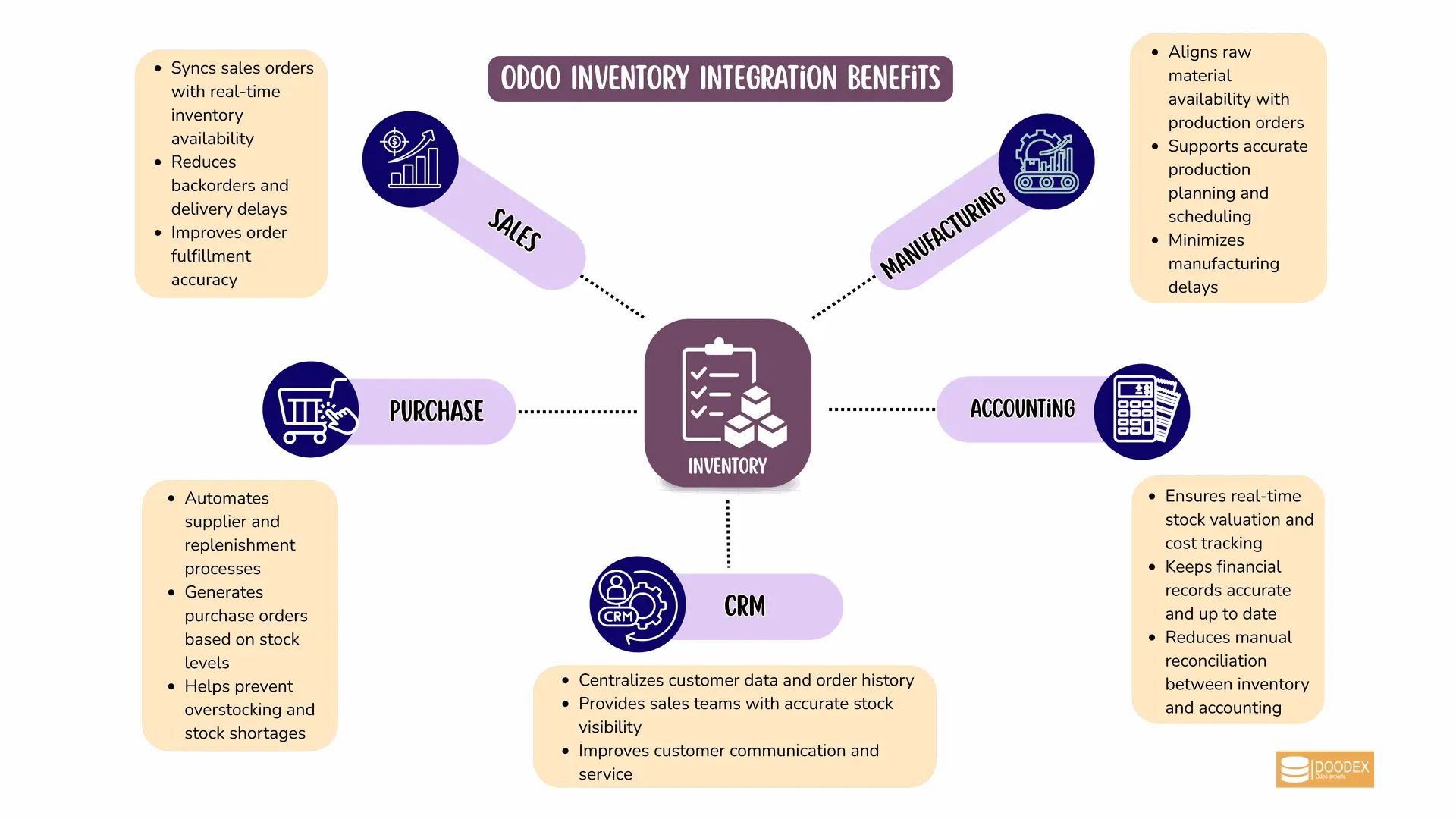
Odoo Inventory Integration with Other Apps
Odoo inventory management does not work in isolation. It integrates seamlessly with several Odoo apps, including:
- Sales for order fulfillment
- Purchase for supplier management
- Manufacturing for production planning
- CRM for customer data
- Accounting for financial accuracy
This integration creates a smooth flow of data across departments, eliminates data silos, and improves overall business productivity.
Best Practices for Inventory Management
To maximize the value of Odoo Inventory:
- Perform regular cycle counting to maintain accuracy
- Use barcode scanning to streamline warehouse operations
- Apply appropriate valuation methods for cost control
- Leverage virtual locations and custom routes for efficient inventory movement
These practices help businesses reduce costs, maintain control, and scale efficiently.
How to Implement Odoo Inventory Management Successfully
Initial Setup
Start by defining warehouses, product categories, units of measure, and stock locations. Proper setup ensures accurate tracking from day one.
Configuration Best Practices
Configure replenishment rules, routes, and user access rights. Align inventory settings with your operational needs to maintain control and flexibility.
Managing Daily Operations
Use barcode scanning for receiving and shipping, track internal transfers, and monitor outgoing shipments to maintain smooth warehouse operations.
Monitoring and Optimization
Regularly review inventory reports, conduct cycle counting, and analyze trends. Continuous optimization ensures your inventory management system remains efficient and cost-effective.
✨Pro Tip
Design inventory workflows around actions, not stock labels
Every inventory step should trigger a clear action—receive, transfer, inspect, reorder, or ship. When each stage is action-driven, your Odoo inventory management system stays accurate, proactive, and efficient instead of becoming a static stock list.
Odoo Inventory Management for Different Business Types
Odoo inventory is suitable for various industries, including retail, manufacturing, distribution, and eCommerce. Whether managing a single warehouse or operating globally with different warehouses, Odoo adapts to different business models and scales with company growth.
Software Consulting Services
With the right consulting partner, Odoo Inventory becomes more than a stock management tool—it becomes a foundation for efficient, data-driven operations.
At Doodex, software consulting focuses on aligning Odoo Inventory with real business processes, not just technical configuration. This includes mapping inventory flows, connecting inventory with accounting and CRM, optimizing automation rules, and ensuring teams understand how to use the system confidently in daily operations.
By combining technical expertise with practical business insight, professional guidance helps companies reduce operational friction, improve visibility, and scale their inventory management with clarity and control—without overcomplicating the system.
Ready to improve visibility for your warehouse?
Contact us to see how Odoo Inventory can support your operations
FAQs
Odoo inventory management is a module within Odoo ERP that helps businesses manage stock, warehouses, and inventory operations in real time.
Yes, Odoo supports multiple warehouses and locations within a single system.
Yes, stock levels and movements are updated instantly across the system.
Odoo supports barcode scanners for receiving, picking, packing, shipping, and inventory counts.
Odoo supports FIFO, LIFO, and Average Cost valuation methods.
Yes, Odoo integrates with manufacturing orders and raw material tracking.
Yes, Odoo inventory integrates seamlessly with sales, purchase, CRM, and accounting modules.