
Odoo Vs. SAP 2026: Complete Comparison, Pricing & Migration Guide
Features, pricing, ROI, and migration insights for executive ERP decisions
For a manufacturing-specific comparison covering MRP, quality control, shop-floor execution, and production planning, read our dedicated Odoo vs SAP Business One for Manufacturing guide →
SAP Business One is a proprietary ERP solution from SAP, designed primarily for small to mid-sized businesses that need strong financial management, compliance, and standardized business processes.
Provides a robust, stable architecture with deep integration across finance, supply chain management, inventory tracking, and customer relationship management, especially for companies operating globally.
Best suited for organizations that require global compliance, high transaction volumes, and SAP’s proven ERP ecosystem with structured implementation methodologies.
Odoo is an open-source ERP system known for its modular approach and flexibility. Businesses can start with basic apps (CRM, sales, inventory) and gradually add advanced features like manufacturing, accounting, HR management, and project management as they grow.
Offers an all-in-one solution with significant customization options and a user-friendly interface. It supports cloud and on-premise deployments and integrates easily with third-party tools.
Ideal for businesses seeking cost flexibility, open-source nature, and scalability for complex workflows and evolving business needs.
Odoo & SAP — by the numbers.
Why the Odoo vs SAP Debate Matters More Than Ever
Choosing the right ERP system has become a strategic business decision, directly influencing operational efficiency, scalability, regulatory compliance, and long-term growth.
SAP is widely recognized for its robust architecture and ability to manage complex processes, making it a strong choice for large enterprises with multifaceted and global operations. Both Odoo and SAP are comprehensive ERP solutions that offer modular platforms designed to streamline business operations and adapt to specific business needs. Their flexibility, integration capabilities, and breadth of features make a detailed comparison increasingly critical for executives, IT leaders, and operations managers.
Early ERP evaluations often uncover challenges such as high implementation costs, rigid system structures, limited customization, and slow user adoption. These concerns help explain why the Odoo vs SAP ERP systems debate continues to gain momentum across industries—from mid-sized businesses seeking scalable solutions to large organizations managing complex workflows and global compliance requirements.
While both platforms are powerful, they address business needs in fundamentally different ways. SAP's processes and customization options vary significantly depending on the size and complexity of the organization. A comprehensive comparison helps organizations select the right ERP solution based on company size, operational complexity, and growth strategy—ensuring optimized business operations and long-term support for complex processes.
Odoo ERP: ~$250,000 · SAP Business One: ~$850,000
| Cost Component | 5-Year Estimate |
|---|---|
| Odoo Enterprise Licenses | $60,000 |
| Initial Odoo Implementation | $70,000 |
| Customization & Modular Extensions | $45,000 |
| Integration Capabilities (APIs, tools) | $25,000 |
| Hosting (Cloud Version / Odoo.sh) | $20,000 |
| Support & Maintenance | $30,000 |
| Total 5-Year TCO (Odoo) | ≈ $250,000 |
- Modular design avoids feature overload
- Open-source model minimizes vendor dependency
- Lower annual costs and upgrade effort
- Faster adaptation to business needs
| Cost Component | 5-Year Estimate |
|---|---|
| SAP Business One Licenses | $180,000 |
| Initial SAP ERP Implementation | $220,000 |
| Customization & Add-Ons | $150,000 |
| Integration & Middleware | $120,000 |
| Infrastructure & Hosting | $80,000 |
| Support, Upgrades & Compliance | $100,000 |
| Internal ERP Project Overhead | $80,000 |
| Total 5-Year TCO (SAP) | ≈ $850,000 |
- Rigid architecture for complex workflows
- High dependency on certified partners
- Expensive customization and integration
- Higher long-term operational costs
Odoo vs SAP Business One: Detailed ERP Comparison
Feature-by-feature side by side across the 12 functional areas Doodex customers ask about most — with an operational summary of how each ERP behaves in production.
Inventory Management
| Feature | Odoo ERP | SAP Business One |
| Multi-Warehouse | ✔ | ✔ |
| Warehouse Quantity Limits | ✔ (no hard limit) | ⚠️ (depends on edition / design) |
| Storage Locations (Hierarchical) | ✔ | ✔ |
| Bin Locations | ✔ | ✔ |
| Bin Replenishment Rules | ✔ | ✔ |
| Inventory Tracking (Real-Time) | ✔ | ✔ |
| Forecasted Stock Availability | ✔ | ⚠️ (basic forecasting) |
| Internal Transfers | ✔ | ✔ |
| Routing Rules | ✔ (rule-based) | ⚠️ (predefined logic) |
| Cross-Docking | ✔ | ⚠️ (add-on or configuration) |
| Dropshipping | ✔ | ⚠️ (configuration-based) |
| Subcontracting Stock Flow | ✔ | ✖ |
| Package Management / Cartoning | ✔ | ✔ |
| Multi-Package per Transfer | ✔ | ⚠️ (supported with constraints) |
| Consignment Stock (Vendor) | ✔ | ✔ |
| Consignment Stock (Customer) | ✔ | ⚠️ (scenario-dependent) |
| Barcode Inventory | ✔ (native) | ⚠️ (via add-on) |
| Mobile Warehouse Operations | ✔ | ⚠️ (scope varies by solution) |
| Freight Carrier Integration | ✔ | ✔ |
| Lot Tracking | ✔ | ✔ |
| Serial Number Tracking | ✔ | ✔ |
| Quality Control Points | ✔ | ⚠️ (limited workflow depth) |
| Quality Alerts | ✔ | ⚠️ (event-based) |
| Automatic ASN (Advanced Shipping Notice) | ⚠️ (module-based) | ✔ |
| EDI (Electronic Data Interchange) | ✔ | ✔ |
| Real-Time Inventory Valuation | ✔ | ✔ |
| FIFO Valuation | ✔ | ✔ |
| LIFO Valuation | ✔ | ✖ |
| Average Cost (AVCO) | ✔ | ✔ |
| Multiple Valuation per Product Category | ✔ | ⚠️ (configuration-dependent) |
| Warehouse User Interface | ✔ (web-based) | ⚠️ (client / web mix) |
Odoo in Practice
Odoo ERP offers flexible inventory management with real-time inventory tracking, package management, and quality control across multiple warehouses. Its modular ERP system adapts easily to complex supply chain management workflows, helping businesses streamline operations and maintain accurate stock visibility.
Manufacturing (MRP)
Need to go deeper on manufacturing? Our Odoo vs SAP Business One for Manufacturing guide covers MRP workflows, quality checkpoints, and shop-floor scenarios in more depth.
| Feature | Odoo ERP | SAP Business One |
| Bill of Materials (BoM) | ✔ | ✔ |
| Multi-Level BoM | ✔ | ✔ |
| Engineering Change (BoM Versioning) | ✔ | ⚠️ (basic version control) |
| Manufacturing Orders (MO) | ✔ | ✔ |
| Work Orders | ✔ | ✔ |
| Routing & Operations | ✔ | ⚠️ (predefined routing structure) |
| Work Centers | ✔ | ✔ |
| Capacity Planning | ✔ | ⚠️ (basic capacity rules) |
| Finite Scheduling | ✔ | ⚠️ (rule-based, limited constraints) |
| Master Production Schedule (MPS) | ✔ | ⚠️ (forecast-driven, basic) |
| MRP (Material Requirements Planning) | ✔ | ✔ |
| Make-to-Stock (MTS) | ✔ | ✔ |
| Make-to-Order (MTO) | ✔ | ✔ |
| Engineer-to-Order (ETO) | ✔ | ⚠️ (configuration-dependent) |
| Subcontracting / Outsourced Production | ✔ | ✖ |
| Shop Floor Control | ✔ | ⚠️ (standard interface) |
| Real-Time Production Tracking | ✔ | ✔ |
| Quality Control Points (In-Process) | ✔ | ⚠️ (post-operation checks) |
| Quality Alerts | ✔ | ⚠️ (event-triggered) |
| Scrap Management | ✔ | ✔ |
| By-Products & Co-Products | ✔ | ⚠️ (supported with constraints) |
| Production Costing (Real-Time) | ✔ | ✔ |
| Work Order Cost Breakdown | ✔ | ⚠️ (summary-level costing) |
| Overall Equipment Effectiveness (OEE) | ✔ | ✖ |
| Maintenance Integration (Preventive & Corrective) | ✔ | ⚠️ (basic linkage) |
| IoT / Shop Floor Device Integration | ⚠️ (module-based) | ⚠️ (add-on based) |
| Barcode-Based Production Reporting | ✔ | ⚠️ (via add-on) |
| Production Traceability (Lot / Serial) | ✔ | ✔ |
| Multi-Company Manufacturing | ✔ | ✔ |
| Multi-Warehouse Manufacturing Flow | ✔ | ⚠️ (routing constraints) |
| Custom Production Workflows | ✔ | ✖ |
| Manufacturing User Interface | ✔ (web-based) | ⚠️ (client / web mix) |
| SME Manufacturing Scope | ✔ | ✖ |
| Large-Scale Industrial Manufacturing | ⚠️ (design-dependent) | ✔ |
Operational Manufacturing with Odoo
Both Odoo and SAP cover production management as a key functional area for manufacturing solutions, supporting a wide range of manufacturing processes. Odoo provides a practical MRP software that supports daily production activities, from material planning to shop floor execution. With real-time tracking and modular configuration, manufacturers can adjust production flows, control costs, and maintain traceability as operational requirements change.
Supply Chain
| Feature | Odoo ERP | SAP Business One |
| End-to-End Supply Chain Management | ✔ | ✔ |
| Procurement Management | ✔ | ✔ |
| Supplier Management | ✔ | ✔ |
| Purchase Requisition | ✔ | ⚠️ (standard approval flow) |
| Automated Replenishment | ✔ | ✔ |
| Demand Forecasting | ✔ | ⚠️ (forecast-driven, basic) |
| Supply Chain Planning (MRP-driven) | ✔ | ✔ |
| Multi-Supplier Sourcing | ✔ | ⚠️ (configuration-based) |
| Drop-Shipping Integration | ✔ | ⚠️ (scenario-dependent) |
| Lead Time Management | ✔ | ✔ |
| Vendor Lead Time per Product | ✔ | ✔ |
| Supply Chain Traceability | ✔ | ✔ |
| Lot & Serial Traceability | ✔ | ✔ |
| Cross-Warehouse Supply Flow | ✔ | ⚠️ (routing constraints) |
| Intercompany Supply Chain | ✔ | ⚠️ (setup-dependent) |
| Subcontracting Supply Flow | ✔ | ✖ |
| Logistics & Delivery Management | ✔ | ✔ |
| Freight Carrier Integration | ✔ | ✔ |
| Routing Rules | ✔ (rule-based) | ⚠️ (predefined logic) |
| Supply Chain Cost Visibility | ✔ | ⚠️ (summary-level) |
| Real-Time Stock & Supply Visibility | ✔ | ✔ |
| Exception Handling & Alerts | ✔ | ⚠️ (event-based) |
| Supply Chain Automation Rules | ✔ | ⚠️ (rule-based, limited scope) |
| EDI (Electronic Data Interchange) | ✔ | ✔ |
| ASN (Advanced Shipping Notice) | ⚠️ (module-based) | ✔ |
| Multi-Company Supply Chain | ✔ | ✔ |
| Global Supply Chain Support | ✔ | ✔ |
| Custom Supply Chain Workflows | ✔ | ✖ |
| Scalability of Supply Chain Processes | ✔ | ⚠️ (design-dependent) |
| SME Supply Chain Scope | ✔ | ✖ |
| Enterprise Supply Chain Compliance | ✔ | ✔ |
Supporting Complex Supply Chain Operations
Odoo stands out for supply chain management by combining real-time visibility, flexible workflows, and tight integration across inventory, procurement, and manufacturing. Its modular design allows supply chain processes to adapt as operational complexity grows, making it a stronger fit than more rigid ERP systems.
Maintenance Management
| Feature | Odoo ERP | SAP Business One |
| Maintenance Management Module | ✔ | ⚠️ (add-on or partner solution) |
| Preventive Maintenance | ✔ | ⚠️ (schedule-based) |
| Corrective Maintenance | ✔ | ⚠️ (incident-based) |
| Maintenance Requests | ✔ | ⚠️ (request handling via configuration) |
| Maintenance Planning & Scheduling | ✔ | ⚠️ (manual or add-on driven) |
| Equipment / Asset Management | ✔ | ✔ |
| Maintenance History Tracking | ✔ | ⚠️ (record-level history) |
| Work Orders for Maintenance | ✔ | ⚠️ (task-level records) |
| Downtime Tracking | ✔ | ✖ |
| Mean Time Between Failures (MTBF) | ✔ | ✖ |
| Mean Time To Repair (MTTR) | ✔ | ✖ |
| Spare Parts Integration with Inventory | ✔ | ✔ |
| Maintenance Cost Tracking | ✔ | ⚠️ (summary-level) |
| Labor Time Tracking | ✔ | ⚠️ (time capture via activities) |
| Maintenance KPIs & Dashboards | ✔ | ⚠️ (report-based) |
| IoT / Sensor Integration | ⚠️ (module-based) | ⚠️ (add-on based) |
| Mobile Maintenance Operations | ✔ | ⚠️ (solution-dependent) |
| Multi-Site Maintenance | ✔ | ⚠️ (design-dependent) |
| Integration with Manufacturing | ✔ | ⚠️ (link-based integration) |
| Custom Maintenance Workflows | ✔ | ✖ |
| SME Maintenance Scope | ✔ | ✖ |
| Enterprise Asset Maintenance Scope | ⚠️ | ✔ |
Supporting Asset & Equipment Reliability
Effective maintenance management requires proactive planning, real-time visibility, and tight integration with production and inventory. Odoo provides stronger preventive and corrective maintenance capabilities, deeper cost and downtime tracking, and better operational usability than more limited maintenance tools, making it a more suitable choice for businesses managing growing equipment and asset complexity.
Quality Management (QMS)
| Feature | Odoo ERP | SAP Business One |
| Quality Management Module | ✔ | ⚠️ (via add-on or partner solution) |
| Quality Control Points | ✔ | ⚠️ (event-based checkpoints) |
| Incoming Quality Inspection | ✔ | ⚠️ (inspection recorded at receipt) |
| In-Process Quality Checks | ✔ | ⚠️ (inspection recorded after operation) |
| Final Quality Inspection | ✔ | ✔ |
| Quality Alerts / Non-Conformance | ✔ | ⚠️ (issue recorded via workflow) |
| Corrective Actions (CAPA) | ✔ | ⚠️ (action tracking via configuration) |
| Preventive Actions | ✔ | ⚠️ (rule- or process-driven) |
| Quality Checklists | ✔ | ⚠️ (template-based) |
| Lot & Serial Traceability | ✔ | ✔ |
| End-to-End Traceability (Source → Delivery) | ✔ | ✔ |
| Quality Status Blocking (Hold / Release) | ✔ | ⚠️ (status-based control) |
| Scrap Management from Quality Checks | ✔ | ✔ |
| Quality Reporting & Dashboards | ✔ | ⚠️ (report-driven) |
| Integration with Manufacturing | ✔ | ⚠️ (transaction-linked) |
| Integration with Inventory | ✔ | ✔ |
| Integration with Maintenance | ✔ | ✖ |
| Root Cause Analysis Support | ✔ | ⚠️ (process-driven) |
| Quality Documentation Management | ✔ | ⚠️ (external document system) |
| Audit Trail for Quality Actions | ✔ | ✔ |
| Regulatory / Compliance Support | ✔ | ✔ |
| Custom Quality Workflows | ✔ | ✖ |
| SME Quality Management Scope | ✔ | ✖ |
| Enterprise Compliance Scope | ⚠️ | ✔ |
Managing Quality & Compliance
Maintaining quality and compliance depends on consistent execution at every operational stage. Odoo integrates quality checks, corrective actions, and traceability into daily processes, making quality management more practical and actionable across production and supply chain activities.
Product Lifecycle Management (PLM)
| Feature | Odoo ERP | SAP Business One |
| PLM Module Availability | ✔ | ⚠️ (via add-on or integration) |
| Product Versioning | ✔ | ⚠️ (attribute-based versioning) |
| Engineering Change Orders (ECO) | ✔ | ⚠️ (process handled via add-on or workflow) |
| Revision Control | ✔ | ⚠️ (revision tracked via configuration) |
| Bill of Materials Version Control | ✔ | ⚠️ (BoM updates tracked per change) |
| Change Approval Workflow | ✔ | ⚠️ (approval handled via standard workflow) |
| Change Impact Analysis | ✔ | ⚠️ (analysis performed via reporting) |
| Product Lifecycle Stages | ✔ | ⚠️ (status-based lifecycle) |
| Integration with Manufacturing (MRP) | ✔ | ⚠️ (transaction-linked) |
| Integration with Inventory | ✔ | ✔ |
| Integration with Quality Management (QMS) | ✔ | ✖ |
| Integration with Maintenance | ✔ | ✖ |
| Document Management (Drawings, Specs) | ✔ | ⚠️ (external document system) |
| Centralized Product Data | ✔ | ✔ |
| Traceability (Design → Production) | ✔ | ⚠️ (transaction-level traceability) |
| Collaboration Across Teams | ✔ | ⚠️ (role-based collaboration) |
| Product Obsolescence Management | ✔ | ⚠️ (status-driven handling) |
| Audit Trail for Product Changes | ✔ | ✔ |
| Regulatory / Compliance Support | ✔ | ✔ |
| Custom PLM Workflows | ✔ | ✖ |
| SME & Mid-Market PLM Scope | ✔ | ✖ |
| Enterprise PLM Scope | ⚠️ | ✔ |
Product Lifecycle Readiness
Organizations managing complex or evolving products require lifecycle tools that adapt to change. Odoo provides structured yet flexible product lifecycle control, making it better suited for ongoing product development and operational alignment.
Financial Management
| Feature | Odoo ERP | SAP Business One |
| Financial Management Module | ✔ | ✔ |
| General Ledger | ✔ | ✔ |
| Accounts Payable | ✔ | ✔ |
| Accounts Receivable | ✔ | ✔ |
| Multi-Company Accounting | ✔ | ✔ |
| Multi-Currency Accounting | ✔ | ✔ |
| Automatic Currency Revaluation | ✔ | ✔ |
| Local Tax Configuration | ✔ | ✔ |
| Custom Tax Rules | ✔ | ⚠️ (rule definition via templates) |
| Fiscal Positions / Tax Mapping | ✔ | ⚠️ (country-driven configuration) |
| Chart of Accounts Customization | ✔ | ⚠️ (template-based structure) |
| Budgeting | ✔ | ✔ |
| Budget Control | ✔ | ⚠️ (threshold-based control) |
| Financial Forecasting | ✔ | ⚠️ (projection via reporting) |
| Fixed Assets Management | ✔ | ✔ |
| Asset Depreciation Methods | ✔ | ✔ |
| Real-Time Financial Reporting | ✔ | ✔ |
| Custom Financial Reports | ✔ | ✖ |
| Financial Dashboards | ✔ | ⚠️ (report-driven) |
| Automated Journal Entries | ✔ | ✔ |
| Inventory Accounting Integration | ✔ | ✔ |
| Manufacturing Cost Accounting | ✔ | ⚠️ (cost aggregation at transaction level) |
| Project Cost Accounting | ✔ | ⚠️ (financial linkage) |
| Deferred Revenue / Accruals | ✔ | ✔ |
| Payment Automation | ✔ | ✔ |
| Bank Synchronization | ✔ | ✔ |
| Audit Trail | ✔ | ✔ |
| Compliance & Localization | ✔ | ✔ |
| Financial Workflow Customization | ✔ | ✖ |
| Non-Finance User Access | ✔ | ⚠️ (role-based access) |
| SME Financial Scope | ✔ | ✖ |
| Enterprise Financial Control Scope | ⚠️ | ✔ |
Designed for Modern Business Operations
Odoo supports adaptable financial management through multi-company accounting, custom tax management, and automated processes. By connecting accounting with inventory management, project management, and CRM, Odoo delivers valuable insights that improve operational efficiency across global business operations.
Sales & Customer Relationship Management (CRM)
| Feature | Odoo ERP | SAP Business One |
| CRM Module Availability | ✔ | ⚠️ (native core + add-on extensions) |
| Lead Management | ✔ | ✔ |
| Lead Scoring | ✔ | ⚠️ (rule-based scoring) |
| Opportunity Management | ✔ | ✔ |
| Visual Sales Pipeline (Kanban) | ✔ | ✖ |
| Custom Sales Stages | ✔ | ⚠️ (stage configuration via setup) |
| Sales Activities & Follow-Ups | ✔ | ✔ |
| Email Integration | ✔ (native) | ⚠️ (integration via configuration) |
| Email Tracking (Open / Click) | ✔ | ✖ |
| Quotation Management | ✔ | ✔ |
| Sales Order Management | ✔ | ✔ |
| Subscription & Recurring Billing | ✔ | ✖ |
| Pricing Rules & Discounts | ✔ | ✔ |
| Customer Portal (Quotes, Orders, Invoices) | ✔ | ✖ |
| Omnichannel Sales (Email, Web, eCommerce) | ✔ | ⚠️ (channel-dependent) |
| Integration with Inventory | ✔ | ✔ |
| Integration with Accounting | ✔ | ✔ |
| Integration with Marketing Automation | ✔ | ⚠️ (via external modules) |
| Sales Forecasting | ✔ | ⚠️ (forecast derived from pipeline data) |
| Sales Performance Dashboards | ✔ | ⚠️ (report-driven) |
| Custom CRM Reports | ✔ | ✖ |
| Mobile CRM | ✔ | ✔ |
| Team & Territory Management | ✔ | ⚠️ (hierarchy-based) |
| Automation Rules (Activities, Emails) | ✔ | ⚠️ (event-driven rules) |
| Custom CRM Workflows | ✔ | ✖ |
| SME Sales Scope | ✔ | ✖ |
| Enterprise Sales Governance Scope | ⚠️ | ✔ |
Built for End-to-End Sales Management
Odoo’s customer relationship management tools unify sales management, invoicing, and inventory within one ERP software platform. Automation, pipeline visibility, and seamless integration help businesses manage customer interactions efficiently while improving overall business operations.
Human Resources & Talent Management
| Feature | Odoo ERP | SAP Business One |
| Core HR Management Module | ✔ | ⚠️ (via add-on or partner solution) |
| Employee Master Data | ✔ | ✔ |
| Organizational Structure | ✔ | ⚠️ (hierarchy defined via configuration) |
| Recruitment Management | ✔ | ✖ |
| Applicant Tracking System (ATS) | ✔ | ✖ |
| Talent Pipeline Management | ✔ | ✖ |
| Employee Onboarding | ✔ | ⚠️ (process-driven setup) |
| Attendance Management | ✔ | ✖ |
| Leave Management | ✔ | ✖ |
| Shift & Work Schedule Management | ✔ | ⚠️ (rule-based configuration) |
| Payroll (Localization-Based) | ✔ | ✔ |
| Payroll Rules Customization | ✔ | ⚠️ (localization-driven rules) |
| Expense Management | ✔ | ✔ |
| Performance Appraisal | ✔ | ⚠️ (evaluation records via workflow) |
| Goals & KPI Tracking | ✔ | ⚠️ (objective tracking via configuration) |
| Training & Skills Management | ✔ | ✖ |
| Employee Self-Service Portal | ✔ | ✖ |
| Manager Self-Service | ✔ | ✖ |
| HR Analytics & Dashboards | ✔ | ⚠️ (report-driven) |
| Workforce Cost Analysis | ✔ | ⚠️ (cost data aggregation) |
| Integration with Accounting | ✔ | ✔ |
| Integration with Projects | ✔ | ⚠️ (time/cost linkage) |
| Integration with Manufacturing | ✔ | ✖ |
| Multi-Company HR Management | ✔ | ⚠️ (structure-driven scaling) |
| Document Management (Contracts, Files) | ✔ | ⚠️ (external document system) |
| HR Workflow Customization | ✔ | ✖ |
| SME & Mid-Market HR Scope | ✔ | ✖ |
| Enterprise HR Scope | ⚠️ | ✔ |
Unified HR Management
Odoo delivers integrated human resources and talent management covering recruitment, attendance, payroll localization, and employee self-service. HR data connects directly with financial and project modules, simplifying workforce management across complex business processes.
Project Management
| Feature | Odoo ERP | SAP Business One |
| Project Management Module | ✔ | ⚠️ (via add-on or partner solution) |
| Project Creation & Structure | ✔ | ✔ |
| Task Management | ✔ | ✖ |
| Task Dependencies | ✔ | ✖ |
| Milestones Management | ✔ | ✖ |
| Gantt Chart Planning | ✔ | ⚠️ (timeline-based planning) |
| Kanban Project View | ✔ | ✖ |
| Timesheet Management | ✔ | ⚠️ (time capture via activities) |
| Time Tracking per Task | ✔ | ✖ |
| Resource Allocation | ✔ | ⚠️ (allocation derived from records) |
| Project Cost Tracking | ✔ | ✔ |
| Labor Cost Tracking | ✔ | ⚠️ (cost aggregation via accounting) |
| Expense Tracking per Project | ✔ | ✔ |
| Project Budget Management | ✔ | ⚠️ (budget tracking via financial controls) |
| Project Profitability Analysis | ✔ | ⚠️ (financial data–based) |
| Billing from Projects | ✔ | ⚠️ (billing generated via accounting process) |
| Fixed-Price Projects | ✔ | ✔ |
| Time & Material Projects | ✔ | ⚠️ (billing configured via transactions) |
| Recurring Project Billing | ✔ | ✖ |
| Integration with Accounting | ✔ | ✔ |
| Integration with Sales (Quotations) | ✔ | ⚠️ (document-level linkage) |
| Integration with HR / Timesheets | ✔ | ✖ |
| Integration with Inventory | ✔ | ⚠️ (scenario-based) |
| Real-Time Project Dashboards | ✔ | ⚠️ (report-driven) |
| Custom Project Reports | ✔ | ✖ |
| Multi-Company Project Management | ✔ | ⚠️ (structure-driven scaling) |
| Project Workflow Customization | ✔ | ✖ |
| Project Team Collaboration | ✔ | ⚠️ (via external collaboration tools) |
| SME & Service Company Scope | ✔ | ✖ |
| Enterprise Project Control Scope | ⚠️ | ✔ |
Real-Time ERP Project Visibility
Odoo’s project management module links tasks, timesheets, and costs directly to accounting and sales data. This integration provides accurate ERP project tracking, improves cost control, and helps businesses boost productivity.
Reporting, Analytics & Business Intelligence
| Feature | Odoo ERP | SAP Business One |
| Built-in Reporting & Analytics | ✔ | ✔ |
| Real-Time Operational Dashboards | ✔ | ✔ |
| Custom Dashboard Creation | ✔ | ⚠️ (dashboard elements defined via reports) |
| Drag-and-Drop Report Builder | ✔ | ✖ |
| Custom Business Reports | ✔ | ✖ |
| User-Level Reporting Access Control | ✔ | ⚠️ (role-based permissions) |
| Cross-Module Reporting (ERP-wide) | ✔ | ⚠️ (module-based aggregation) |
| Financial Dashboards | ✔ | ✔ |
| Sales & CRM Analytics | ✔ | ⚠️ (transaction-based views) |
| Manufacturing & Operations Analytics | ✔ | ⚠️ (operation-level reporting) |
| Inventory & Supply Chain Analytics | ✔ | ⚠️ (transaction-driven reporting) |
| Project & Cost Analytics | ✔ | ⚠️ (financial data–based) |
| KPI Definition & Custom KPIs | ✔ | ⚠️ (KPI set defined via configuration) |
| Drill-Down Analysis | ✔ | ✔ |
| Ad-Hoc Reporting | ✔ | ✖ |
| Scheduled Reports | ✔ | ✔ |
| Export to Excel / CSV | ✔ | ✔ |
| Embedded Business Intelligence | ⚠️ (operational analytics layer) | ✔ |
| Advanced Enterprise BI Integration | ⚠️ (external BI tools) | ✔ |
| Data Model Transparency | ✔ | ✖ |
| Self-Service Analytics (Non-Technical Users) | ✔ | ✖ |
| Visualization Configuration | ✔ | ⚠️ (visuals defined by report types) |
| Predictive / Trend Analysis | ⚠️ (rule- or history-based) | ⚠️ (via external BI tools) |
| Data Refresh Frequency | ✔ (real-time) | ✔ |
| Cost of Analytics Stack | ✔ | ✖ |
| SME & Mid-Market Analytics Scope | ✔ | ✖ |
| Enterprise BI Scope | ⚠️ | ✔ |
Data Visibility & Decision Support
Strong decision-making depends on clear and accessible data. Odoo offers transparent data models and flexible reporting tools that make insights available to business users across departments.
Integration Capabilities & Architecture
| Feature | Odoo ERP | SAP Business One |
| Modular ERP Architecture | ✔ | ⚠️ (module grouping by solution scope) |
| Single Unified Database | ✔ | ⚠️ (application + service layers) |
| Open Source Core | ✔ | ✖ |
| API Availability | ✔ | ✔ |
| API Type | REST / XML-RPC | REST / DI API |
| API-First Architecture | ✔ | ⚠️ (API exposed alongside core services) |
| Custom Module Development | ✔ | ✖ |
| Low-Code / No-Code Customization | ✔ (Studio-based) | ✖ |
| Source Code Access | ✔ | ✖ |
| Data Model Flexibility | ✔ | ⚠️ (schema-driven data model) |
| Custom Workflow Engine | ✔ | ⚠️ (workflow via configuration rules) |
| UI Customization | ✔ | ✖ |
| Integration with Third-Party Applications | ✔ | ✔ |
| Third-Party Application Ecosystem | ✔ | ⚠️ (partner-curated ecosystem) |
| Native Module Interoperability | ✔ | ✔ |
| Event-Driven Automation | ✔ | ⚠️ (event handling via services) |
| Webhook Support | ✔ | ⚠️ (integration-mediated) |
| ETL / Middleware Integration | ✔ | ✔ |
| Cloud Deployment Options | ✔ (Online / Odoo.sh / Self-hosted) | ✔ (SAP Cloud) |
| On-Premise Deployment | ✔ | ⚠️ (deployment scope restricted) |
| Hybrid Deployment | ✔ | ⚠️ (architecture-dependent) |
| Upgrade-Safe Customization | ✔ | ✖ |
| Version Upgrade Model | ✔ (incremental) | ⚠️ (version-based migration) |
| Vendor Lock-In Model | ✔ (code ownership retained) | ✖ (vendor-managed codebase) |
| Integration Cost Model | ✔ (module-based) | ⚠️ (add-on / service-based) |
| Scalability of Integrations | ✔ | ⚠️ (architecture-dependent) |
| SME & Mid-Market Architecture Scope | ✔ | ✖ |
| Enterprise IT Governance Scope | ⚠️ | ✔ |
Open, Modular ERP Architecture
With its open source nature and modular approach, Odoo offers strong integration capabilities through APIs and custom modules. Businesses can extend functionality while preserving a unified data model across ERP solutions.
Customization, Usability & UX
| Feature | Odoo ERP | SAP Business One |
| User Interface Delivery Model | ✔ (web-based) | ⚠️ (client + web components) |
| Navigation Model | ✔ (role-driven navigation) | ⚠️ (menu-driven navigation) |
| Role-Based UI Customization | ✔ | ⚠️ (view assignment via roles) |
| Low-Code Customization Tools | ✔ | ✖ |
| No-Code Customization | ✔ | ✖ |
| Custom Fields & Views | ✔ | ⚠️ (schema-driven configuration) |
| Custom Business Logic | ✔ | ✖ |
| Custom Workflows | ✔ | ⚠️ (approval-based workflows) |
| UI Layout Customization | ✔ | ✖ |
| Drag-and-Drop Configuration | ✔ | ✖ |
| Kanban Views (CRM / Projects) | ✔ | ✖ |
| Gantt Views | ✔ | ⚠️ (timeline-based views) |
| Dashboard Customization | ✔ | ⚠️ (dashboard built from reports) |
| User-Level Access Control | ✔ | ✔ |
| User-Specific Preferences | ✔ | ⚠️ (profile-based settings) |
| User Adoption Model | ✔ (configuration-driven) | ⚠️ (training-driven) |
| Training Requirement Model | ⚠️ (role-based onboarding) | ✖ (formal training dependency) |
| Mobile UX Delivery | ✔ (native mobile/web) | ⚠️ (solution-dependent) |
| Cross-Module UX Consistency | ✔ | ⚠️ (module-context dependent) |
| UX for Non-Technical Users | ✔ | ✖ |
| Custom Menu & Navigation | ✔ | ✖ |
| Theme / Branding Customization | ✔ | ✖ |
| Upgrade-Safe UI Customization | ✔ | ✖ |
| Daily Operational UX Scope | ✔ | ⚠️ (transaction-driven) |
| SME & Mid-Market UX Scope | ✔ | ✖ |
| Enterprise UX Governance Scope | ⚠️ | ✔ |
User-Friendly by Design
Odoo features a modern user interface with intuitive navigation and significant customization options. This allows businesses to align ERP software with real business processes rather than adapting operations to rigid system structures.
Scalability, Cost & Market Fit
| Feature | Odoo ERP | SAP Business One |
| Incremental Adoption Model (Start Small) | ✔ | ✖ |
| Modular Scaling Model | ✔ | ⚠️ (bundle-based expansion) |
| Scalability Across Business Units | ✔ | ✔ |
| Scalability Across Countries | ✔ | ✔ |
| Multi-Company Scaling Model | ✔ | ⚠️ (structure-driven setup) |
| Performance Scaling (Users / Transactions) | ✔ | ✔ |
| Cloud Scaling Model | ✔ | ✔ |
| On-Premise Scaling Model | ✔ | ⚠️ (deployment-scope dependent) |
| Cost Evolution Predictability | ✔ | ✖ |
| Entry-Level License Model | ✔ | ✖ |
| Per-User Pricing Model | ✔ | ✖ |
| Cost Model for Additional Modules | ✔ | ✖ |
| Customization Cost Model | ✔ | ✖ |
| Upgrade Cost Model | ✔ | ✖ |
| Consultant Dependency Model | ⚠️ (optional engagement) | ✖ (required engagement) |
| Total Cost of Ownership Structure | ✔ | ✖ |
| SME Budget Alignment | ✔ | ✖ |
| Mid-Market Operational Scope | ✔ | ✔ |
| Large Enterprise Operational Scope | ⚠️ | ✔ |
| Industry Adaptation Model | ✔ | ⚠️ (industry template–driven) |
| High-Growth Business Alignment | ✔ | ✖ |
| Standardized / Controlled Business Alignment | ⚠️ | ✔ |
| Market Adoption Trend | ✔ | ⚠️ |
| Ecosystem Governance Model | ✔ (open ecosystem) | ✖ (vendor-controlled ecosystem) |
| Vendor Lock-In Model | ✔ (code ownership retained) | ✖ (vendor-managed platform) |
| Long-Term Cost Control Model | ✔ | ✖ |
| Business Model Adaptation Scope | ✔ | ⚠️ |
Built to Scale with Business Needs
Odoo supports scalable ERP solutions for medium sized businesses and large organizations alike. Flexible licensing, cloud version options, and lower implementation costs make it a suitable ERP system for long-term growth and global operations.
Support and Community
| Feature | Odoo ERP | SAP Business One |
| Official Vendor Support | ✔ | ✔ |
| Support via Certified Partners | ✔ | ✔ |
| Global Partner Network | ✔ | ✔ |
| Community Support Availability | ✔ | ✖ |
| Open Community Forums | ✔ | ✖ |
| Community Knowledge Base Access | ✔ | ⚠️ (partner-mediated access) |
| Open Source Community Contributions | ✔ | ✖ |
| Documentation Availability | ✔ | ✔ |
| Technical Documentation Coverage | ✔ | ✔ |
| Developer Documentation Access | ✔ | ⚠️ (access-controlled) |
| Public Issue Tracking | ✔ | ✖ |
| Community Modules / Extensions | ✔ | ✖ |
| Application Marketplace Scope | ✔ | ⚠️ (partner-curated) |
| Product Roadmap Visibility | ✔ | ⚠️ (vendor-managed) |
| Direct Vendor Support (Paid Plans) | ✔ | ✔ |
| Support Cost Model | ✔ (tier-based) | ✖ (fixed / contract-based) |
| Self-Service / DIY Support Options | ✔ | ✖ |
| Learning Resources (Tutorials, Courses) | ✔ | ✔ |
| Community Events & Meetups | ✔ | ⚠️ (partner-organized) |
| Community-Driven Issue Resolution | ✔ | ✖ |
| Dependency on Paid Support Channels | ⚠️ | ✖ |
| SME Support Model Alignment | ✔ | ✖ |
| Enterprise SLA & Governance Model | ⚠️ | ✔ |
Ongoing Support & Knowledge Access
Sustainable ERP use requires more than ticket-based support. Odoo offers wider access to documentation, community contributions, and partner solutions, enabling teams to resolve issues and evolve systems more independently.
Faster ERP deployment leads to faster ROI.
A phase-by-phase comparison of typical implementation timelines. All durations are taken from the source table verbatim.
- 9–24+ months for full enterprise resource planning deployment
- Lengthy phases including planning, workflow customization, data migration, testing, and extensive user training
- Higher risk of delays for global operations and multi-site organizations
- ROI is frequently delayed due to long go-live timelines
- Extended disruption to ongoing business processes and daily operations
- 2–6 months for core module implementation
- Modular approach enables phased go-live and incremental expansion
- Immediate operational benefits from early deployment stages
- Intuitive user interface and strong integration capabilities reduce training time
- Minimal disruption to ongoing business operations
Odoo vs SAP by team size.
Which ERP fits at each stage — from small teams to global enterprises. Labels taken verbatim from the source fit table.
What customers actually gained.
Four Doodex migrations from SAP to Odoo — with the before, after, measured impact, and why it worked. All numbers verbatim from source.
- High annual licensing and maintenance fees
- Slow production changes due to heavy customization
- Strong dependency on external SAP consultants
- Manufacturing, inventory management, and quality control moved to Odoo
- SAP retained only for limited financial reporting
- ≈ 40% reduction in total ERP-related costs
- Faster production planning and rescheduling
- Lower customization and support expenses
Odoo handled complex production processes natively , eliminating expensive SAP custom development and accelerating operational decisions.
- Rising ERP costs as operations scaled
- Custom changes required long lead times
- Limited flexibility across business units
- Core business operations migrated to Odoo
- Modular ERP structure replaced rigid SAP workflows
- 50–60% reduction in ERP total cost of ownership
- Faster deployment of new workflows
- Reduced reliance on external consultants
Odoo’s modular ERP software allowed companies to scale without reimplementing or duplicating systems.
- Manual invoice validation across regions
- Delayed billing cycles due to fragmented operational data
- Limited real-time visibility into transport and service execution
- Operational workflows migrated from SAP to Odoo
- Automated invoice generation and validation
- Unified operational dashboards across entities
- 25–40% reduction in invoice processing time
- 20–30% decrease in manual accounting effort
- Faster billing cycles leading to earlier revenue recognition
- Improved operational visibility across multiple countries
By automating operational workflows and connecting execution data directly to invoicing, Odoo reduced manual intervention and shortened billing cycles—something SAP struggled to deliver without heavy customization.
- Project tracking disconnected from invoicing
- Manual timesheets and delayed approvals
- Limited visibility into project profitability
- Billing cycles dependent on end-of-month consolidation
- Project management, timesheets, invoicing, and accounting unified in Odoo
- Automated approval flows for time and expenses
- Real-time project cost and revenue tracking
- 30–50% faster billing cycles (from monthly or bi-weekly to weekly or near-real-time invoicing)
- +10–15% increase in billable utilization driven by better time tracking, fewer missed billable hours, and clearer accountability
- 15–30% reduction in Days Sales Outstanding (DSO) improving cash flow predictability and working capital
- Significant reduction in manual reconciliation effort between project execution and financial management
Odoo ERP connects project execution directly to financial management . Time entries, costs, and invoices are generated from the same data model—eliminating delays, manual checks, and revenue leakage common in SAP-based project environments without heavy customization.
Migration to Odoo from SAP.
Migrating from SAP to Odoo ERP is not a “rip-and-replace” exercise. In most successful projects, Odoo is introduced progressively to modernize business operations while controlling risk, cost, and disruption.
- SAP Business One has become cost-heavy or inflexible
- ERP customization cycles are slow or expensive
- Business units need faster operational execution
- Integration capabilities with modern tools are limited
- ERP project ROI is declining over time
Three ways to phase the move.
Phased Replacement
- Keep SAP for core finance/compliance initially
- Deploy Odoo for sales, inventory, manufacturing, or projects
- Integrate via APIs
- Gradually reduce SAP scope
minimizes risk, delivers ROI early, avoids operational downtime.
Functional Carve-Out
- Replace specific SAP modules with Odoo
- Typical candidates: CRM, inventory, production, projects
focuses Odoo where flexibility and speed matter most.
Full Migration
- Migrate master data, transactions, and processes fully to Odoo
- Suitable when SAP Business One no longer fits business needs
simplifies architecture and lowers long-term ERP costs.
The 6-step playbook.
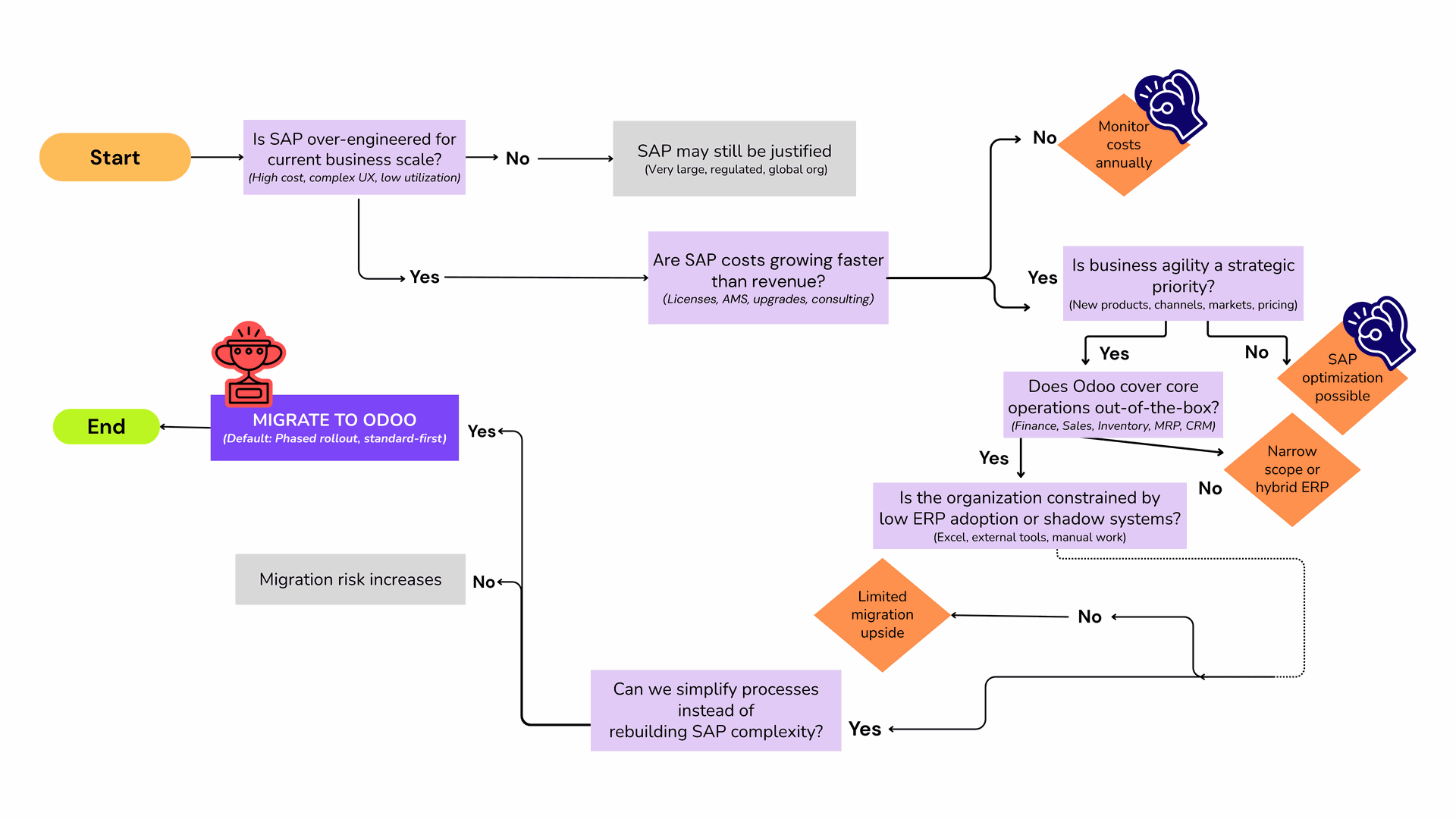
Thinking About Your ERP Setup? This Simple Flow Can Help
A one-glance decision flow: from “Is SAP over-engineered for your scale?” all the way to “Migrate to Odoo” — or the alternatives.
Plan Your SAP to Odoo Migration
Get a clear, phased migration roadmap — scope, data, risks, and timeline — tailored to your business scale.