

Sending emails without knowing what happens next is no longer enough. Marketing teams need visibility, accountability, and measurable outcomes—not just open rates. Odoo email marketing, enhanced by the Doodex Growth Suite, gives businesses control over how campaigns are planned, executed, and followed up.
Whether you are comparing Odoo to standalone tools like Mailchimp or HubSpot, or setting up your very first Odoo email marketing campaign, this playbook walks you through everything you need to build scalable, data-driven, and coordinated email & SMS campaigns inside Odoo.
Key Takeaways
- Odoo email marketing becomes exponentially more powerful with Doodex
- Campaigns are not just emails—they are workflows
- Multi-channel outreach drives higher engagement
- Real-time dashboards eliminate guesswork
- One platform replaces multiple marketing tools
Key Takeaways
Why Odoo Email Marketing Is Different From Traditional Marketing Tools
Odoo Email Marketing Application: The Foundation
Mailing Campaigns: From Idea to Execution
- Creating Mailing Campaigns in Odoo
Mailing List & Mailing List Contacts: Clean Data Wins Campaigns
- Building and Managing a Mailing List
- Audience Segmentation That Actually Works
Mail Body Tab: Designing Emails That Convert
- Visual Email Creation With Drag and Drop
- Templates for Faster Campaigns
Odoo Email Automation Meets Real Campaign Management
- Beyond Basic Odoo Email Automation
Odoo SMS Marketing: Multi-Channel Outreach That Gets Results
Campaign Module: The Brain of Multi-Channel Campaigns
- Campaign Creation and Structure
- Kanban View vs List View: How Teams Actually Work
- Calendar View & Scheduling: Perfect Timing Matters
- Graph View: Visualizing Campaign Performance
Bizscan: Turning Offline Contacts Into Campaign Members
- From Business Card to Mailing List
Email Module: Professional Communication Inside Odoo
- A/B Testing: Optimize Your Campaigns With Data
- Link Tracker: Measuring Engagement Beyond Opens
- Opt-out Reasons & Blacklisted Addresses: Managing Compliance and Deliverability
Tracking Performance With Dashboards
- Marketing Performance Dashboard
Permissions, Roles, and Access Control
How Doodex Compares to Standalone Marketing Tools
Best Practices for Successful Campaigns
Why Odoo Email Marketing Is Different From Traditional Marketing Tools
Most email marketing platforms operate in isolation. You send newsletters, view open rates, and export reports—but your campaign data lives outside your CRM, sales pipeline, and customer history.
Feature / Capability | Traditional Email Marketing Tools | Odoo Email Marketing(with Doodex Growth Suite) |
Campaign Structure | Individual email blasts or basic automations | Campaigns are structured, named, owned, and tracked across their full lifecycle |
Contact Management | Separate contact lists per tool | Centralized contacts shared across CRM, campaigns, and activities |
Follow-Up Tracking | Limited to opens and clicks | Email engagement + follow-up activities tracked together |
Team Collaboration | Mostly single-user or basic sharing | Multi-user campaigns with roles, responsibilities, and permissions |
Visibility Beyond Sends | Focus on delivery metrics only | Full visibility into what happens after emails are sent |
Performance Tracking | Email metrics only (open, click, bounce) | Campaign progress, activities, leads, and outcomes |
Real-Time Dashboards | Limited or add-on reporting | Live dashboards showing campaign health and performance |
Customization | Template-based with limited flexibility | Custom indicators, fields, and campaign logic |
Long-Term Campaign Tracking | Short-term, send-based | Full historical traceability over time |
Odoo email marketing, enhanced with the Doodex Growth Suite, solves this by centralizing everything:
- Email campaigns
- Odoo marketing
- Mailing list contacts
- Leads and opportunities
- Activities, tasks, and follow-ups
- Performance dashboards
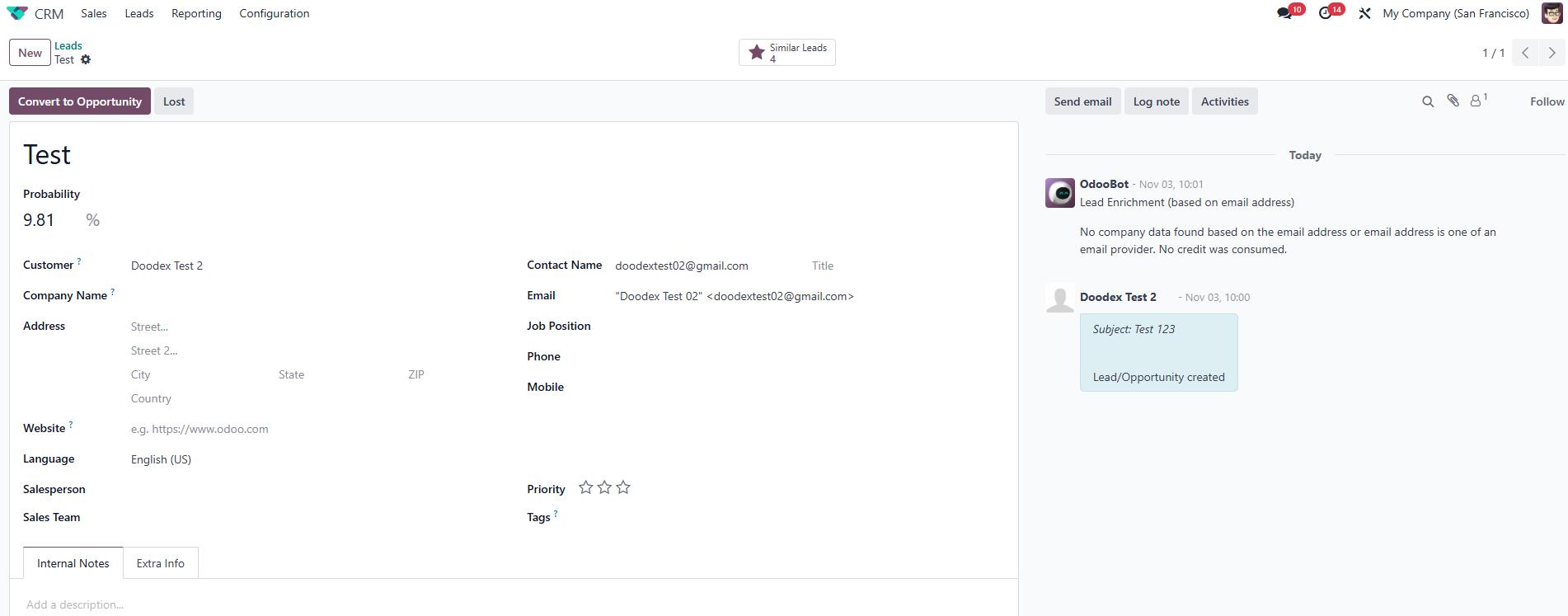
Automatic Lead/Contact Creation
Odoo email marketing offers a comprehensive set of features, including advanced campaign design tools, automation options, and in-depth analytics, giving you full control over campaign management and performance analysis.
Instead of juggling tools, Odoo becomes your single source of truth.
Key issue fixed:
“We send campaigns, but we can’t see what actually happens afterward.”
With Doodex, campaigns are not just messages—they are tracked business processes.
Supercharge Your Odoo Today
Get the full Doodex Growth Suite and streamline operations from day one
Odoo Email Marketing Application: The Foundation
At the core of the system is the email marketing application, which enables you to create, send, track, and optimize mass mailing campaigns.
From the main menu, users can navigate to the Email Marketing app and immediately see:
- Existing mailings
- Campaign status
- Open rates and bounce rates
- Mailing lists and recipients
The dashboard gives a quick snapshot of performance, with key metrics and data displayed visually for easier analysis, helping teams focus on what matters.
Within the email marketing application, users can access the settings tab to customize campaign options, enable tracking, and manage additional campaign features.
Mailing Campaigns: From Idea to Execution
- Creating Mailing Campaigns in Odoo
To start, click the New button in the upper right corner. You can also use the Add button to initiate new campaign elements or Kanban cards. This opens a new campaign form where you define:
- Campaign name
- Responsible user
- Campaign type
- Status (Draft, Scheduled, Sent)
After defining campaign details, you can click the Edit button to modify campaign information, responsible parties, or tags.
With Doodex Campaign Module, this campaign becomes more than a mailing—it becomes a central coordination hub.
You can:
- Add participants (team members)
- Assign activities
- Track progress indicators
- Link mailing lists and leads
This structure is especially useful for companies running multiple campaigns at various stages.
If a campaign or email message is no longer needed, you can use the Delete option to remove it and keep your campaign list organized.
Mailing List & Mailing List Contacts: Clean Data Wins Campaigns
- Building and Managing a Mailing List
Every successful campaign starts with a clean mailing list.
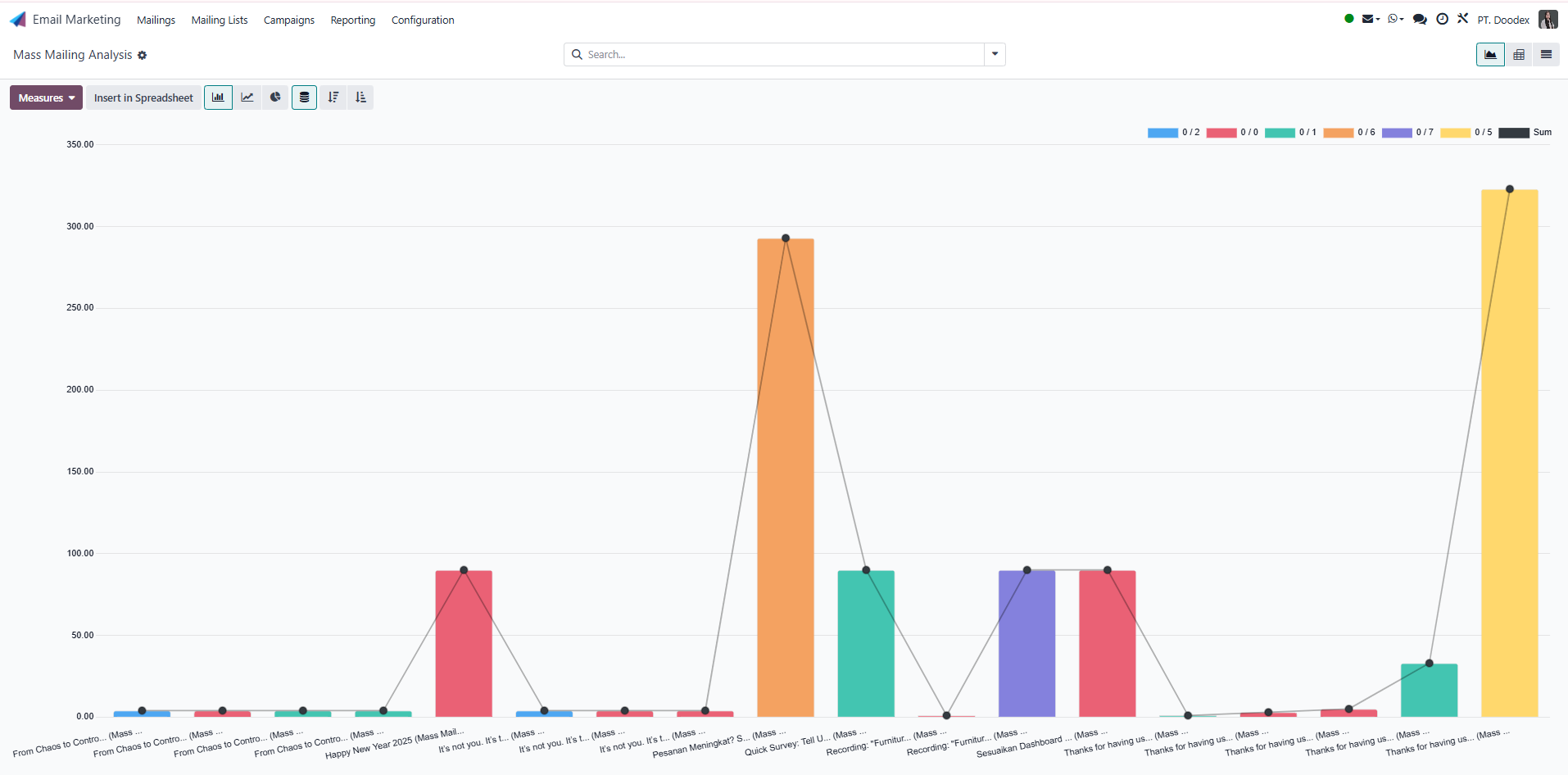
Mass Mailing Analysis
In Odoo, you can create a new mailing list using:
- Manual selection
- Import from file
- Domain-based filters
- Custom filter rules (define a rule or set of rules to filter and target contacts)
Using the search bar, marketers can quickly locate contacts, remove duplicates, or add custom filter logic and rules based on country, company name, or customer status.
- Audience Segmentation That Actually Works
Unlike many tools, Odoo lets you segment using real business data:
- Leads vs customers
- Country or region
- Event participants
- Opportunity stage
- Activity history
This level of audience segmentation dramatically improves open rates and conversion percentages.
Mail Body Tab: Designing Emails That Convert
Visual Email Creation With Drag and Drop
Inside the mail body tab, users can design emails using a drag and drop editor:
- Add images, text blocks, buttons
- Insert dynamic fields
- Customize layout without coding
You can preview the mail body instantly and adjust the preview sentence to optimize open rates. When sending or scheduling emails, a pop up window appears, allowing users to select dates, choose recipients, or test email options.
Templates for Faster Campaigns
Save time by using reusable templates. With the save button, marketers can store layouts and reuse them across campaigns—ideal for newsletters, announcements, or event follow-ups.
Odoo Email Automation Meets Real Campaign Management
Beyond Basic Odoo Email Automation
Standard Odoo email automation focuses on triggers and sequences. The Doodex Campaign Module goes further by adding:
- Human activities (calls, meetings, tasks)
- Manual and automated outreach
- Campaign-level indicators and progress tracking
Additionally, scheduled emails are placed in a queue, allowing users to monitor which messages are waiting to be sent.
This hybrid approach supports real-world marketing where not everything is automated.
Odoo SMS Marketing: Multi-Channel Outreach That Gets Results
Email alone is no longer enough. Odoo SMS marketing allows businesses to reach customers instantly for:
- Event reminders
- Time-sensitive offers
- Follow-ups after email campaigns
When SMS is linked to the same campaign as email, teams can track message delivery, responses, and follow-up actions in one place.
💡Best practice:
Use SMS to reinforce email campaigns—not replace them.
Campaign Module: The Brain of Multi-Channel Campaigns
The Doodex Campaign Module is what turns Odoo into a true marketing command center.
Campaign Creation and Structure
Each campaign includes:
- Basic information and description
- Indicators and KPIs
- Specific fields for custom metrics
- Additional information for contacts and companies
- Display options for leads, mailing lists, and companies
- The option to add a post, allowing users to share content or notifications through marketing channels as part of the campaign.
Campaigns move through various stages, visible in kanban view or list view, depending on user preference.
Kanban View vs List View: How Teams Actually Work
- Kanban view is ideal for visual progress tracking
- List view is better for data review and bulk actions
Users can remove columns, group records, or archive completed campaigns. To further customize your data views, click the downward arrow icon to reveal dropdown menus with options like Filters, Group By, and Favorites.
This flexibility supports both marketing and sales teams.
Calendar View & Scheduling: Perfect Timing Matters
With calendar view, marketers can:
- Schedule email campaigns
- Plan SMS sends
- Coordinate follow-ups
- Avoid overlap between campaigns
Everything is tied to a date, ensuring no message is sent at the wrong time.
Graph View: Visualizing Campaign Performance
Understanding the impact of your mailing campaigns goes beyond numbers—sometimes, you need to see the big picture. The Graph View in the Odoo email marketing app transforms raw campaign data into clear, actionable visuals. With just a click from the dashboard or the upper right corner of your campaigns screen, you can switch to graph view and instantly spot trends in open rates, bounce rates, and recipient engagement.
Bizscan: Turning Offline Contacts Into Campaign Members
From Business Card to Mailing List
The Bizscan Module an operational gap many organizations face:
“We collect contacts at events, but never follow up properly.”
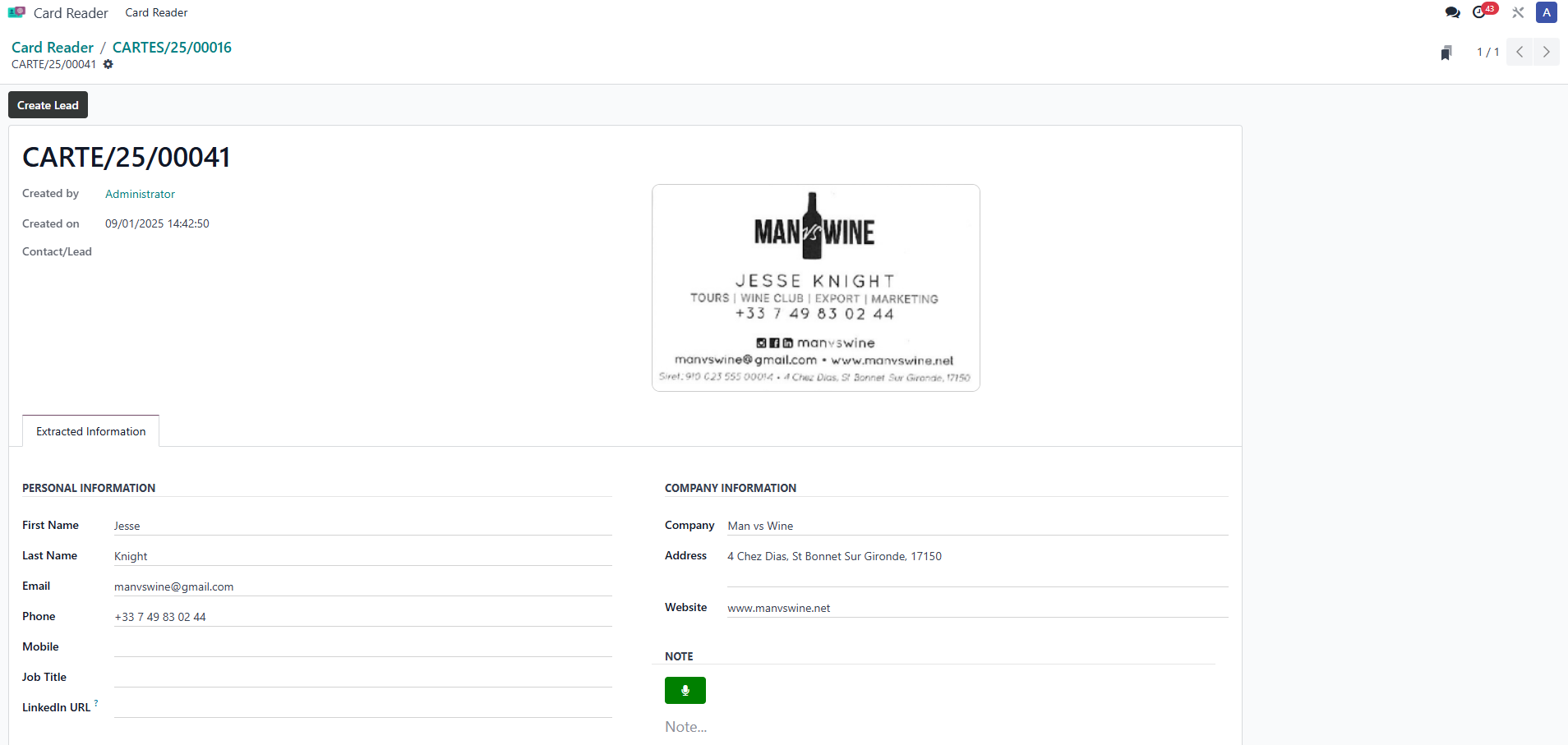
Data Extraction by BizScan Module
Bizscan allows users to:
- Scan business cards
- Extract data automatically
- Create contacts instantly
- Add them directly to campaigns
This ensures no lead is lost and every event fuels future email campaigns.
Email Module: Professional Communication Inside Odoo
The Doodex Email Module enhances standard Odoo email with:
- CC and BCC support
- Gmail synchronization
- Automatic lead creation
- Full conversation tracking
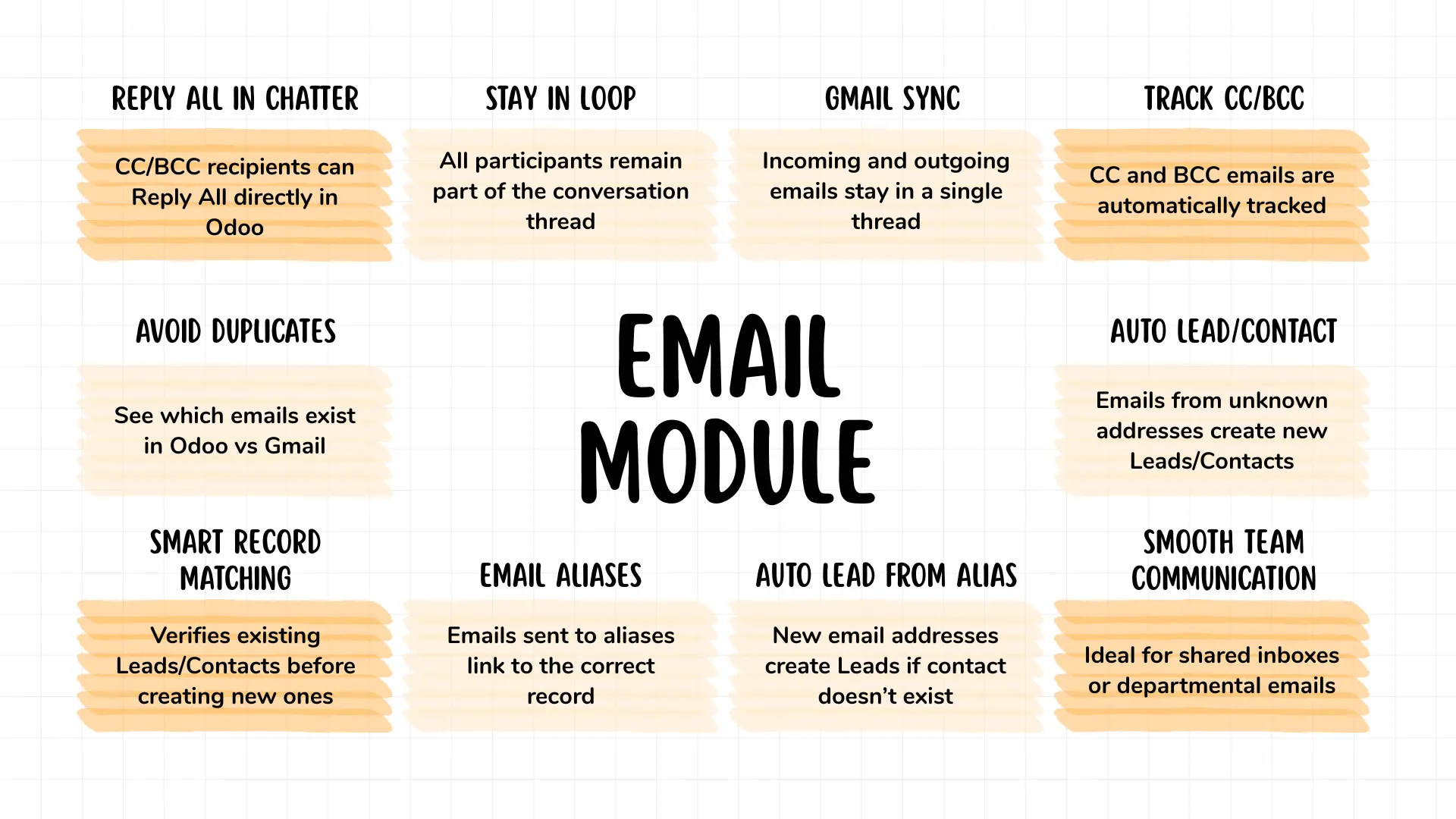
Doodex Email Module Features
Every message sent or received is linked to the contact, campaign, and activity history. Users can also manage a blacklist to prevent specific email addresses from receiving future mailings, which helps improve deliverability and reduce spam issues.
A/B Testing: Optimize Your Campaigns With Data
To truly maximize the effectiveness of your email marketing, you need to know what resonates with your audience. Odoo’s A/B Testing feature lets you experiment with different versions of your email campaigns—right from the mail body tab.
Link Tracker: Measuring Engagement Beyond Opens
Open rates are just the beginning. With Odoo’s Link Tracker, you can measure real engagement by tracking exactly which links your recipients click within your email and SMS campaigns. Every link you include in your mail body or message is automatically tracked, giving you deep insight into what content drives action.
Opt-out Reasons & Blacklisted Addresses: Managing Compliance and Deliverability
Maintaining a healthy mailing list is essential for both compliance and deliverability. Odoo’s email marketing app makes it easy to manage opt-outs and blacklisted addresses, ensuring your campaigns reach the right recipients and respect user preferences.
When a contact unsubscribes, Odoo records the opt-out reason—whether it’s frequency, relevance, or another factor. You can review these reasons in the contacts section or via the dashboard, helping you identify patterns and improve your messaging strategy.
Tracking Performance With Dashboards
Marketing Performance Dashboard
With the Dashboard Module, teams can track:
- Open rates
- Bounce rates
- Subscriptions and unsubscriptions
- Campaign engagement
- Link clicks and website visits
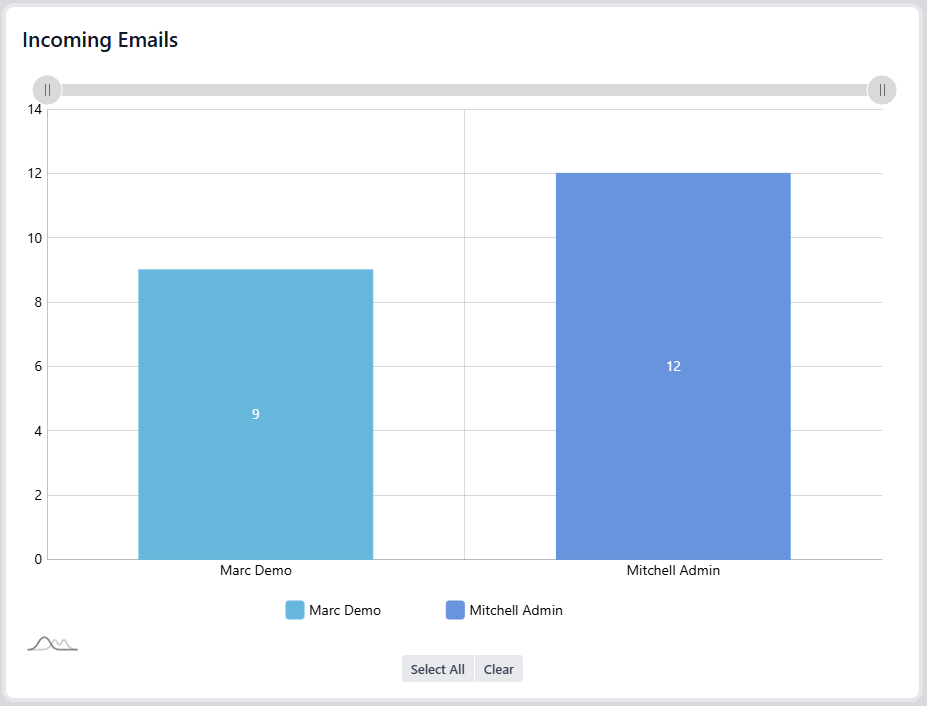
Incoming Emails Dashboard
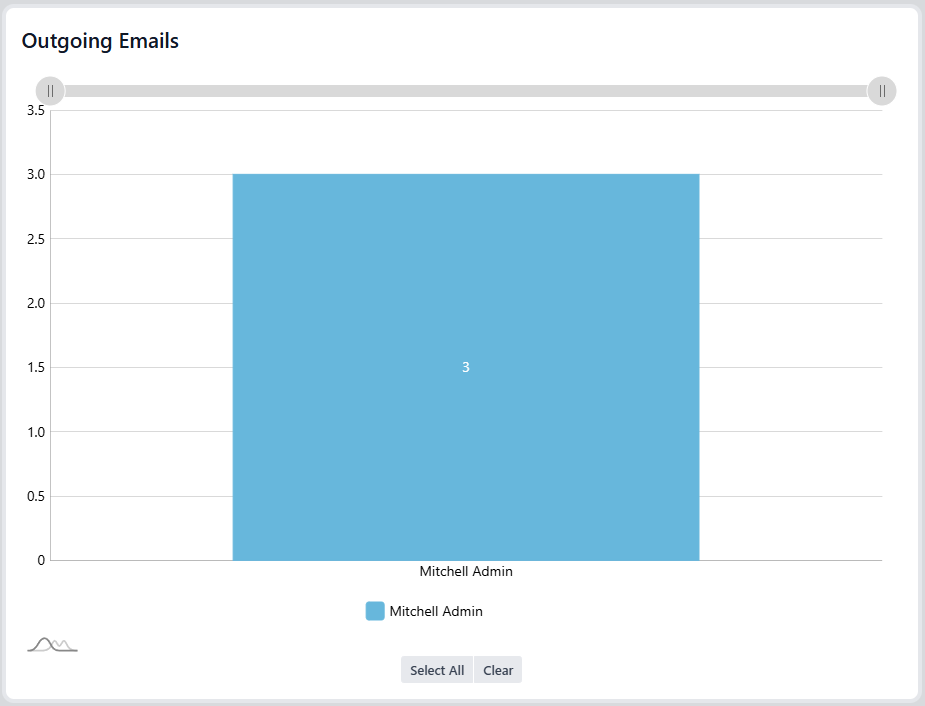
Outgoing Emails Dashboard
Charts update in real time, helping marketers optimize ongoing campaigns instead of waiting until it’s too late.
Permissions, Roles, and Access Control
Marketing involves multiple users. The User Roles Module ensures:
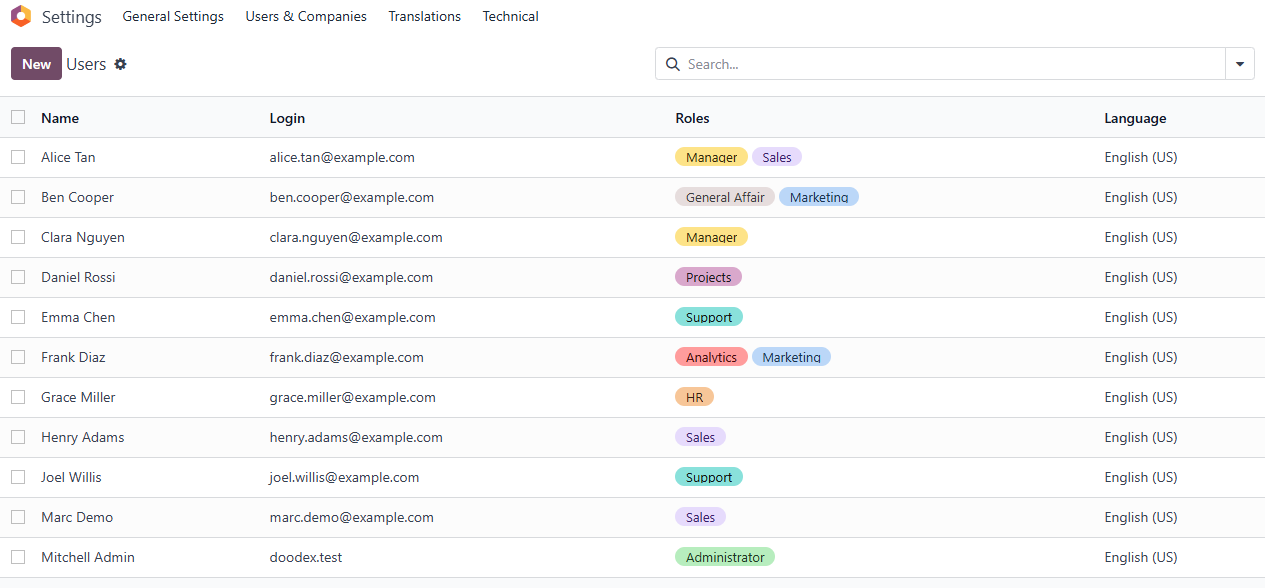
User Assignment in User Roles Module
- Correct access rights
- Data security
- Clear responsibilities
Managers can oversee campaigns while contributors focus on execution—without risking unauthorized changes.
How Doodex Compares to Standalone Marketing Tools
Feature | Standalone Tools | Odoo + Doodex |
✔ | ✔ | |
CRM Integration | Limited | ✔ |
Campaign Collaboration | ❌ | ✔ |
Activity Tracking | ❌ | ✔ |
Offline Lead Capture | ❌ | ✔ |
Multi-department Visibility | ❌ | ✔ |
This is why companies moving away from disconnected tools choose Doodex Growth Suite.
Best Practices for Successful Campaigns
- Clean your mailing list regularly
- Use audience segmentation aggressively
- Combine email and SMS strategically
- Track activities, not just sends
- Review dashboards weekly
- Clone successful campaigns instead of starting from scratch
Conclusion: Why Odoo Email Marketing With Doodex Wins
If you are serious about building scalable, measurable, and collaborative marketing, Odoo email marketing powered by Doodex Growth Suite is not just an alternative—it is an upgrade.
Instead of sending messages into the void, you create connected campaigns where email, SMS, activities, leads, and data work together. This is how modern teams build successful campaigns that actually drive revenue.
Looking for a Bespoke Odoo Solution?
Tell us what you need and we’ll adapt the system for a perfect fit
FAQs
Yes. Odoo email marketing is well-suited for beginners thanks to its clean interface, drag-and-drop email editor, and guided workflows. When combined with the Doodex Growth Suite, first-time users benefit from structured campaign setup, clear roles, manual activity tracking, and visual indicators that guide them step by step—reducing the learning curve compared to standalone email tools.
Yes. Odoo email marketing allows you to manage planning, execution, and follow-up within a single campaign structure. With the Doodex Campaign Module, email sends, manual activities, mailing lists, leads, and performance indicators are all connected to one campaign record—so nothing is scattered across tools or spreadsheets.
While Odoo email automation handles rule-based workflows, Doodex enhances automation with human oversight. It adds manual activities, campaign indicators, collaboration features, and progress tracking—making it ideal for complex or relationship-driven campaigns where not everything should be automated.
Yes. The Doodex Dashboard Module provides real-time insights into email campaigns, SMS outreach, activities, leads, and conversions. You can monitor open rates, campaign progress, member engagement, and team performance using interactive charts—without exporting data or switching tools.
Bizscan is not required, but it adds significant value—especially for events and offline campaigns. With Bizscan, you can scan business cards, automatically create contacts, and instantly add them to email or SMS campaigns, eliminating manual data entry and speeding up follow-ups.
Yes. The Doodex Campaign Module is designed for team collaboration. Multiple users can participate in a campaign with role-based permissions, assigned responsibilities, shared activities, and full traceability—something most standalone email marketing tools lack.
Definitely. Doodex is built for companies that have outgrown basic email tools. It supports scalable campaign management, structured collaboration, multi-channel outreach, advanced reporting, and controlled user access—making it ideal for growing teams that need visibility, accountability, and consistency across email and SMS marketing efforts.