
If your sales team is constantly switching between a gmail inbox, CRM, and spreadsheets, you are losing time and context every single day. This is where odoo gmail integration becomes a game changer. By connecting your gmail account directly to your odoo database, teams can link emails, track conversations, trigger follow ups, and run automated workflows without leaving Gmail.
Unlike standalone plugins, odoo gmail integration inside the Doodex Growth Suite goes beyond basic syncing. It turns Gmail into a powerful tool connected to Odoo CRM, activities, and customer history. For companies comparing Odoo with tools like HubSpot or setting up their first campaigns, this integration delivers immediate productivity gains.
Key Takeaways
- Odoo gmail integration eliminates inbox chaos
- Emails sync directly to the odoo database
- Sales teams gain full visibility
- Automated workflows save hours weekly
- Doodex Growth Suite extends native Odoo capabilities
If email is central to your business, this integration is not optional. It is a powerful tool for scaling efficiently.
Key Takeaways
Why Businesses Struggle Without Odoo Gmail Integration
How Odoo Gmail Integration Works with the Odoo Database
Gmail Plugin: More Than a Simple Add On
Gmail Inbox Productivity for Sales Teams
Install the Gmail Plugin Step by Step
Mail Plugin Configuration Inside Odoo
Automated Workflows That Save Hours
Why Doodex Growth Suite Is Different
FAQs
Why Businesses Struggle Without Odoo Gmail Integration
Sales and marketing teams face the same pain points everywhere:
- Emails are scattered across personal inboxes
- No shared visibility for the sales team
- Follow ups are forgotten
- Customer history is incomplete
- Managers cannot track communication
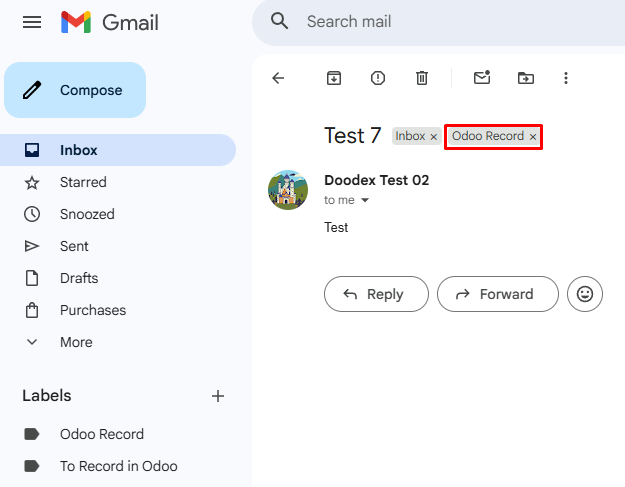
Gmail Synchronization in Doodex Growth Suite Module
Without odoo gmail integration, emails live outside Odoo. That means no logs, no automated reminders, and no reliable reporting. Doodex solves this by tightly connecting Gmail and Odoo through purpose-built odoo mail plugins.
Supercharge Your Odoo Today
Get the full Doodex Growth Suite and streamline operations from day one
How Odoo Gmail Integration Works with the Odoo Database
Odoo Gmail Integration and the Odoo Database
With odoo gmail integration, every email you send or receive can be logged directly into the odoo database. Emails are linked to leads, opportunities, or contacts in Odoo CRM, creating a single source of truth.
Instead of copying subject line details manually, users simply access the odoo inbox addin from the Gmail right sidebar. One click connects the conversation to Odoo, enabling full traceability across teams.
This tight database connection is what allows the Doodex Growth Suite to power analytics, reminders, and automated workflows.
Want to build reliable, multi-channel campaigns in Odoo?
👉 Discover how email and SMS work together inside Odoo in our complete guide ->
Gmail Plugin: More Than a Simple Add On
Gmail Plugin Built for Business Teams
The gmail plugin included in the Doodex Growth Suite is not just a visual tool. It is a full mail plugin feature designed for productivity:
- Sync emails from the same gmail folder
- Log emails automatically
- Create leads from emails
- Trigger follow ups
- Access Odoo records directly from Gmail
The odoo gmail plugin appears as a purple odoo icon in your Gmail right sidebar. Clicking the odoo icon opens the odoo plugin window, where users can search records using the search bar and link emails instantly.
Gmail Inbox Productivity for Sales Teams
Gmail Inbox Meets Odoo Inbox
With odoo gmail integration, your gmail inbox becomes an extension of the odoo inbox. Emails stay in the same gmail folder, while data flows into Odoo behind the scenes.
Sales teams no longer ask, “Did anyone reply to this client?” Every message is visible inside Odoo, improving collaboration and accountability. This is especially valuable for growing sales teams handling hundreds of conversations weekly.
Want to ensure your emails always reach the inbox in Odoo?
👉 Learn deliverability best practices for Odoo Email ->
Install the Gmail Plugin Step by Step
Install the Gmail Plugin from Google Workspace Marketplace
The setup is straightforward and designed for non-technical users.
- Open Google Workspace Marketplace
- Search for the Odoo Gmail plugin
- Click install
- Accept gmail access permissions
- Click authorize access
- Login using your Odoo credentials
A pop up window confirming successful installation will appear. The google apps icon will show the plugin enabled.
For odoo online users, this process takes minutes. Odoo on premise users may additionally configure settings via Google Cloud Console, including a google project, https access, and credentials.
Advanced users can download mail plugin files as a zip file, open them in Visual Studio Code, click the green code button, select download zip, and deploy the add on manually.
✨Pro Tip
Use one shared sending identity first
Start with one team inbox or one shared sales address in Odoo, then connect individual Gmail accounts after the workflow is stable.
Cleaner tracking → fewer duplicates → stronger reporting
Mail Plugin Configuration Inside Odoo
Mail Plugin Options and General Settings
Inside Odoo, admins access the integrations section from the top right corner under general settings.
Here you can:
- Enable gmail and odoo integration
- Configure mail plugin options
- Control user access
- Enable automated workflows
Once enabled, users click login, click continue, and access the Google account securely. A pop up window appears to confirm access, and the system returns notify logs for successful connections.
Struggling to track email conversations
Automated Workflows That Save Hours
Automated Workflows Powered by Odoo Gmail Integration
This is where the Doodex Growth Suite shines.
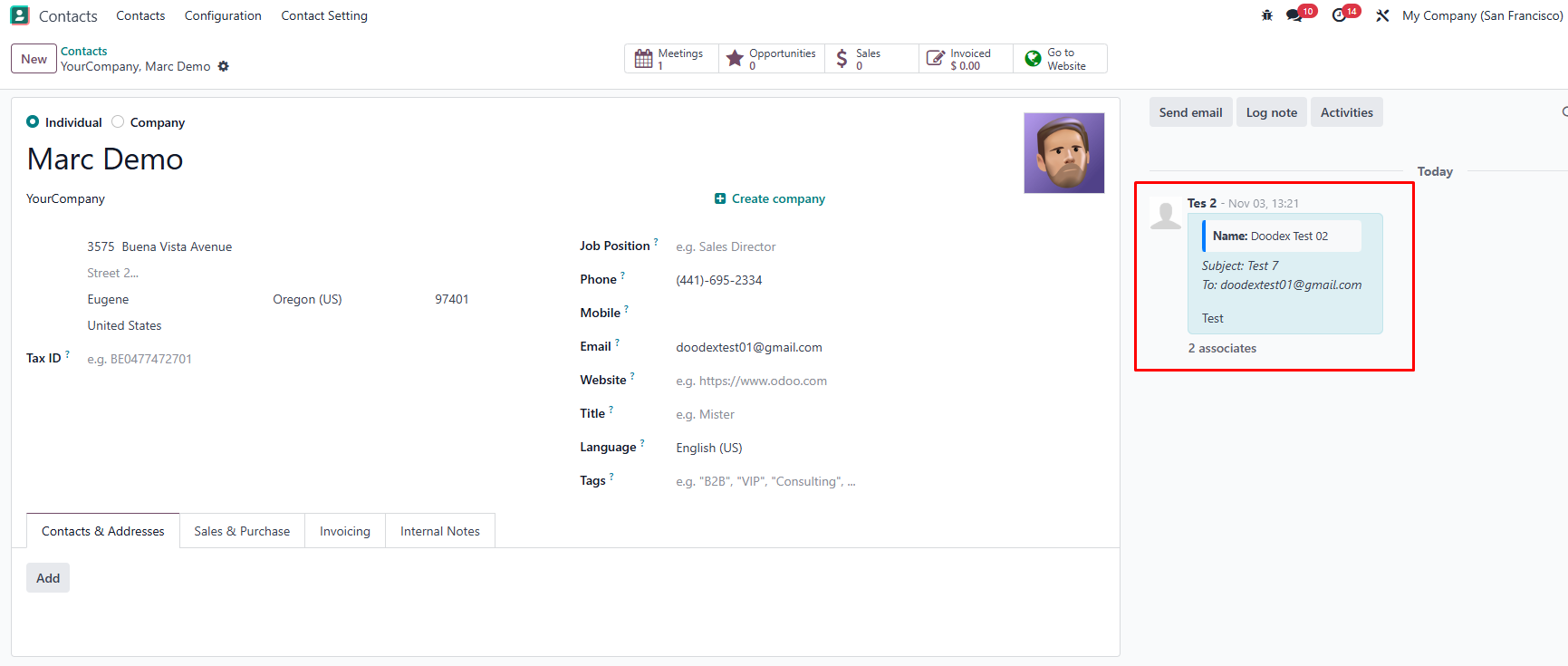
Incoming emails from customers will automatically appear in Odoo
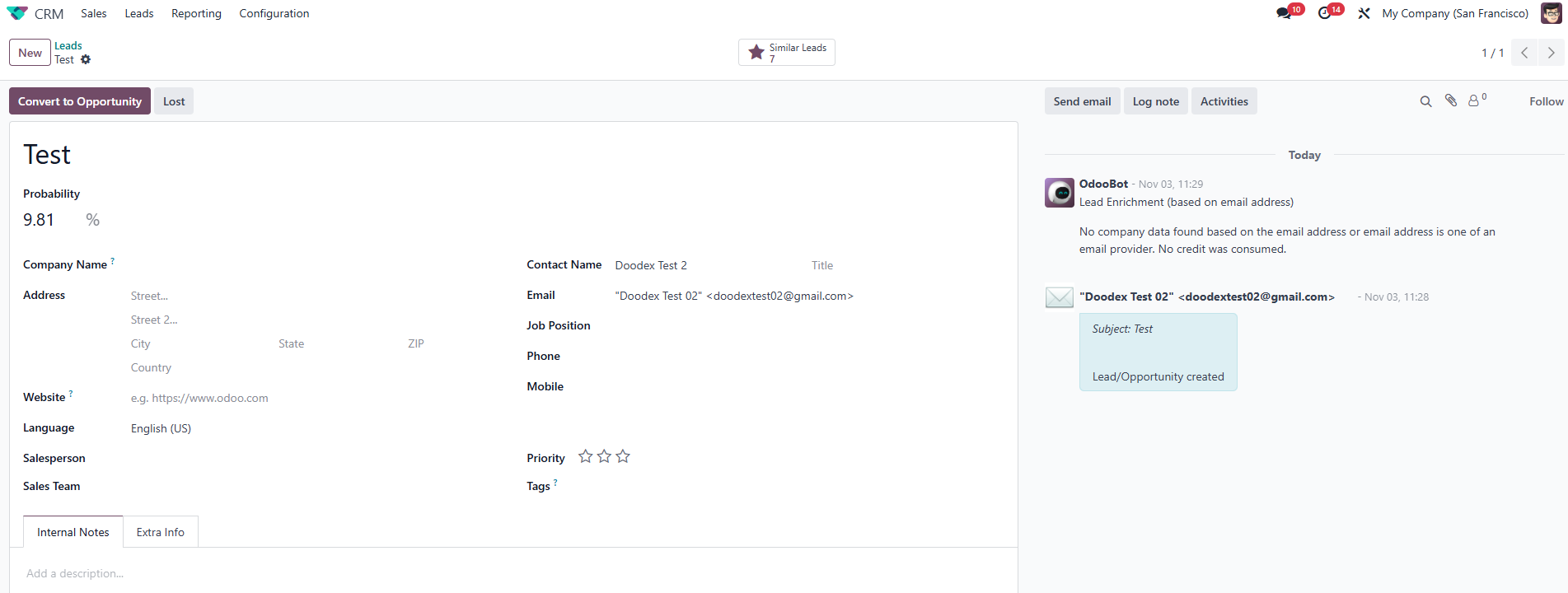
Unknown senders automatically create a Lead/Contact only if the sender’s email does not already exist in Odoo Contacts
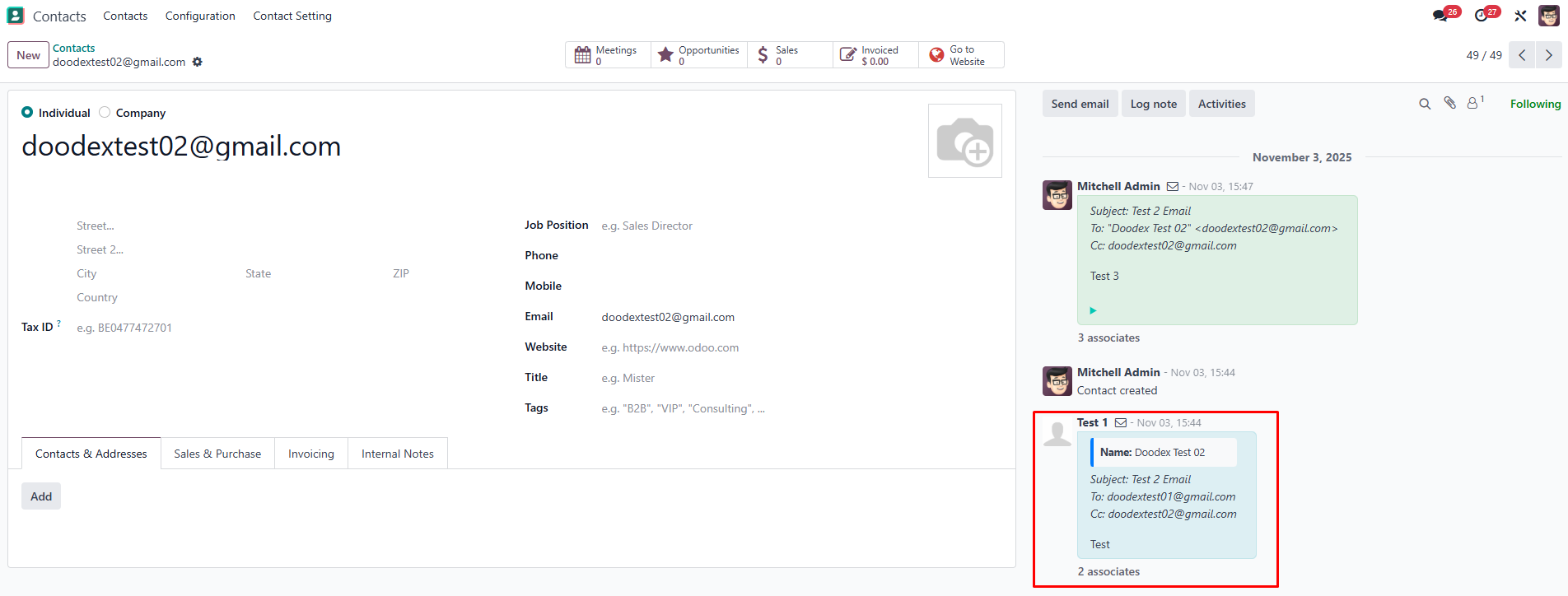
CC and BCC recipients are also recorded
Using odoo gmail integration, businesses can build automated workflows such as:
- Create a lead when a client emails
- Schedule follow ups automatically
- Assign emails to the right sales team
- Trigger reminders based on subject line
- Update CRM stages automatically
These workflows transform Gmail into a conversion engine. For many clients, this level of automation is a game changer compared to basic Gmail plugins.
Campaign follow-ups hard to manage
Why Doodex Growth Suite Is Different
Generic Odoo setups only sync emails. The Doodex Growth Suite connects Gmail to CRM, dashboards, and campaign logic.
This means:
- Better visibility
- Improved productivity
- Stronger follow ups
- Measurable performance
For businesses evaluating marketing tools, this unified approach eliminates the need for separate platforms while keeping everything inside Odoo.
Looking for a Bespoke Odoo Solution?
Tell us what you need and we’ll adapt the system for a perfect fit
FAQs
Yes. Odoo online users install directly, while odoo on premise users configure additional settings.
Only authorized folders and emails based on permissions.
Yes. Each user connects their own gmail account securely.
Yes. Automated workflows are a core feature of the Doodex Growth Suite.
Yes. Emails link to leads, opportunities, and clients.
Yes. Data stays inside Odoo, enabling better reporting and follow ups.
Most teams complete setup in under 15 minutes.