
As teams scale, email communication often becomes a bottleneck. Messages are scattered, follow-ups are missed, and campaign performance is hard to track. With Odoo Email Integration, powered by the Doodex Growth Suite, businesses centralize incoming emails, automate lead capture, and manage campaign-driven outreach directly from the Odoo database.
If you’re a small business, an e commerce team, or a growing organization comparing Odoo with standalone marketing platforms, this article shows how Odoo’s native email system—enhanced by Doodex—becomes a centralized engine for email communication, sales execution, and campaign visibility.
Key Takeaways
- Odoo email integration is powerful but underused without proper configuration
- Incoming mail server and outgoing mail server must work together
- Google OAuth improves security and scalability
- Doodex Growth Suite turns emails into campaign intelligence
- One Odoo database = one source of truth for communication
Key Takeaways
Odoo Email Integration: More Than Just Sending Emails
Why Email Setup Is a Pain Point for First-Time Odoo Users
Understanding the Incoming Mail Server in Odoo
- What the Incoming Mail Server Really Does
- Typical Incoming Email Server Setup
Outgoing Mail Server: The Backbone of Transactional Emails
- Why Outgoing Email Servers Matter
- SMTP Server Options Explained
Email Communication Inside Odoo CRM (With Doodex)
Edit App Registration: Gmail, Google OAuth & Odoo
- Why Google OAuth Matters
- Step-by-Step: Edit App Registration
Custom Domain & Google Workspace Organization
Create a New Campaign Flow With Doodex
Email + E Commerce + Campaigns = One System
FAQs
Odoo Email Integration: More Than Just Sending Emails
Most users assume Odoo email integration is just about sending messages. In reality, it’s about connecting incoming emails, outgoing emails, CRM records, and campaigns inside one Odoo database.
With the Doodex Growth Suite installed, email becomes a growth signal:
- Incoming mails automatically create leads
- Outgoing mail is logged and tracked per user
- Email communication feeds campaigns, dashboards, and sales teams
- No switching between your email client and CRM
Instead of fragmented tools, you get outgoing and incoming communication unified across teams.
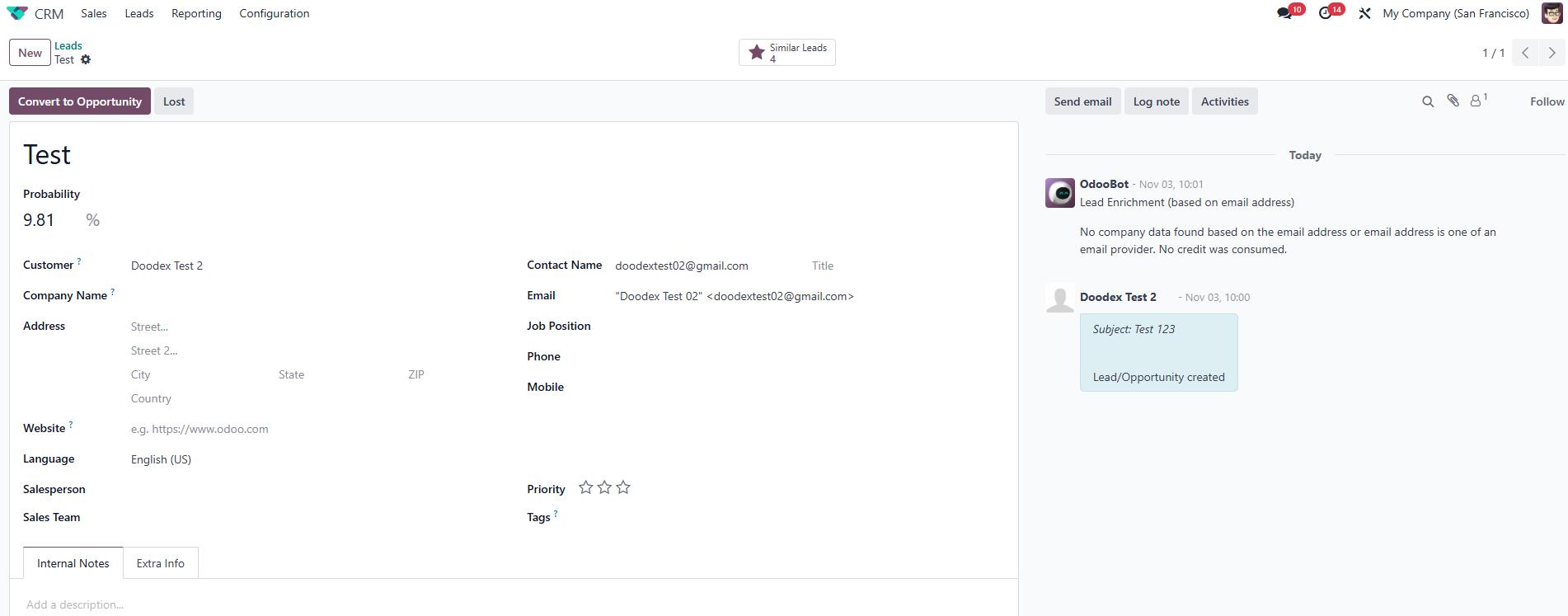
Emails from unknown contacts automatically create new Leads/Contacts. No duplicates, always up-to-date
Want to build reliable, multi-channel campaigs in Odoo?
👉 Discover how email and SMS work together inside Odoo in our complete guide ->
Supercharge Your Odoo Today
Get the full Doodex Growth Suite and streamline operations from day one
Why Email Setup Is a Pain Point for First-Time Odoo Users
When users enter Odoo for the first time, email configuration feels intimidating:
- Multiple email settings screens
- Confusion between incoming mail server and outgoing mail server
- Gmail OAuth vs SMTP relay
- Personal Gmail account vs Google Workspace organization
This friction causes delays, missed emails, and broken workflows.
Doodex simplifies this by documenting, guiding, and enhancing the full email server configuration so teams can focus on campaigns—not troubleshooting.
Want to save hours every week by streamlining yor email workflow?
👉 Discover how to sync your gmail with Odoo ->
Understanding the Incoming Mail Server in Odoo
- What the Incoming Mail Server Really Does
An incoming mail server allows Odoo to receive emails automatically and convert them into actionable data.
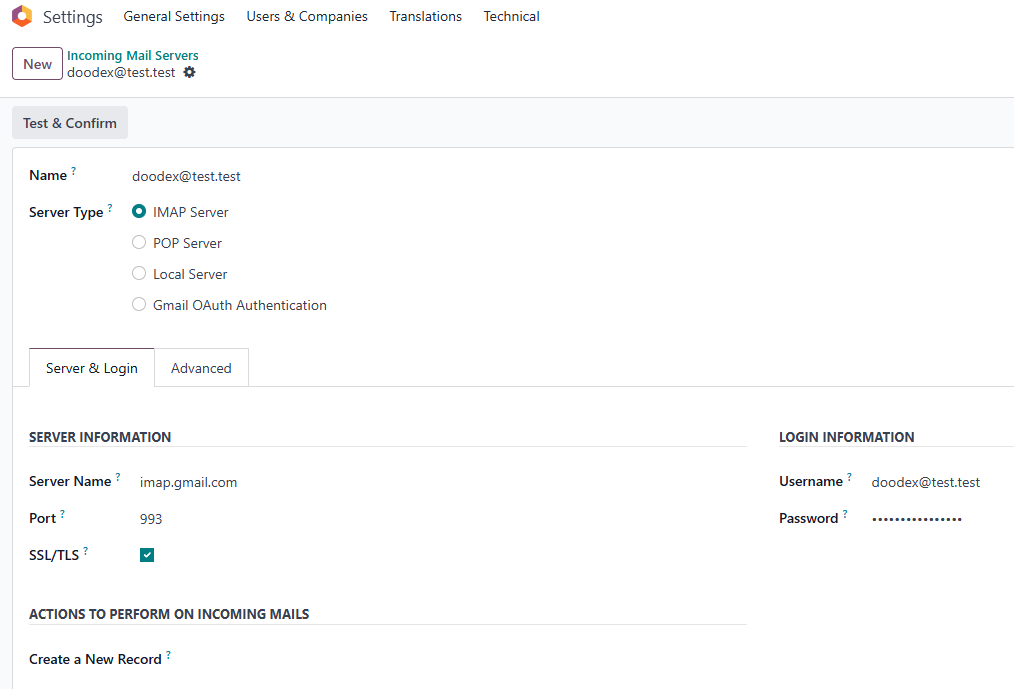
Incoming Email servers
Once configured:
- Incoming emails create records (leads, contacts, tickets)
- Replies are logged in the chatter
- Emails can trigger workflows in campaigns
This is essential for multi-channel campaigns where replies matter more than opens.
- Typical Incoming Email Server Setup
In settings technical, administrators configure:
- Server type (IMAP)
- Server name (e.g. imap.gmail.com)
- Email account credentials
- Catchall email address for routing
- Filtering field rules
When you click test connection, Odoo confirms the server is reachable and secure.
With Doodex Email Module installed, incoming emails are also threaded correctly, even if the first email comes from an external gmail account.
Outgoing Mail Server: The Backbone of Transactional Emails
- Why Outgoing Email Servers Matter
Your outgoing mail server controls how emails are sent, delivered, and trusted.
Poor setup leads to:
- Emails going to spam
- Broken sender's email address
- Lost transactional emails
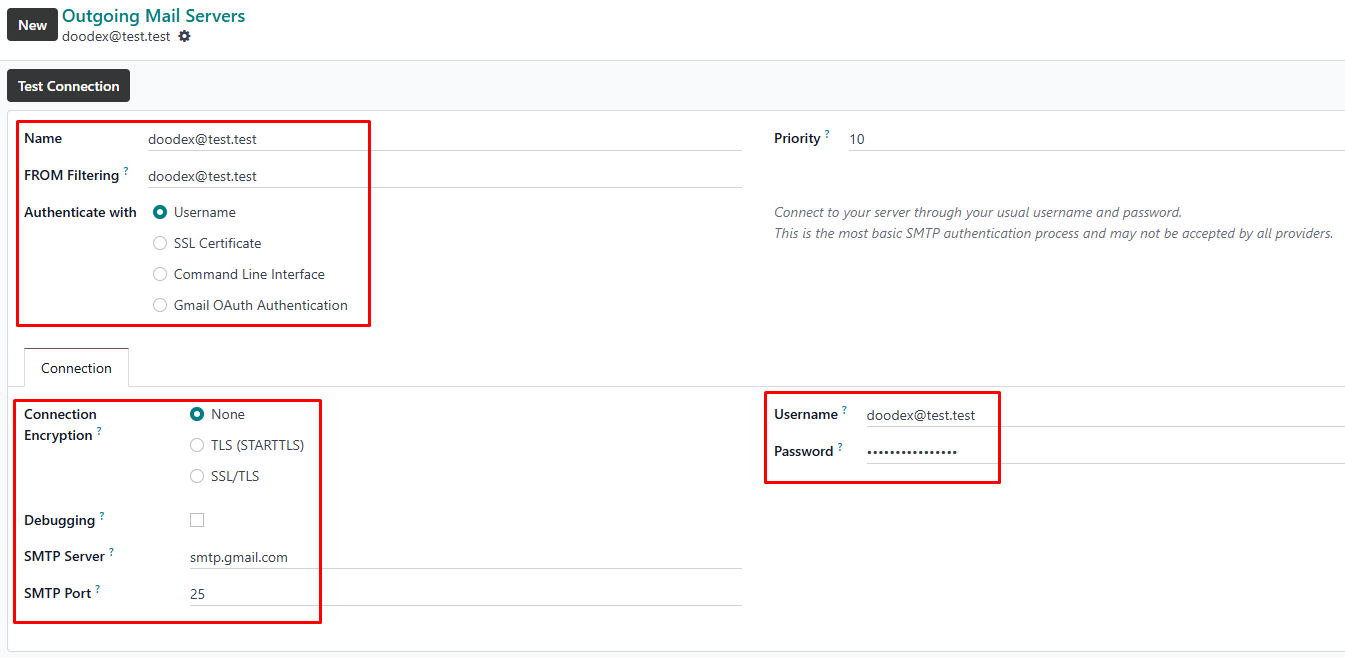
Outgoing Email servers
Odoo supports multiple outgoing email servers, allowing:
- Separate email server per department
- Different sender rules for sales teams
- Reliable delivery for campaigns and notifications
- SMTP Server Options Explained
You can use:
- SMTP relay (recommended for scale)
- Gmail account (personal gmail account for testing)
- Google Workspace with custom domain
After configuration, always click test and then click save to ensure reliability.
Want to ensure your emails always reach the inbox in Odoo
👉 Learn deliverability best practices for Odoo Email ->
Email Communication Inside Odoo CRM (With Doodex)
Here’s where Doodex changes the game.
Instead of emails living outside the CRM, Doodex ensures:
- Every outgoing email is linked to leads, contacts, and campaigns
- Incoming mails update records automatically
- Sales teams see full conversation history
- Users don’t need to leave Odoo to manage email communication
This is critical when you create leads, create records, or create opportunities from inbound interest.
Struggling to track email conversations?
Edit App Registration: Gmail, Google OAuth & Odoo
- Why Google OAuth Matters
For secure emails, especially with Google Workspace, OAuth is preferred over passwords.
To enable google oauth odoo, admins must:
- Enter Odoo
- Enable developer mode
- Go to the technical menu
- Open app registration
- Step-by-Step: Edit App Registration
In a new window, you:
- Create project in Google Cloud
- Configure oauth consent screen
- Choose user type (external user type or internal user type)
- Add developer contact information section
- Create credentials → OAuth client
- Set redirect URI for Odoo
- Generate client secret
Then return to Odoo and edit app registration page:
- Paste google credentials
- Set testing mode or external testing mode
- Add test users if required
- Click save
Once saved, configuration automatically loads into email settings.
✨Pro Tip
Start with one shared inbox
Connect a single email on your custom domain first, ensure emails flow correctly, then add personal accounts step by step.
Strong email foundations → reliable campaigns & clean CRM data
Custom Domain & Google Workspace Organization
Using a custom domain (e.g. odoo@doodex.net) increases trust and deliverability.
With Google Workspace:
- Use organization’s email address instead of personal email address
- Centralize user support email field
- Control outgoing mail permissions
- Scale email for teams and campaigns
Doodex supports this setup seamlessly, ensuring outgoing mail and incoming email server work together.
Create a New Campaign Flow With Doodex
Here’s what happens when everything is connected:
- Create a new campaign in Doodex
- Add mailing lists and members
- Receive emails from prospects
- Automatically create new records
- Sales teams follow up inside Odoo
- Outgoing emails tracked per user
- Dashboards show generated value
This is where Odoo becomes a real multi-channel platform—not just a CRM.
Too many manual marketing tasks?
Email + E Commerce + Campaigns = One System
For e commerce teams, email isn’t optional—it’s transactional.
- Order confirmations
- Payment receipts
- Support replies
- Follow-ups
With proper email server setup and Doodex modules:
- Transactional emails are reliable
- Replies create records
- Customer conversations stay visible
No lost context. No blind spots.
Looking for a Bespoke Odoo Solution?
Tell us what you need and we’ll adapt the system for a perfect fit
FAQs
Yes. With an incoming email server configured, Odoo can receive emails and create records automatically.
It’s recommended, especially for Google Workspace organization accounts, to ensure secure emails.
Yes, for testing or small setups, but a custom domain is better for production.
Odoo checks if the email server credentials and server are reachable.
Yes. With proper setup, outgoing and incoming email flows are unified.
Doodex connects emails to campaigns, dashboards, and sales activities automatically.
Absolutely. Doodex makes enterprise-grade email workflows accessible for small business teams.