




What syncs when you connect Amazon to Odoo
The Odoo Amazon connector keeps both platforms aligned — Amazon orders, inventory, products, fees, and settlements — on a scheduler that runs at regular intervals you control. The simplest way to picture it is three lanes: what comes into Odoo, what goes back out to Amazon, and what stays mirrored on both sides.
 →
→

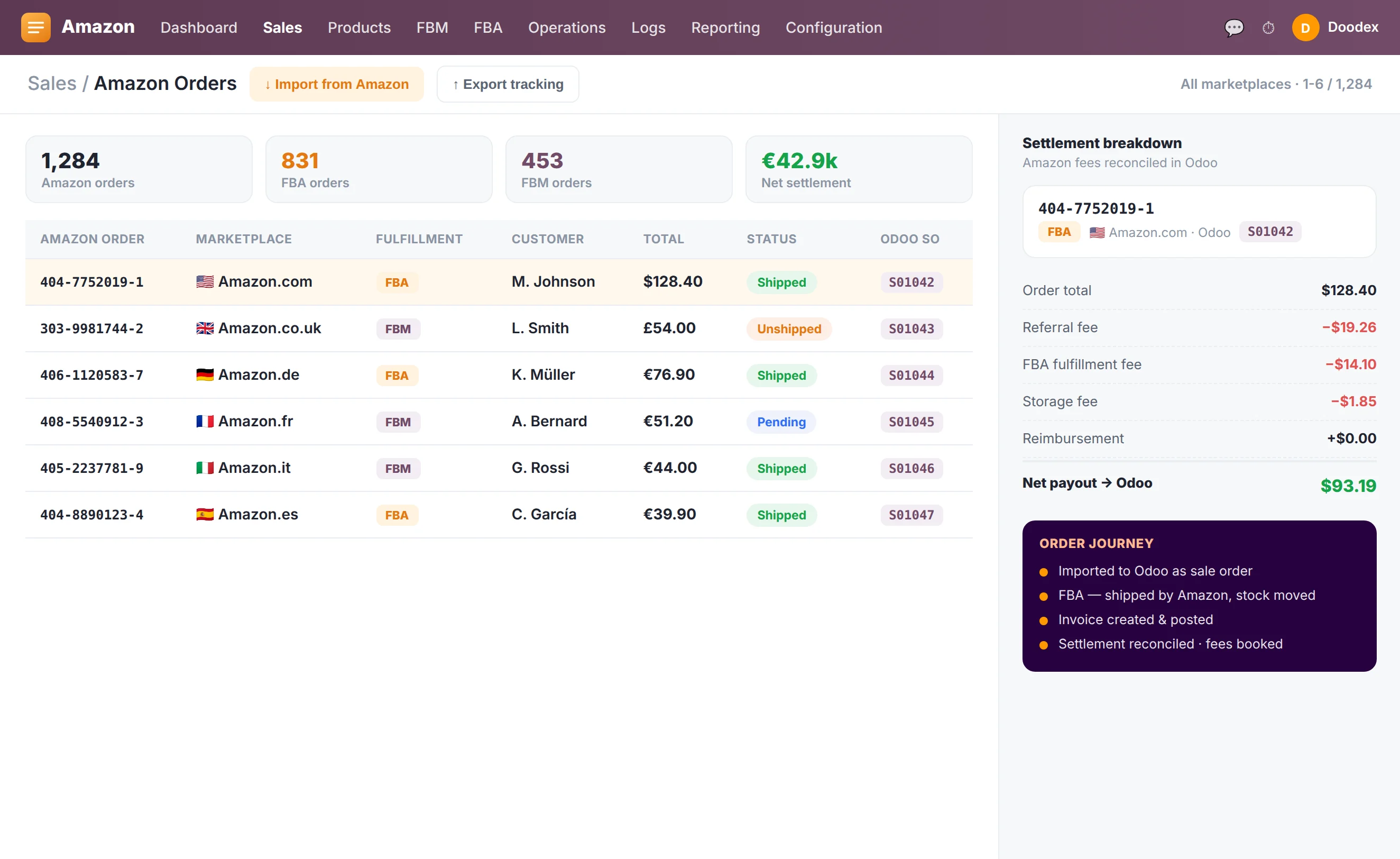
Every Amazon order — FBA orders and FBM orders, including pending, historical, and confirmed orders, with taxes applied and shipping addresses — becomes a synchronized order in Odoo. Each Amazon order imports as a sales order and drives the whole flow from there.
Every customer record and customer email addresses are created or matched automatically on import — no duplicate contacts, and the same company is never entered twice.
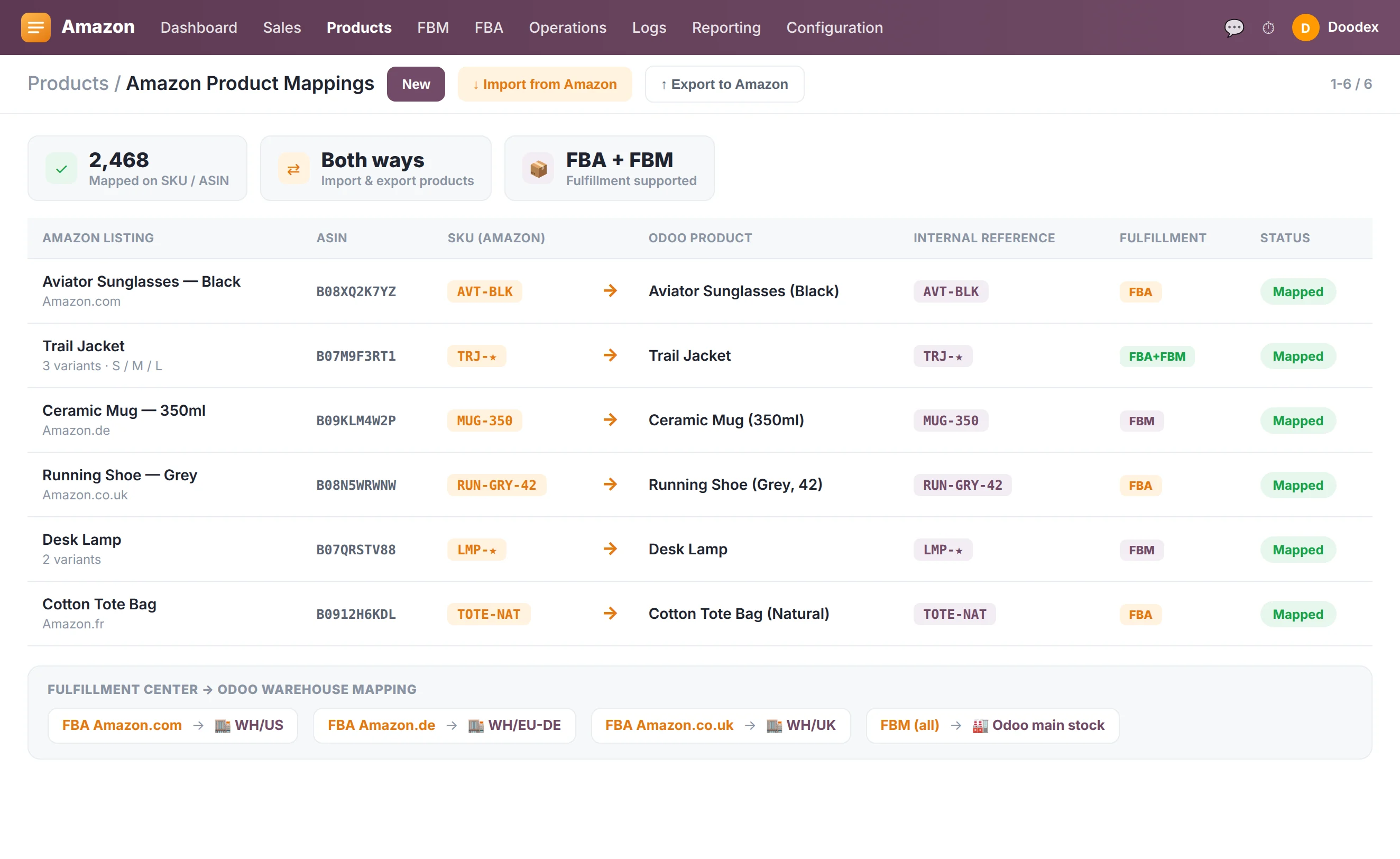
Product information, Amazon SKU, ASIN, and marketplace items are automatically fetched into Odoo; default products can be mapped so nothing is missed.
Amazon settlement reports, Amazon fees, VCS/VAT reports, reimbursements, and refunds import for clean reconciliation — plus customer returns, gift wrapping charges, delivery charges, inbound, and removal shipments.
FBM stock synchronization and price updates are pushed back to your Amazon marketplaces, so listings across synchronized marketplaces stay current.
Each shipment, its tracking number and chosen carrier, plus outbound and removal orders and customer invoices, are generated in Odoo and sent back to Amazon.
Products, SKU/ASIN, and listings stay consistent between Amazon and Odoo as your catalogue changes.
Stock stays accurate across FBA fulfillment centers and FBM stock locations — with full stock management and stock adjustments — and Odoo as the single source of truth, preventing overselling across every marketplace.
How the Odoo Amazon connector works


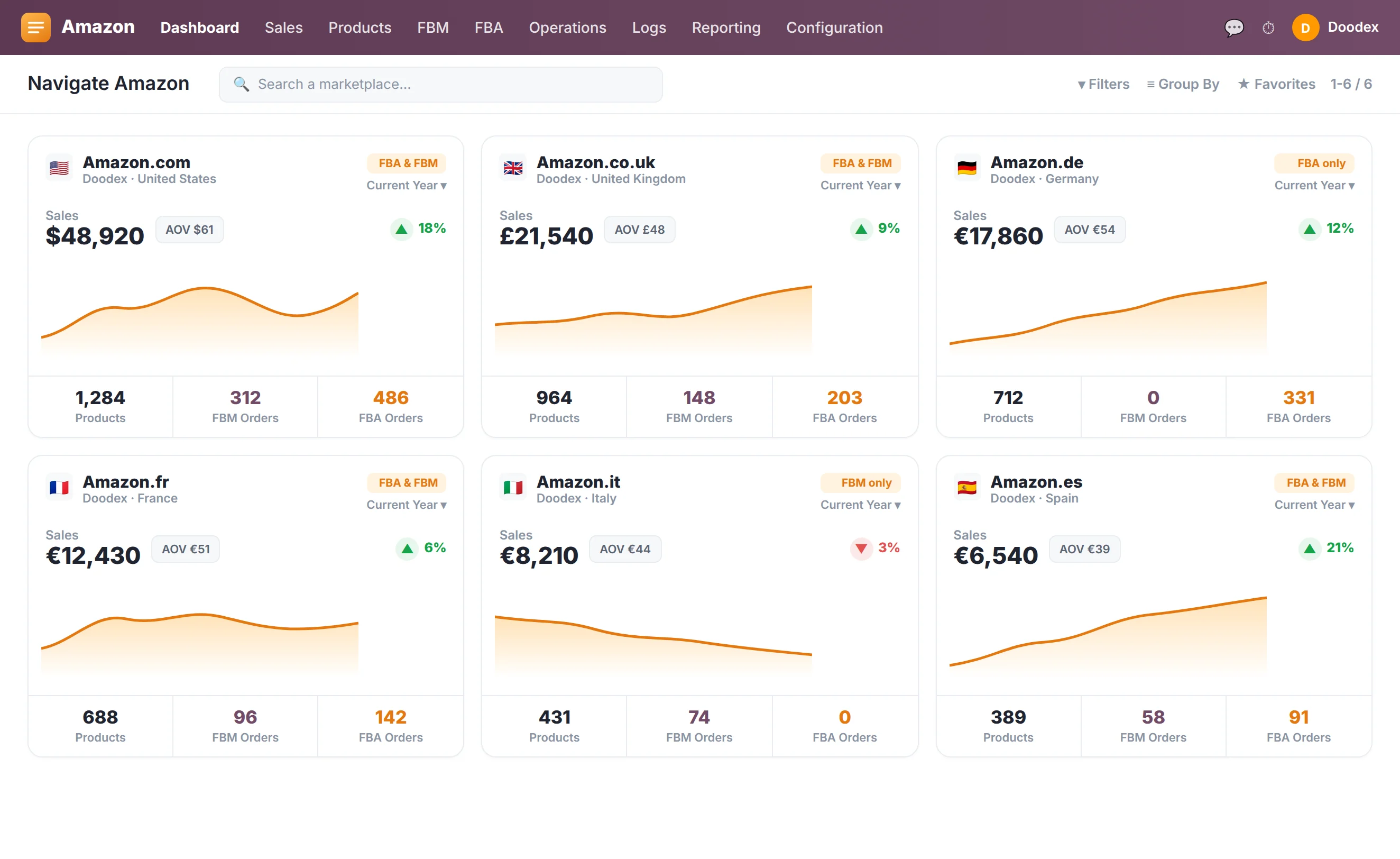
The connector links your Amazon Seller Central account to Odoo through the Amazon Selling Partner API (SP-API). Orders, inventory, products, and settlements sync on a queue-based scheduler that runs at regular intervals you control, with error handling and a manual force synchronization option — Amazon uses scheduled polling rather than real-time webhooks.
The connector matches products on SKU and internal reference, and maps each Amazon region and fulfillment center to an Odoo warehouse or virtual location, so every order, stock move, and marketplace stays in sync.
From each Amazon order, the connector creates the Odoo sales order: for FBA (Fulfilled by Amazon), Amazon ships and the stock move is written to Odoo automatically, with a full moves history; for FBM (Fulfilled by Merchant), you ship from Odoo, the delivery order is confirmed, and the tracking number with the chosen carrier is sent back to Amazon — full or partial via backorders. Any status change is kept in step, and figures can be corrected directly in Odoo.
How to connect your Amazon seller account
Setting up the Amazon sync feature is a guided sign up process. You register your Amazon account by pasting the Seller Central URL and authorizing the app, which creates an Amazon intermediary account and completes the Amazon account configuration.
From the Marketplaces tab you add a new marketplace record for each region — the marketplace id is automatically fetched, and you simply click save.
Available marketplaces appear so you can pick which ones become synchronized marketplaces; other marketplaces can be added later, and you can always manually create a marketplace entry.
The rest is standard Odoo. In the Sales app, product tax configuration and the right fiscal position make sure the correct taxes applied and VAT numbers land on every document; in the Inventory app, the stock location and delivery charges are mapped so delivery orders and stock moves stay accurate.
Amazon-specific fields — the Amazon shipping code, the Amazon gift wrapping code, and the default payment method — are mapped on the configuration page so gift wrapping charges and shipping are posted correctly. Amazon payments are posted through a dedicated bank journal, with registering payments, vendor bills, and a write off handled the Odoo way. You can trigger a force synchronization at any time, or let the scheduler run on its schedule, and separate mapping can be configured per marketplace if needed for stock tracking. Assign the marketplace to a sales team, and your inventory managers get clean sales data and a live view of stock — a smooth integration from first order to reconciled settlement.
Why integrate Amazon with Odoo
A well-planned Odoo ecommerce integration keeps your Amazon marketplace and Odoo in step, so orders, fees and settlements stay accurate without double entry.
Built by Doodex, from Amazon marketplace to Odoo ERP
We build on Odoo's native Amazon Connector in the Sales app and a proven Odoo Amazon connector for everything they handle well, then extend functionality with custom development and Amazon SP-API integration for what standard connectors cannot handle — for example, more than one Amazon seller account and multiple marketplaces, custom field and listing mapping, settlement and fee workflows, and configuration beyond the default fields. Whether you sell on one marketplace or across several, we connect Amazon with Odoo so your operations stay simple. Clear roadmaps, realistic timelines, straightforward pricing — no hidden fees. Every Odoo e-commerce integration we deliver is hand-built and maintained by the same team, so your Amazon connector keeps working as your catalogue and order volume grow.
Every project includes hands-on support: our responsive support team installs and configures the connector, sets up the automated workflows and the scheduler, tests the Amazon sync feature against real orders and settlements, and trains your team to run day-to-day operations. From FBA and FBM fulfillment to reconciling invoices, refunds, and settlements, the goal is a reliable business system that helps your business grow, not just another app — and our team provides ongoing support after go-live.




What the Odoo Amazon integration costs
We scope the Amazon connector and the implementation as one project and quote it after a short call — no hidden fees. Pricing depends on the number of marketplaces and seller accounts, whether you use FBA, FBM, or both, how much settlement and custom mapping you need, and your Odoo edition. Odoo's native Amazon Connector is included with Odoo Enterprise and needs a paid Amazon seller account (Professional selling account); a third-party connector may carry its own module license for the full two-way and settlement features. You will know the full scope and cost before you commit.
Request a quote →Requirements, multiple marketplaces & hosting
A paid Amazon seller account — an Amazon Seller Central Professional selling account — with Selling Partner API (SP-API) access, an Odoo instance on Odoo.sh or on-premise (Enterprise or Community), and clean product references — Amazon SKU and internal reference — for accurate mapping. Multiple marketplaces, more than one seller account, FBA and FBM, and multi-company are all supported.
Orders and settlement data import on a scheduler you control; FBA and FBM inventory sync keeps stock accurate, and you can force synchronization at any time. Mismatched Amazon SKU and internal reference values are the most common cause of mapping errors, so aligning them is part of onboarding, and each Amazon region and fulfillment center needs a warehouse mapping up front. The connector runs on Odoo.sh and on-premise (not Odoo Online). Doodex provides support at every step.
E-commerce integrations
Doodex brings the platforms behind your sales into Odoo, keeping orders, inventory and settlements aligned across every channel.



Amazon Odoo integration FAQ
How do I set up the Odoo Amazon connector?
Does it support FBA orders and FBM orders?
Which Amazon marketplaces are supported?
Do I need Odoo Enterprise?
How often does data sync?
Which way do orders and inventory flow?
What data can the connector sync?
How are Amazon fees and settlements handled?
Does it sync FBA inventory?
Will it work with my existing Amazon account?
Ready to connect Odoo and Amazon?
Tell us about your Amazon business and we will map out the integration — from connecting your Amazon seller account and configuring the connector to custom development. Sell across Amazon marketplaces, and manage everything in Odoo. Odoo and Amazon, finally in sync.