
Odoo Partner · Data reviewed August 2026
Odoo Migration Statistics: What the Data Actually Says in 2026

 Reviewed by Jean-François Taille, CEOExpert reviewer
Odoo migration statistics for 2026 show a clear planning signal for businesses on 16.0 or 17.0: Odoo 19.0 currently shows a 90.8% module readiness index, and Odoo 17.0 leaves standard support in September 2026. That gives every business still running 16.0 or 17.0 a dated deadline and a real need to understand how long an Odoo migration takes, what it costs, and why it fails.
This analysis is built for companies planning or evaluating an Odoo ERP upgrade, and for the IT teams, partners, and decision-makers responsible for executing it. It benchmarks support windows, migration duration and budget, common failure causes, data migration and mapping discipline, accounting data choices, validation and security, custom code compatibility, migration strategies, professional service options, and what successful migration looks like in practice.
Book your free Odoo migration audit How our Odoo migration services scope a project
Sourced from Odoo's own documentation and 12 independent studies. How we sourced these figures · last reviewed 6 August 2026.
Seven Odoo Migration Statistics to Plan Around
These seven numbers frame everything else on this page. Three come from Odoo's own documentation, three from independent ERP research, and one we measured ourselves.
Standard support per major Odoo version — helpdesk, bug fixing and security updates. After that, extended support costs extra and drops security updates.
Odoo documentation, 2026
Planned end of standard support for Odoo 17.0. Odoo 16.0 has been out of standard support since September 2025.
Odoo documentation, 2026
Data migration projects that run over time or over budget — cost overruns averaging 30% and time overruns 41%. Moving data is the risk, not installing the software.
Bloor Group figures, via Oracle white paper
Median duration of an ERP project in the most recent independent survey (n = 170, median revenue $200.5M). ~24% ran past schedule.
Panorama Consulting ERP Report 2026
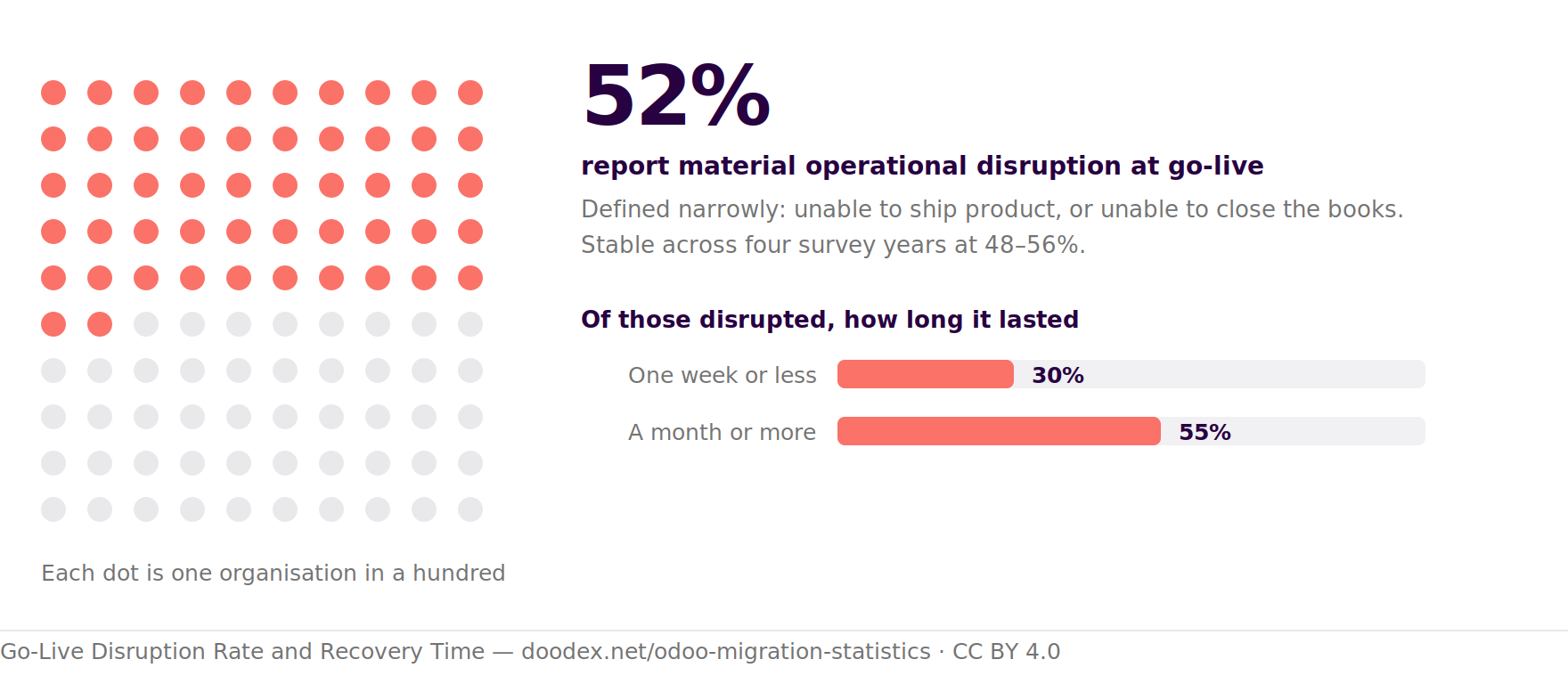
Organisations reporting material operational disruption at go-live — unable to ship product or close the books. Stable across four survey years: 48–56%.
Panorama, 2013–2016 data
ERP initiatives predicted to fall short of their original business case by 2027 — delays, weak adoption, or benefits never realised. Up to a quarter of those failing outright.
Gartner prediction, made 2024
Odoo 19.0 module readiness — the share of the largest supported catalogue that has a 19.0 listing. Roughly 1 in 11 modules available for 18.0 has no 19.0 version yet.
Doodex Odoo Module Readiness Index, 6 Aug 2026
Doodex original measurement
The Doodex Odoo Module Readiness Index
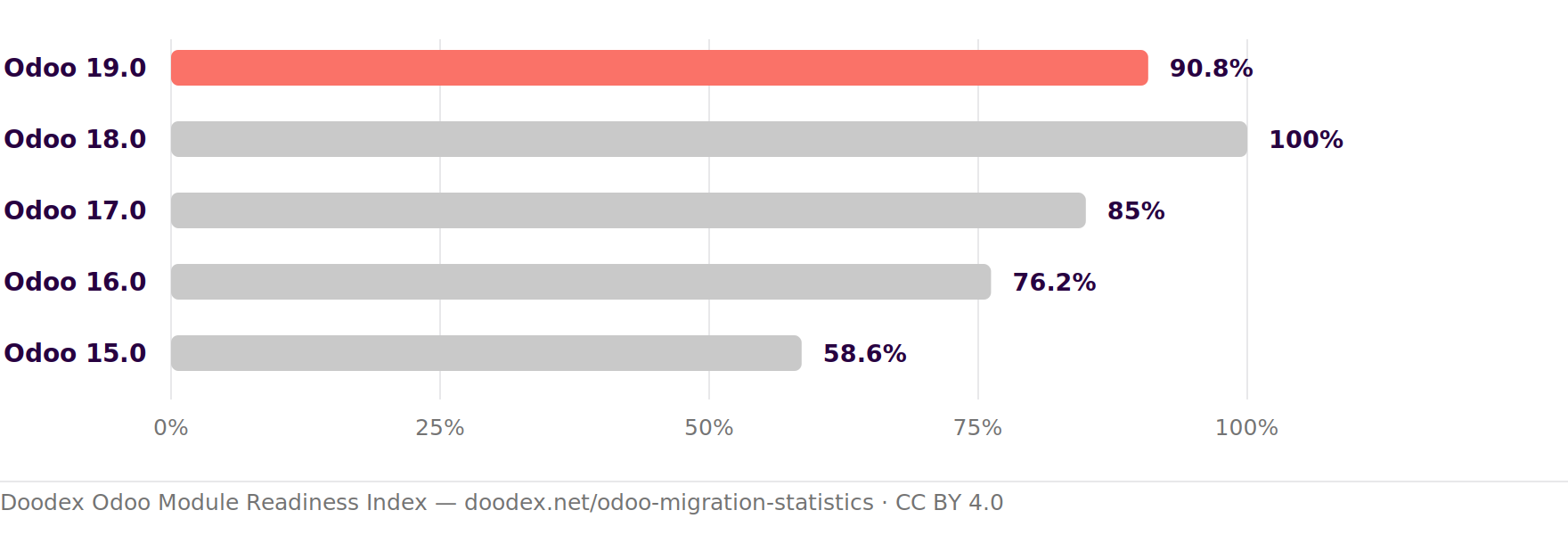
Nobody publishes how ready the Odoo ecosystem is for a new version, so we measure it. The index is the number of modules listed on the Odoo Apps Store for a given version, as a share of the largest catalogue among currently supported versions.
Odoo 19.0 module readiness — 6 August 2026
90.8%38,279 modules listed for Odoo 19.0, against 42,168 for Odoo 18.0 — the most complete catalogue of any supported version. In practical terms, roughly 1 in 11 modules you can install on 18.0 has no 19.0 listing yet.
Module readiness by version
Apps Store listings per version, as a share of the largest supported catalogue (Odoo 18.0 = 100%).
Scroll sideways to see the whole chart.
| Version | Apps listed | Readiness index | Reading |
|---|---|---|---|
| Odoo 19.0 | 38,279 | 90.8% | Newest release, ecosystem still catching up |
| Odoo 18.0 | 42,168 | 100% | Reference — the most complete catalogue |
| Odoo 17.0 | 35,862 | 85.0% | Leaves standard support September 2026 |
| Odoo 16.0 | 32,138 | 76.2% | Extended support only |
| Odoo 15.0 | 24,698 | 58.6% | Extended support only |
Method
For each version we read the result count returned by the Odoo Apps Store module browser with the version filter applied — apps.odoo.com/apps/modules/browse?series=19.0, changing the series parameter. The index is that count divided by the highest count across supported versions. Measured 6 August 2026 and re-measured monthly; the figures above are the latest reading.
What the Index Does and Does Not Tell You
- It does show how far the third-party and community ecosystem has moved to a new version — a leading indicator of whether a migration to that version will hit missing dependencies.
- It does not tell you whether your specific modules are ready. A catalogue listing is not a compatibility guarantee, and a module absent from the store may still have a maintained fork.
- It is not a rewrite rate. It says nothing about how much of your custom code needs changing — no credible source publishes that figure, as we set out further down this page.
- Above 100% is possible. As a version matures its catalogue can overtake the previous one, since new modules are published that never existed for older releases.
Cite this indexFree to reuse with attribution · CC BY 4.0
Doodex Odoo Module Readiness Index, August 2026. Doodex. https://doodex.net/odoo-migration-statistics
Doodex. (2026, August 6). Odoo migration statistics: what the data actually says in 2026. Doodex. https://doodex.net/odoo-migration-statistics
<a href="/odoo-migration-statistics">Doodex Odoo Module Readiness Index, August 2026</a>
<iframe src="https://doodex.net/embed/odoo-module-readiness" width="100%" height="380" style="border:0" loading="lazy" title="Doodex Odoo Module Readiness Index"></iframe><p>Source: <a href="/odoo-migration-statistics#module-readiness-index">Doodex Odoo Module Readiness Index</a></p>
The embed renders this chart live, so it updates itself when we re-measure. Need a reading for a specific month or an earlier Odoo version? Ask us and we will pull it.
How to Read These Odoo Migration Statistics
What this page covers, in order: support windows and deadlines, realistic duration and budget benchmarks, the ranked causes of failure, then the part that actually breaks projects — data migration, data mapping, master data and transactional data, accounting data and opening balances, validation, data integrity and data security. Every figure is sourced and dated; every process step is one we run on real projects.
There is no published, peer-reviewed dataset of Odoo migration outcomes. Anyone quoting an exact "average Odoo migration takes X weeks and costs $Y" across the whole community is inventing it. So this page is built on three kinds of evidence, each labelled where it appears:
1. Odoo's own documentation and contracts. Support windows, the Odoo migration process, what the free upgrade covers and what it explicitly refuses to cover. These are facts, not estimates.
2. Independent cross-ERP research. Duration, budget, failure causes, data migration overruns and go-live disruption — mainly Panorama Consulting's annual ERP Report, plus Gartner, McKinsey and studies of SAP S/4HANA transformations. Odoo projects are usually smaller than the median respondent in these surveys, so read them as the shape of the risk rather than as Odoo-specific values.
3. Measurements and practice we can show. Where we publish a number of our own — module availability per version, for example — we say exactly how it was taken so you can repeat it. Where we describe a migration process, it is the one our team runs.
A note on the survey data: Panorama's respondent pool is self-selected and small (n = 131 to 562 depending on the edition), and median respondent revenue swings from $200M to $1.7B between years, which mechanically moves the cost and duration figures. We date-stamp every figure and we do not present year-over-year changes as trends.
Two Very Different Projects, Both Called "Odoo Migration"
Before any statistic means anything, be clear which project you are running. The word covers two jobs with different risks, different budgets and different statistics — and Odoo's free upgrade service only touches one of them.
| Version upgrade | Odoo data migration | |
|---|---|---|
| What it is | Moving an existing Odoo database from an older version to a newer one, e.g. 17.0 to 19.0 | Moving data out of a legacy system — another ERP, an accounting software package, spreadsheets — into a new Odoo database |
| Dominant risk | Custom modules and third-party apps that have no version for the target release | Data mapping, data integrity and data loss when moving data between two different structures |
| Covered by Odoo? | Yes — the technical database conversion is free with an Enterprise subscription | No. Odoo states plainly that an upgrade "does not cover migrating from another ERP to Odoo" |
| Main tooling | upgrade.odoo.com test and production requests | Odoo's import tool, the Odoo API (XML-RPC / JSON-RPC), ETL scripts, staged validation |
| Where time goes | Adapting custom code, then testing the upgraded database | Extracting and cleaning source data, proper data mapping, iterative import and validation |
Which One Is Your Business Running?
Most real projects are a blend. A business on Odoo 16.0 that also wants to retire a separate accounting software package and consolidate everything into one Odoo database is running both at once — which is exactly the pattern the research warns about, because scope expansion during execution is the single most cited cause of overrun. Our Odoo migration services scope the two tracks separately even when they run in the same programme. If the second track is your first Odoo build rather than a replacement, our guide to implementing Odoo in a small business covers the setup work these statistics do not.
Migrating off SAP Business One, Sage X3, or another manufacturing ERP? That is the "Odoo data migration" column above, not the free upgrade — the track where scope, cost and data-mapping risk actually live. Our free diagnostic tools for manufacturers — ROI calculator, pain-points checklist and a migration audit — give you a quantified starting point before any proposal.
Start the free manufacturing diagnosticPart 1 · The migration process
The Odoo Migration Process, Step by Step
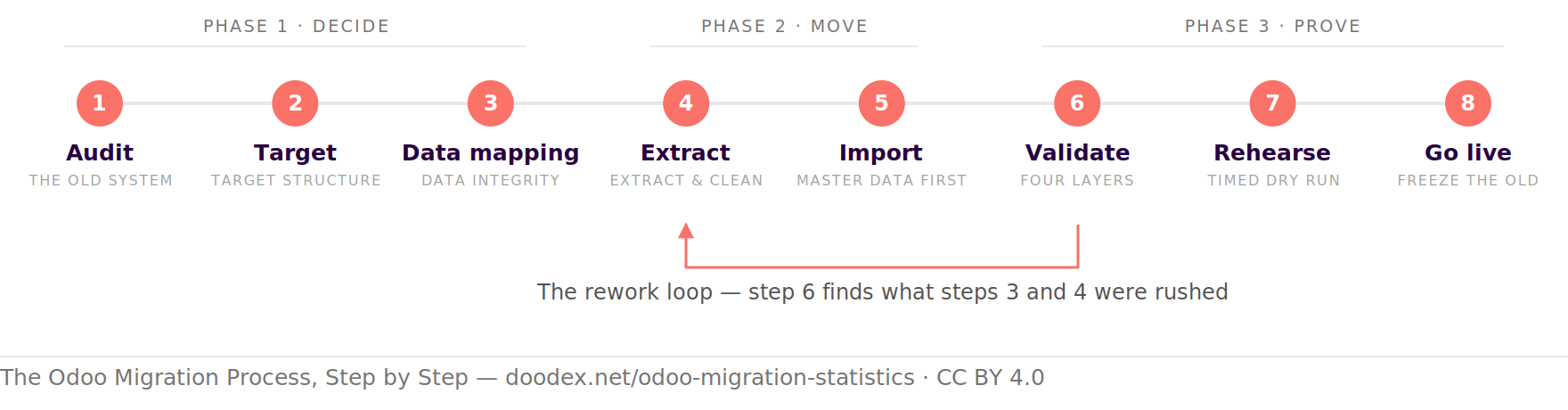
Odoo documents a seven-step loop for a version upgrade. A full migration off a legacy system needs more than that, because nobody has to map data when the source is already Odoo. This is the entire process we run, and the order matters more than any single step.
Identify the Relevant Data before You Move Anything
The first decision of the entire process is not technical. It is deciding which records deserve to exist in the new system at all. Teams that skip this step do not save time — they pay for it later, in validation effort spent proving that data nobody needed was migrated correctly.
The process, and the loop that breaks it
Eight steps, three phases. The order matters more than any single step.
Scroll sideways to see the whole map.
Cite this figureFree to reuse with attribution · CC BY 4.0
The Odoo Migration Process, Step by Step. Doodex, 2026. https://doodex.net/odoo-migration-statistics#migration-process
Doodex. (2026, August 6). Odoo migration statistics: what the data actually says in 2026. Doodex. https://doodex.net/odoo-migration-statistics#migration-process
<a href="/odoo-migration-statistics#migration-process">The Odoo Migration Process, Step by Step — Doodex</a>
Our own process, not a third-party statistic — reuse freely with attribution.
Where the Entire Process Usually Breaks
This is the return arrow on the map above. Steps 3 and 4 get compressed because they produce nothing demonstrable, while step 5 is visible and satisfying. Then the project discovers at step 6 that the mapping was wrong, and repeats steps 4 through 6 under deadline pressure with a live date already announced. Every duration statistic on this page is generated by exactly that loop.
Part 2 · Duration and budget
How Long Does an Odoo Migration Take?
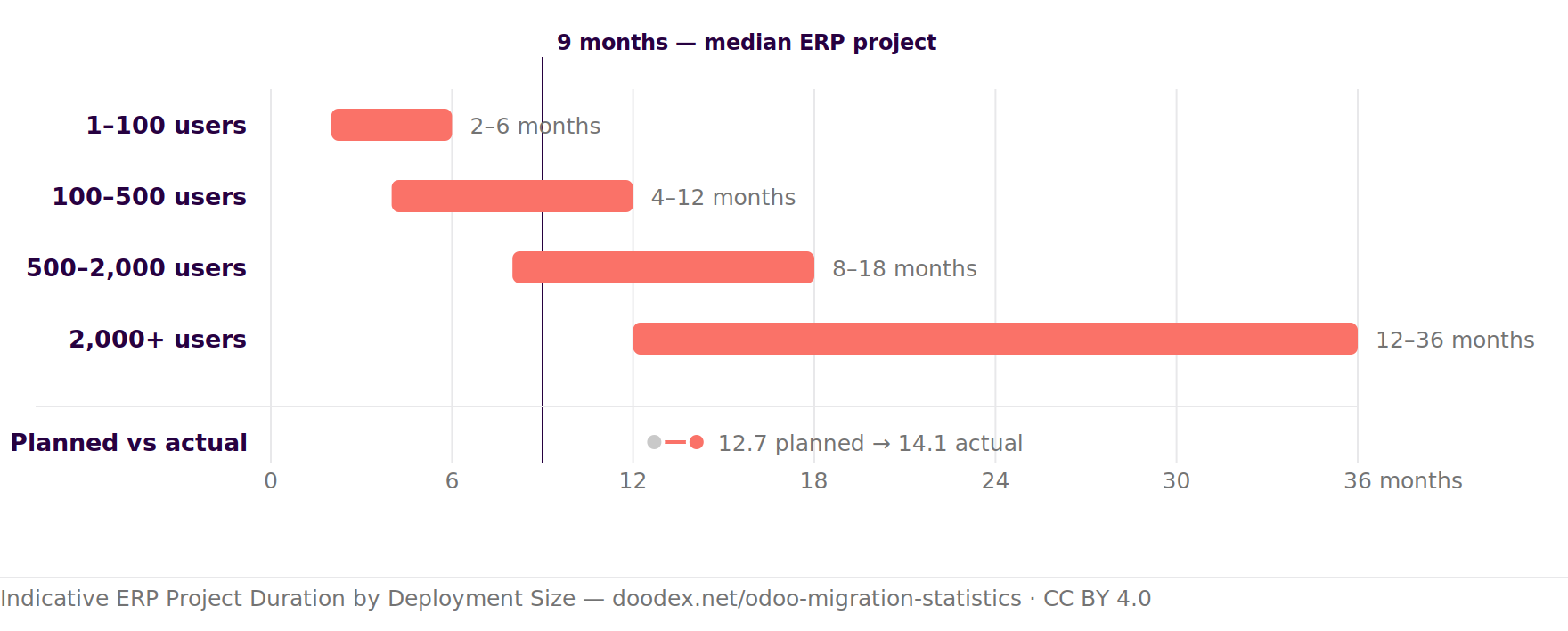
No one measures Odoo migrations specifically — not Odoo, not any independent study. What exists is cross-ERP duration data, plus four hard timing constraints inside Odoo's own upgrade process. Read the first as the shape of the risk and the second as fixed.
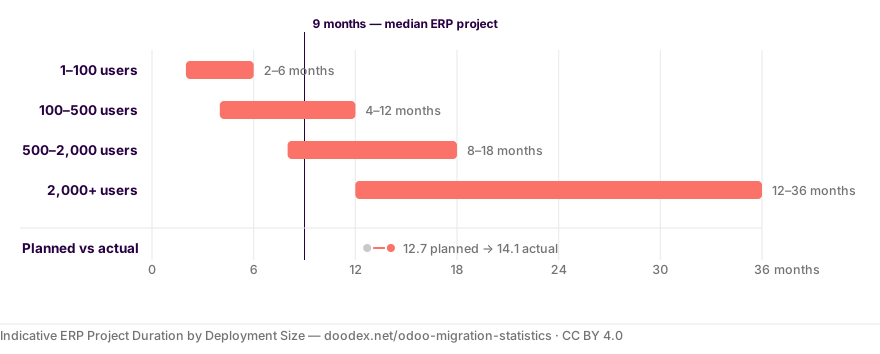
How long it takes, by deployment size
One axis, in months. Bands are indicative; the reference line and the dumbbell come from survey data on different samples.
Scroll sideways to see the whole chart.
Cite this figureFree to reuse with attribution · CC BY 4.0
Indicative ERP Project Duration by Deployment Size. Doodex, 2026. https://doodex.net/odoo-migration-statistics#duration
Doodex. (2026, August 6). Odoo migration statistics: what the data actually says in 2026. Doodex. https://doodex.net/odoo-migration-statistics#duration
<a href="/odoo-migration-statistics#duration">Indicative ERP Project Duration by Deployment Size — Doodex</a>
Bands: ERP Research cost-and-duration model. Median 9 months: Panorama ERP Report 2026 (n = 170). Planned vs. actual: Panorama 2019 (n = 241).
Cross-ERP Duration Benchmarks
| Benchmark | Figure | Data year & sample |
|---|---|---|
| Median ERP project duration | 9 months | 2025–26, n = 170 |
| Median ERP project duration | 15.5 months | 2022–23, n = 131 |
| Planned vs actual duration | 12.7 → 14.1 months | 2019, n = 241 |
| Mid-size business ($50M–$1B revenue) | 14–16 months | ~1,000 transformations |
| Large enterprise (>$1B revenue) | 31–34 months | ~1,000 transformations |
| Projects running past schedule | ~24% | 2025–26, n = 170 |
| Projects running past schedule | 58%, by 11% on average | 2019, n = 241 |
| Data migration projects over time or budget | >80%; cost +30%, time +41% on average | Bloor Group, via Oracle |
| SAP S/4HANA transformations | 30% longer than planned; fewer than 1 in 10 hit the schedule | Q1 2025, n = 200 |
| Large IT projects, all types | 7% over time; each extra year adds 15% to cost overrun | through 2012, n = 5,400+ |
Duration is driven largely by scope breadth, magnitude of process change, operational complexity, weak change-management investment and level of software customisation — not by which vendor was chosen. Complex migrations with many legacy systems feeding one Odoo database sit at the top of every band.
The Timing Rules Odoo Does Impose — and Why Sufficient Time Is the Real Constraint
Inside the Odoo migration process, four numbers are fixed and worth designing around:
| Constraint | What it means for your plan |
|---|---|
| 3 days | Maximum window between a successful test upgrade and the production upgrade. Miss it and you re-run the test. This, not the testing period, is the figure people misquote as "Odoo recommends 3 days of testing". |
| Under 20 minutes | On Odoo Online, the one-click Rolling Release path is only offered when Odoo's silent test upgrade completes in under 20 minutes. Slower than that and you are back to a manual test cycle. |
| The day before | Odoo recommends a full rehearsal of the entire process the day before touching production, and re-requesting a fresh test database if the test phase has run long. |
| 2 business days | Odoo's contractual commitment is to start handling a support submission within two business days. It is not a resolution SLA. Build that latency into the test-and-fix loop. |
The planning implication. Odoo publishes no minimum test-phase length, which means the test phase is where your timeline is actually decided. For a customised database, Odoo's own developer guidance starts with "stop the developments" and recommends a complete codebase freeze for the duration. A plan without a declared freeze window, a named test period and sufficient time for validation is not a plan — it is a date.
Odoo Migration Budget Benchmarks
Odoo's technical upgrade service is free with an Enterprise subscription. Everything that makes a migration actually land — custom module adaptation, data cleaning, data mapping, validation, retraining — is not. That gap is the migration budget.
What ERP Projects Cost, and How Often the Number Moves
| Benchmark | Figure | Data year & sample |
|---|---|---|
| Median total ERP project cost | $450,000 | 2022–23, n = 131 |
| Planned vs actual cost | $1.01M → $1.25M | 2019, n = 241 |
| Total cost of ownership, business <$1B revenue | 3–5% of annual revenue | ~1,000 transformations |
| Total cost of ownership, business >$1B revenue | 2–3% of annual revenue | ~1,000 transformations |
| Organisations exceeding budget | >25% | 2025–26, n = 170 |
| Organisations exceeding budget | 45%, by 24% on average | 2019, n = 241 |
| Large IT projects, all types | 45% over budget, delivering 56% less value than predicted | through 2012, n = 5,400+ |
Budget by Scope: What Actually Scales the Number
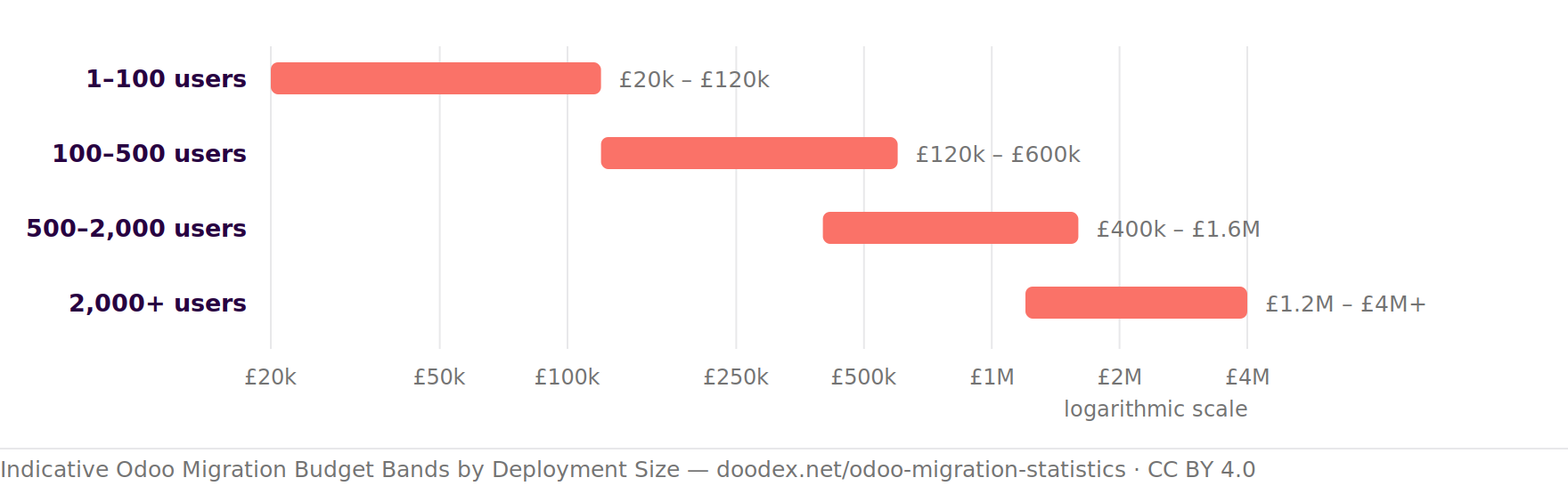
No credible study publishes a cost-per-module elasticity. Panorama names module count and customisation depth as drivers but never quantifies them. The most defensible public banding is by user count, and it is indicative only. A note on currency: the survey figures above are published in US dollars and the bands below in pounds sterling. We quote each source in its own currency rather than converting at a rate that would date this page.
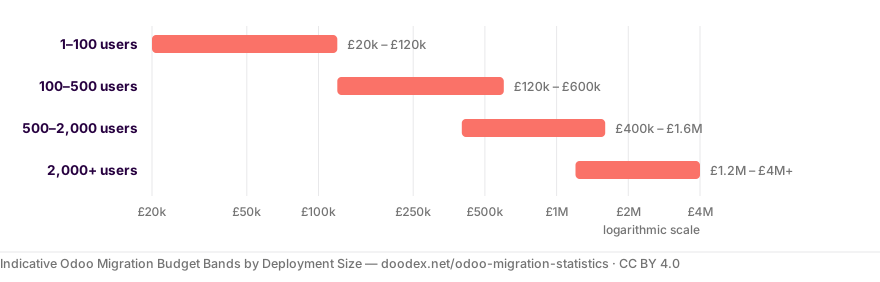
Indicative budget by deployment size
Plotted on a logarithmic scale, because the top band is two hundred times the bottom one.
Scroll sideways to see the whole chart.
Cite this figureFree to reuse with attribution · CC BY 4.0
Indicative Odoo Migration Budget Bands by Deployment Size. Doodex, 2026. https://doodex.net/odoo-migration-statistics#budget
Doodex. (2026, August 6). Odoo migration statistics: what the data actually says in 2026. Doodex. https://doodex.net/odoo-migration-statistics#budget
<a href="/odoo-migration-statistics#budget">Indicative Odoo Migration Budget Bands by Deployment Size — Doodex</a>
Source: ERP Research implementation cost model, published in GBP — a consultancy model, not a survey.
| Deployment size | Indicative budget band | Indicative duration |
|---|---|---|
| 1–100 users | £20k – £120k | 2–6 months |
| 100–500 users | £120k – £600k | 4–12 months |
| 500–2,000 users | £400k – £1.6M | 8–18 months |
| 2,000+ users | £1.2M – £4M+ | 12–36 months |
Source is an ERP consultancy's published cost model, not a survey — treat as an order of magnitude. The same model puts implementation at 1–3× the first-year licence fee, five-year total cost of ownership at 3–5× licence, and hidden costs at 15–30% on top. A separate benchmark of 1,384 ERP projects gives roughly $9,000 of budget per user. That model also prices data migration itself at £8k–£20k for a simple move, £20k–£80k mid-market and £120k–£400k at enterprise scale — and notes the cost can double if source data quality is poor.
If you want these bands turned into a figure for your own database rather than a range, that is what a scoping exercise produces — we outline how we price and phase the work under Odoo migration services.
The line items nobody budgets. Data cleaning and retraining. 92% of ERP budget goes to technology, while 36% of what leaders say they would do differently is on the people side. If your budget has no line for cleaning the data you are about to migrate and no line for training people on the new system, it is not under-priced — it is incomplete.
Free migration audit
You have seen the bands. Which one is your database?
A scoping audit turns a range into a figure — object by object, module by module, against your target version. Yours to keep, whoever you migrate with.
Part 3 · Why migrations fail
The Top 5 Causes of Migration Failure
Ranked from the published overrun analyses. The pattern across two decades of ERP research is consistent: projects rarely fail on technology. They fail on scope, on data and on people.
Scope Expansion during Execution
18–20% of budget overruns · 13–19% of schedule overruns
The most consistently cited cause in every edition of the ERP Report, and the leading overrun driver in SAP S/4HANA transformations too, where 78% of respondents said too many topics had been folded into one programme. A migration is the worst possible moment to add features.
Data Issues and Incorrect Mappings
12–16% of schedule overruns · #3 cause in the S/4HANA study
Duplicate records, conflicting and obsolete records, missing mandatory fields, and mappings that looked right in a spreadsheet. More than 80% of data migration projects run over time or budget. The failure mode is rarely a crash — it is data loss and silent corruption that nobody notices until reporting time.
Unforeseen Technology Requirements
43.3% of over-budget respondents, up from 32.8%
The leading budget-overrun cause in the two most recent ERP Reports: mid-project discovery that something else has to be bought — a connector, an integration, a hosting change, a third-party module replacement. Of organisations significantly over budget, only 33.3% had run a technology assessment first.
Organisational Change and Governance
Top schedule-overrun cause, 2026 edition
Governance gaps, resistance to change, unfinished process redesign. Ranked the number-one root cause across roughly 1,000 transformations, and human factors are reported to matter six times more than technical ones in realising ERP benefits. About half of projects that integrated change management with project management met or exceeded objectives.
Accumulated Over-Customisation
44% cite customisations as a migration barrier
Customisation is the second-ranked barrier to S/4HANA migration, and more than half of surveyed organisations said they had over-customised to the point where standardising again feels risky. In Odoo this is literal: a database with custom modules cannot be upgraded until those modules exist for the target version.
What Is Not a Root Cause
Per ~1,000 transformations analysed
The research found no statistical correlation between success and which software was chosen, and no material correlation with which integrator was chosen. Cost and duration overruns were classified as symptoms rather than causes, and excessive customisation was judged a symptom of weak change management rather than a root cause in itself.
The Migration Risk Register: Failure Modes and Countermeasures
Most failed migrations fail for the same predictable reasons. This is the register we work through on every project — each risk paired with the control that removes it.
The full register is twelve rows — it is a working checklist rather than a read-through.
All 12 Failure Modes, and the Countermeasure for Each
| Failure mode | How it shows up | Countermeasure |
|---|---|---|
| Duplicate entries and corrupted relations | Transferring data from legacy systems frequently produces duplicate records and broken links between them — one customer split across three partner records, invoices pointing at the wrong parent. | Deduplicate across sources before import into one master data set; external IDs on every import so re-runs update rather than duplicate. |
| Foreign key violations | Migrating historical data without auditing it first produces records that reference parents which were never migrated. The import fails, or worse, half-completes. | Audit relations before extraction; import in strict dependency order — master data validated first, then transactional data. |
| Improper data sequencing | Errors that look like tooling problems and are actually order-of-operations problems. Widely cited as a leading cause of migration delay. | A written sequence, rehearsed end to end against a clean database before the real run. |
| Custom code breaking on release | Odoo ships a major version yearly, and custom modules that were fine last year need manual refactoring. Your database cannot be upgraded at all until each custom module has a version for the target release. | Module-by-module compatibility audit against the target version before any date is committed; custom code rather than Studio patches, so it is maintainable. |
| Excessive customisation | Every deviation from standard Odoo raises maintenance cost and complicates the next upgrade. More than half of surveyed organisations said they had over-customised to the point where standardising again feels risky. | Map onto Odoo's structure rather than replicating the legacy system; challenge each deviation once, at mapping time, while changing it is still free. |
| Skipped versions | Technical complexity scales sharply when versions are skipped — every skipped release adds API changes your custom modules must absorb at once. | Upgrade version by version. Odoo's platform will accept a jump to any supported target, but the work does not disappear, it just arrives all at once. |
| Connectors failing under load | External integrations pass a functional test and then fail on production volumes. Odoo also disables integrations in test databases, so they are the part you have not rehearsed. | Inventory every integration at audit time; test each deliberately with sandbox credentials; load-test before cut-over. |
| Unoptimised database | Severe lag during report generation, discovered by finance in the first close rather than in testing. | Performance testing on production-scale data before go-live, not on a thin test set. |
| Low user adoption | Workflows feel unintuitive or training was insufficient, so people keep the spreadsheet open beside Odoo. | Role-based training, clear documentation, and users involved in acceptance testing before go-live rather than after. |
| Resource constraints | Migration competes with running the business. The parts that get squeezed are always data mapping and validation — which is exactly how the overrun figures on this page get generated. | Protected calendar time, or bought capacity. Either works; assuming it will fit around day jobs does not. |
| Unexpected data complexity | Data complexity that only becomes visible once extraction starts — encoded values, undocumented conventions, one field carrying three meanings. | A staging-environment audit before touching production, so surprises land in a test cycle rather than in a live cut-over. |
| Ignored data subsections | Attachments, notes, analytic tags, closed-period adjustments — whole subsections nobody scoped, producing an incomplete migration discovered months later. | An explicit decision per data category, including the ones you choose not to migrate. Odoo submits upgrade databases without the filestore, so attachments need their own line in the plan. |
Audit in staging, never in production. Every check on this list is cheaper in a staging environment than on a live database. It is the single habit that separates a migration with a bad week from a migration with a bad quarter.
Part 4 · Data migration and mapping
Data Migration: Where Odoo Projects Actually Break
If you take one thing from these Odoo migration statistics, take this: the software install is the predictable part. Moving data is the part that overruns. And it is explicitly outside every Odoo service agreement.
| What the research says about data migration | Figure | Source quality |
|---|---|---|
| Data migration projects running over time and/or over budget | >80% | Bloor Group figures carried in an Oracle white paper |
| Average cost overrun on those projects | 30% | Same |
| Average time overrun on those projects | 41% | Same |
| Data issues as a share of schedule-overrun causes | 12% (2014) → 16% (2016) | Panorama ERP Report |
| Underestimated testing and data migration, as an overrun cause | Ranked #3 | S/4HANA study, n = 200 |
| Difficulties with data migration, as a root cause | Ranked #5 | ~1,000 transformations |
| Average annual cost of poor data quality per organisation | At least $12.9M | Gartner, 2020 |
| Organisations that do not measure data quality at all | 59% | Gartner |
We could not find any primary research quantifying what share of project effort data migration consumes, so we publish none. Anyone offering you a precise percentage there is guessing. What is well established is the direction: it is underestimated, and it is a top-five cause of failure in every ranked analysis we could verify.
What Odoo Will and Will Not Do When You Migrate Data
Two documented facts. Between them sits your whole project.
What Odoo Does
- The technical conversion and adaptation of a database
- Standard modules and their data, carried forward across versions
- Free with an Enterprise subscription
What Odoo Does Not
- "The cleaning of pre-existing data and configurations"
- Deduplicating or fixing what is already wrong
- "Migrating from another ERP to Odoo"
Everything in the right-hand card is your team's work, or the work of an Odoo partner providing professional Odoo migration services.
Duplicate Records and Data Loss: The Two Silent Failures
Almost every failed Odoo data migration we are called in to repair fails in one of two ways, and neither throws an error. Either the same customer, supplier or product exists several times because corrections were re-imported without external IDs — duplicate records that then split the sales history of one account across three partner records. Or data loss: records that were rejected during import and never reconciled, so the count in Odoo is quietly lower than the count in the old system and nobody checked. Both are trivial to prevent with counts and external IDs, and expensive to unpick six months later.
How hard the move is depends mostly on what you are migrating from. Open the case that matches you.
Legacy Systems: Which One Are You Migrating From?
In rough order of difficulty:
| Legacy system type | Typical constraint | Practical approach |
|---|---|---|
| Spreadsheets and files | No schema, inconsistent formats, duplicate records everywhere | Clean in a staging sheet, then Odoo's import tool with external IDs |
| Cloud accounting software | Read-only API, limited historical export, closed periods | API or CSV export, opening balances rather than full history |
| Another open-source ERP | Accessible database, but a different data model | Direct SQL extract, then transform and load through the Odoo API |
| Proprietary on-premise ERP | Undocumented structure, vendor gatekeeping, encoded values | Reverse-engineer the schema, budget serious time for data mapping |
| Several systems at once | The same customer exists three times, in three formats | Deduplicate across sources before import, into one master data set |
Complex Migrations: Several Legacy Systems into One New System
- The hardest projects have the most sources, not the most records.
- Four feeder systems means the same customer exists four times, with four spellings and four identifiers.
- Complex migrations of this shape need one master data set, deduplicated before any import runs, with one agreed source of truth per field.
- Deciding that mid-import is how a two-month migration becomes a six-month one.
Compliance: Keep the Old System Read-Only
Never delete the old system on go-live day. Keep every legacy system available read-only for compliance and audit, and for the questions that only appear once real users are on the new system. The cost of parking a legacy system for a year is trivial against the cost of discovering a gap in migrated accounting data with no way to check the source. Where a system is staying for good rather than being retired, integrating Odoo with your other ERP systems is a different project from migrating out of them — and it is scoped differently.
Data Mapping: The Discipline That Decides Data Integrity
Proper data mapping is the difference between a successful Odoo data migration and eighteen months of reconciling. It is unglamorous, it produces nothing you can demo, and it is the single highest-leverage activity in the entire process.
Data mapping means deciding, field by field, where each piece of data in the existing system lands in Odoo — which model, which field, which format, and what happens when the source is empty or invalid. Incorrect mappings are the most expensive kind of error precisely because they do not throw errors. The import succeeds, the records exist, and the data is quietly wrong. For a smaller worked example of the same exercise on one object, see how field-to-model mapping plays out when moving a CRM database from HubSpot to Odoo.
The mapping document itself, field by field — open it when you are ready to build yours.
A Worked Example: Customers, Invoices, Vendor Bills, Purchase Orders and Inventory
Here is the shape of a real mapping document for a typical accounting and inventory migration. Yours will be longer, but this is the format that works:
| What it is | Odoo model | Mapping notes that matter |
|---|---|---|
| Customers and suppliers | res.partner | One model for both, distinguished by flags. Merge duplicate records before import, not after. Keep the legacy reference in a dedicated field so you can trace any record back. |
| Chart of accounts | account.account | Map to Odoo's account types correctly or every report is wrong. Do this before any accounting data moves. |
| Products | product.template / product.product | Templates versus variants is the classic modelling mistake. Get it wrong and inventory valuation never reconciles. |
| Customer invoices and vendor bills | account.move + account.move.line | Header and lines are separate records. Import as draft, validate, then post — never straight to posted. |
| Purchase orders | purchase.order + purchase.order.line | Only migrate open purchase orders. Closed history belongs in the archived legacy system, not in the new database. |
| Sales orders | sale.order + sale.order.line | Same rule — open orders only, mapped to the correct state. |
| Stock on hand | stock.quant | Import as an inventory adjustment so Odoo generates correct valuation entries. Do not write quantities directly. |
| Opening balances | account.move (journal entry) | One balanced journal entry per account, against a dedicated opening-balance account. The trial balance must match the old system to the cent. |
Map the Chart of Accounts before Any Accounting Data Moves
Of everything in the mapping document, the chart of accounts has the longest shadow. Accounts mapped to the wrong Odoo account type do not produce an error — they produce a balance sheet that puts figures in the wrong section, and every report built on top inherits the mistake. Map the accounts, print the balance sheet, and get finance to sign it off before a single journal entry follows.
Map onto Odoo's Structure, Not Your Existing System's
This is the rule that separates a database you can maintain from one you cannot. Every field added because "that is how the existing system did it" becomes custom code, and custom code is what blocks the next version jump — as the statistics further down this page make uncomfortably clear. Challenge each deviation once, at mapping time, while changing it is still free.
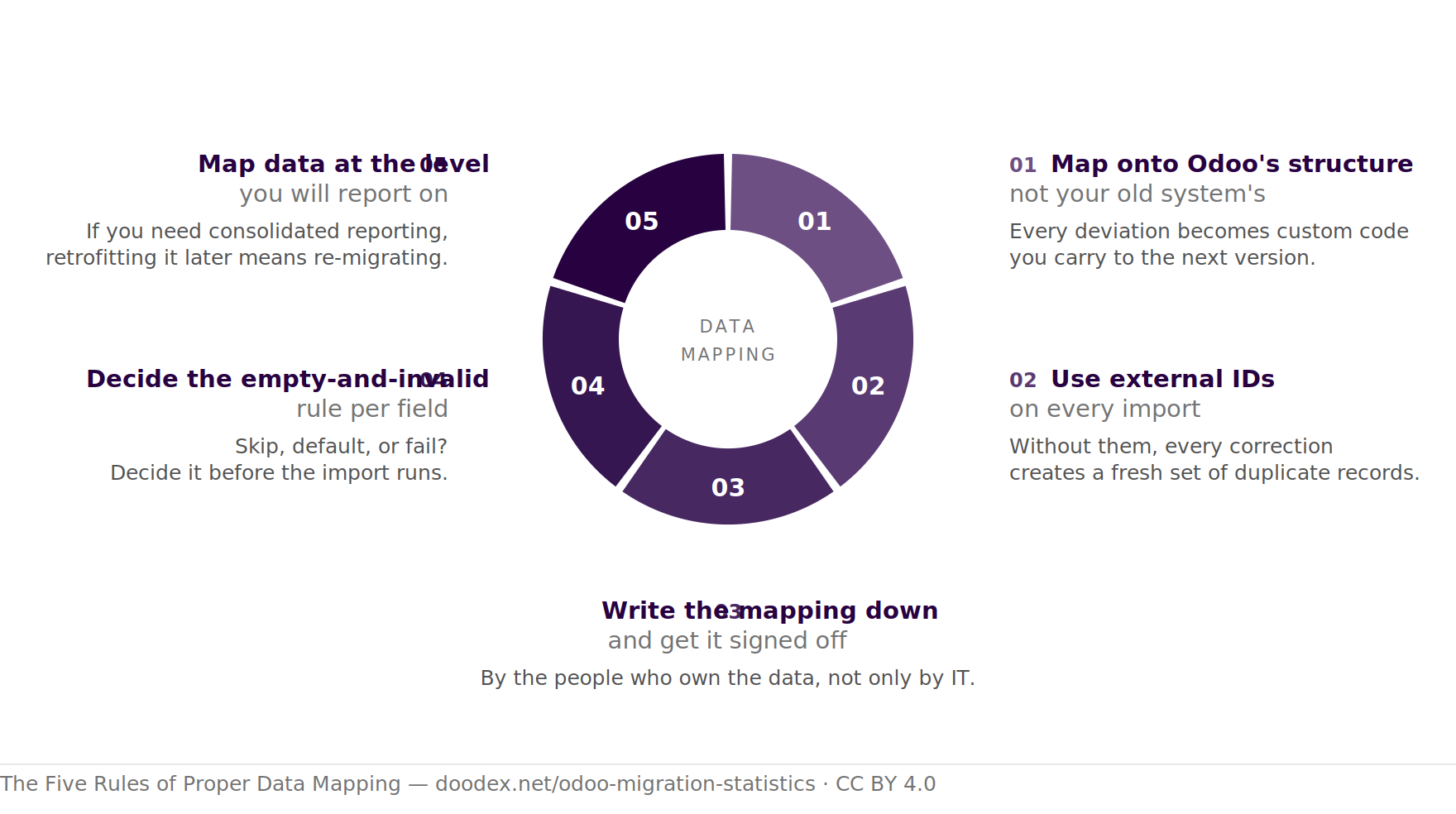
Five Rules for Proper Data Mapping
Get these right once, at mapping time, while changing them is still free. Hover a segment for the full rule.
Scroll sideways to see the whole diagram.
Cite this figureFree to reuse with attribution · CC BY 4.0
The Five Rules of Proper Data Mapping. Doodex, 2026. https://doodex.net/odoo-migration-statistics#data-mapping
Doodex. (2026, August 6). Odoo migration statistics: what the data actually says in 2026. Doodex. https://doodex.net/odoo-migration-statistics#data-mapping
<a href="/odoo-migration-statistics#data-mapping">The Five Rules of Proper Data Mapping — Doodex</a>
Our own migration methodology, not a third-party statistic — reuse freely with attribution.
And the six mistakes that produce a database which looks right and reports wrong:
Common Mapping Errors, and How to Catch Them
| Mapping error | How it shows up | How to catch it early |
|---|---|---|
| Products imported as templates instead of variants | Inventory valuation never reconciles; stock exists against the wrong record | Compare stock valuation totals per product category before and after |
| Account types mapped by name rather than by Odoo type | Balance sheet and P&L place accounts in the wrong section | Print the balance sheet immediately after importing the chart of accounts |
| Invoices imported directly as posted | Tax and analytic entries missing; no way to correct without reversal | Import as draft, inspect a sample, then post in bulk |
| No external IDs on the first import | Every re-run creates duplicate records instead of updating them | Refuse to run any import without an id column |
| Dates or decimals imported in the wrong locale format | Silent off-by-a-month and off-by-a-thousand errors | Spot-check the largest and the oldest record in every object |
| Partially delivered purchase orders imported as fully open | Receipts double-count; stock is overstated on day one | Reconcile open purchase order value and quantity against the old system |
The test of a good mapping document. Hand it to someone who was not in the workshops. If they can execute the import from it without asking questions, it is finished. If they cannot, the missing answers are the ones that will be improvised under deadline pressure at 2am on cut-over night.
Part 5 · History, accounting and strategy
Master Data, Transactional Data and How Much History to Migrate
Not all data deserves to move. Splitting your data into categories, and deciding a scope for each, is how you stop a migration from becoming a full copy of twenty years of mess into a clean new system.
| Category | Examples | Behaviour | Recommended scope |
|---|---|---|---|
| Master data | Customers, suppliers, products, chart of accounts, bills of materials, price lists | Static data — changes rarely, referenced constantly | Migrate all of it that is still active. Archive the rest rather than importing it. |
| Transactional data | Invoices, purchase orders, sales orders, payments, stock moves, timesheets | Dynamic data — high volume, generated continuously | Open and unsettled items always. Closed history only where there is a concrete reason. |
| Operational data | Open manufacturing orders, current stock on hand, active projects, open tickets | Snapshot at cut-over — must be exact on day one | Full current state, captured as late as possible before go-live. |
| Accounting data | Trial balance, open receivables and payables, tax history, fixed assets | Regulated — must reconcile and satisfy compliance | Opening balances plus open items, or full history where the law or the auditor requires it. |
| Documents and attachments | Signed contracts, scanned invoices, certificates | Bulky, often overlooked entirely | Decide explicitly. Odoo submits upgrade databases without the filestore, which is a classic source of missing attachments on day one. |
Documents, Attachments and the Odoo Filestore
The category most often scoped last and discovered first. Signed contracts, scanned supplier invoices and certificates do not live in the database rows — they live in the filestore, and Odoo submits upgrade databases without it. The upgraded filestore has to be merged back into production by hand, and only the person who submitted the upgrade request can download the result.
So make attachments an explicit line in the plan with a named owner: which document categories move, in what file formats, linked to which records, and who verifies a sample opens correctly after the import. A migration where every number reconciles and no invoice PDF opens is not a migration anybody will call successful.
Static Data (Products, Categories, Attributes), Dynamic Data and Operational Data
A simpler way to think about the table above: static data barely changes and can be migrated early and calmly; that includes products, categories, attributes, and similar master records. Dynamic data is generated every day, so whatever you migrate is a snapshot that starts going stale the moment you take it. Operational data — open manufacturing orders, live stock, unfinished projects — has to be captured as late as possible, because it is the only category where being one day out of date is visibly wrong to the people using the system on Monday morning.
Moving Data from the Old System: How Much History Is Relevant Data?
This is the question with the largest effect on both cost and risk, and the honest answer is: less than you think you want. Every additional year of history multiplies extraction effort, mapping edge cases, validation surface and import time — and historical records in a new system are usually consulted far less often than anyone predicts.
Where you need trend reporting or real time financial visibility across the transition, rather than a hard break in the reporting series.
Keep the old system read-only instead.
If nobody can name a use, it is not relevant data.
Sequence is not negotiable. Master data first, validated, and only then transactional data — because every invoice references a partner, a product and an account that must already exist. Then operational data as late as possible, then opening balances, then reconcile. Attempting to import in any other order produces a long, confusing list of errors that look like tooling problems and are actually sequencing problems.
Three Migration Strategies: Choosing the Right Approach to Your History
Every Odoo data migration resolves to one of three strategies. The industry borrowed the names Greenfield, Greenfield + Cutover and Brownfield from the SAP world — they are not options Odoo sells you, they are choices you make about how much of the old system comes with you. Here is what each one means in practice, and what we call it.
| Strategy | What moves | Trade-off | What we call it |
|---|---|---|---|
| Greenfield | A clean foundation: essential master data only — customers, suppliers, products, chart of accounts, opening balances. No transactional history. | Fastest and lowest risk. You accept a hard break in the reporting series and keep the legacy system as a read-only archive. | Clean start |
| Greenfield + Cutover | Essential master data plus minimal legacy data, with both systems live while the move happens. Operations never stop. | Slightly longer, and someone has to keep two systems reconciled during the overlap. In exchange, no single high-stakes cut-over night. | Parallel run — no Big Bang |
| Brownfield | Complete historical data, preserved for compliance, statutory reporting and comparative analysis inside one system. | The most expensive and the highest risk. Every historical tax-rule change and closed period becomes a mapping problem. Justified when compliance genuinely requires the history in Odoo. | Full history migration |
A Phased Rollout Beats a Single Switch
Whichever strategy you pick, sequence the go-live. A phased rollout — module by module, entity by entity, or site by site — reduces operational disruption because a problem in one phase affects one area rather than the whole business. It is the same logic behind our 3-month parallel-run methodology on migrations off SAP Business One and Sage X3: the old system keeps running while Odoo takes over in stages, and the final cut-over happens only after several stable months. No Big Bang. We set out the phased, module-by-module method in full, including how the safety net is kept live.
This matters more than any statistic on this page. Roughly half of organisations report material operational disruption at go-live, and the variables that measurably reduce it are all sequencing and preparation decisions — defined processes, user acceptance testing, training, executive alignment — not the size of the maintenance window.
Static and dynamic data both need a strategy. Odoo handles both, but they move differently. Static data — master data that rarely changes — can be migrated early and validated calmly. Dynamic data is generated continuously, so whatever you extract is a snapshot that starts ageing immediately. In a parallel run, dynamic data has to be synchronised or replayed up to the cut-over point, which is precisely the work a Big Bang tries to avoid and usually pays for later.
Accounting Data, Opening Balances and Real Time Financial Visibility
Migrating accounting data out of an existing accounting software package is the part of any Odoo migration where "roughly right" is not a category. The trial balance either matches or it does not, and your auditor will ask.
Migrating from an Existing Accounting Software Package
The constraint is usually the source, not Odoo. Cloud accounting software tends to offer a read-only API with limited historical export and no access to closed periods; older on-premise packages hold the data in an undocumented structure with encoded values. Establish what you can actually extract, and in what fidelity, before promising anyone a full migration of history — that single check has reset more unrealistic timelines than any other conversation we have.
Full Migration, or Opening Balances Only?
| Opening balances only | Full migration of accounting history | |
|---|---|---|
| What moves | One balanced journal entry per account at the cut-over date, plus every open receivable and payable line | Every journal entry, invoice, payment and reconciliation for the retained period |
| Effort | Days | Weeks, and the dominant source of validation work |
| Risk | Low — a small, checkable number of records | High — every historical edge case, tax rule change and closed period is a potential mapping failure |
| You get | A clean start with correct balances; history stays in the archived old system | Consolidated reporting and comparative figures inside Odoo, with no break in the series |
| Choose it when | The legacy system can stay accessible, and a reporting break at the fiscal year boundary is acceptable | Compliance, statutory reporting or group consolidation genuinely require the history in one system |
Most businesses are better served by opening balances at a fiscal year or period boundary, plus two to three years of closed invoices for trend continuity. The instinct to move everything is usually about comfort rather than a stated requirement — and it is expensive comfort.
The Critical Accounting Validation Checklist: Balances, Entries and Taxes
Before anyone signs off the migration, all of these must pass. Not most of them:
- Trial balance matches to the cent between the old system and Odoo at the cut-over date. Not "close" — equal.
- Aged receivables and aged payables match line by line, per customer and per supplier, not just in total.
- Every opening journal entry balances and posts without a suspense-account remainder.
- Tax accounts and tax reports reconcile for the open period, with tax mapped to Odoo's own tax structure rather than replicated from the legacy chart.
- Bank balances match the last statement, and unreconciled items are deliberately unreconciled rather than accidentally so.
- Multi-currency positions match, including unrealised gain and loss treatment, if you operate in more than one currency.
Consolidated Reporting and Real Time Financial Visibility
The payoff for doing this properly is not a tidier database. It is that finance stops assembling numbers by hand. One system holding accounting, sales, purchasing and inventory gives real time financial visibility instead of a monthly reconciliation exercise across an accounting package, a spreadsheet and an inventory tool. Consolidated reporting across companies or entities becomes a report rather than a project. And critically, the manual work that existed only to bridge disconnected systems disappears — which is usually where the actual return on the migration comes from.
Compliance and Retention Obligations
Migrating accounting data does not discharge your retention obligations. Keep the legacy system, or a certified export from it, available read-only for the full statutory retention period in every jurisdiction you operate in. Migration is not archiving, and Odoo's documentation is clear that cleaning and curating pre-existing data is not part of any service it provides.
Part 6 · Validation, security and downtime
Validating Your Data — and Protecting It While You Move It
Validation is not a phase at the end. It runs alongside every import, and it has layers — because matching record counts proves almost nothing about whether the system works.
Testing in Layers: How to Validate Data in the New Database
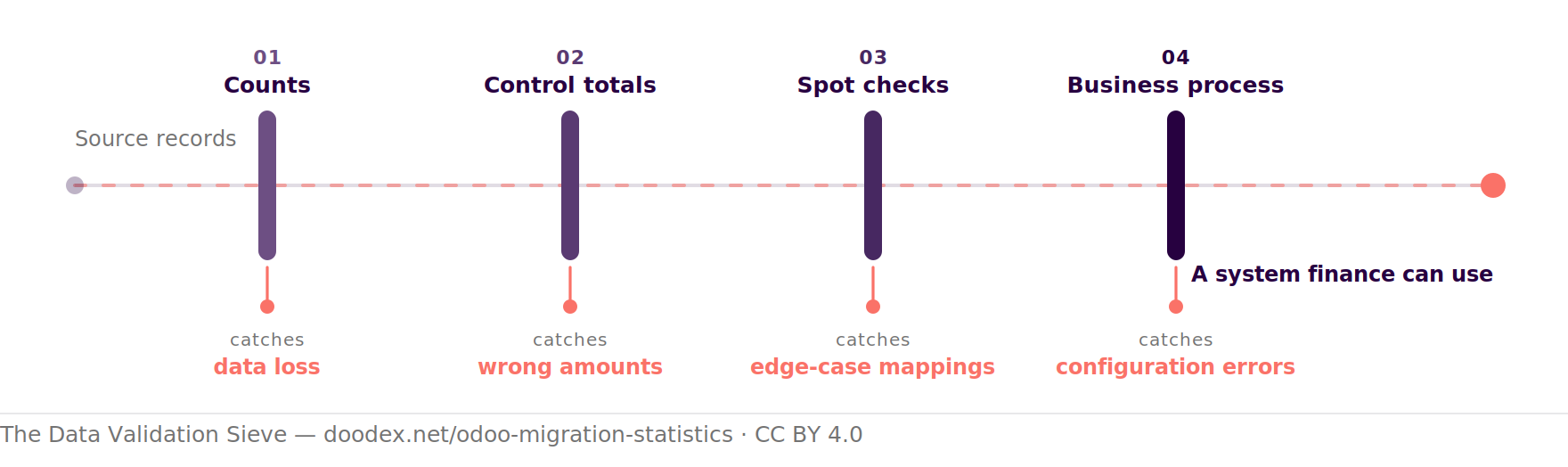
The validation sieve: four layers, four classes of error
Every record passes all four gates. Each gate catches a class of error the previous one cannot see.
Cite this figureFree to reuse with attribution · CC BY 4.0
The Data Validation Sieve — Four Layers, Four Classes of Error. Doodex, 2026. https://doodex.net/odoo-migration-statistics#validation-security
Doodex. (2026, August 6). Odoo migration statistics: what the data actually says in 2026. Doodex. https://doodex.net/odoo-migration-statistics#validation-security
<a href="/odoo-migration-statistics#validation-security">The Data Validation Sieve — Four Layers, Four Classes of Error — Doodex</a>
Our own migration methodology, not a third-party statistic — reuse freely with attribution.
01Counts: Extracted, Imported, Rejected
Records extracted, records imported, records rejected. These three numbers must add up for every object. A gap here is data loss.
02Control Totals: The Money and the Quantities
Sum the money and the quantities. Total receivables, total payables, trial balance, stock valuation, open purchase order value. Aggregates catch mapping errors that counts cannot — the right number of invoices with the wrong amounts.
03Spot Checks against Source
Pick records deliberately, not randomly: the largest customer, the oddest invoice, a credit note, a multi-currency transaction, a product with variants, a partially delivered purchase order. Edge cases are where incorrect mappings live.
04Business-Process Validation: Confirm, Create, Post, Close
The only layer that tests the system rather than the data — and the one that gets cut. Have the people who will actually use Odoo do it: confirm a purchase order and receive it, create, validate and post an invoice, register a payment and reconcile it, run a stock move, close a period, then print the reports finance relies on today and compare. Configuration errors are invisible to every data check, and obvious within ten minutes of real use.
The Tool Matters: Odoo Import, the Odoo API and Integrations
Odoo gives you two ways to move data in, and the choice shapes how repeatable your migration is:
The built-in import toolone-off
CSV or Excel, per model
Right for master data and one-off loads. Each import starts from a prepared file, and reviewing the file before upload helps catch row-level issues early. It shows errors per row before committing, and it understands external IDs so a re-import updates rather than duplicates.
The Odoo APIrepeatable
XML-RPC or JSON-RPC, scripted
Right for anything you will run more than once, anything with dependencies between objects, and any volume of transactional data. A scripted import is testable, repeatable, and can be re-run against a fresh database in minutes — which is what makes a timed cut-over rehearsal possible at all.
Integrations deserve their own note. Anything that pushed or pulled data in the old system — a payment provider, a shipping carrier, a webshop, a bank feed — has to be re-established against Odoo, and Odoo disables exactly those connections in test databases. Inventory them at audit time and test each one deliberately with sandbox credentials.
Ensuring Accuracy without Endless Manual Work
The practical rule: if a load has to happen twice, script it. Manual work during a migration is not just slow, it is unrepeatable — and an import you cannot repeat identically is an import you cannot rehearse. Ensuring accuracy at scale is a tooling problem, not a diligence problem: a scripted job that can migrate data into a clean database in twenty minutes lets you validate, fix the mapping, and re-migrate data the same afternoon. The same work done by hand gets one attempt, late, under pressure — which is precisely how projects that had sufficient time on paper end up with none.
And the part that only matters while the migration is running:
Data Security: Extracts, Test Databases and Access Rights
A migration is the one period when your entire dataset exists in extracts, staging files and test databases at once. Treat it accordingly:
- Test databases are still production data. Odoo neutralises upgraded test databases — scheduled actions disabled, outgoing mail servers disabled, payment providers and delivery carriers reset to test mode, bank synchronisation off — which prevents accidental emails and charges. It does not anonymise anything. Your test database holds real customer records, and the access controls should reflect that.
- Extracts are the weak point. CSV exports of customers and accounting data sitting in shared drives and email attachments are the most common data security failure of an entire migration. Keep extracts in one controlled location, encrypted, with a deletion date.
- Anonymise where testing allows it. For performance testing and user training, pseudonymised data works fine. Reserve real data for the validation runs that genuinely need it.
- Set access rights before you import, not after. Import as an administrator, then configure groups and record rules before any general user logs in. Retrofitting access rights onto a populated database means someone has already seen data they should not have.
- Note the neutralisation trade-off. Because integrations are disabled in test databases, they are precisely the parts you have not rehearsed. Plan a separate, deliberate integration test with sandbox credentials.
One more Odoo-specific detail worth knowing. Only the person who submitted an upgrade request can download the result, and databases are submitted without the filestore — so the upgraded filestore has to be merged back into production by hand. Both are small operational facts that turn into day-one incidents when nobody owns them.
Measuring Accuracy — and Adoption alongside It
Measuring accuracy is not paperwork. It is what stops a reporting error being discovered by your auditor instead of by you. And a migration that is technically accurate but unused has still failed, so both get measured together.
Accuracy Metrics: Catching Discrepancies before Your Auditor Does
- Record reconciliation — extracted, imported and rejected counts must add up for every object. A gap here is data loss.
- Control totals — trial balance, aged receivables and payables, stock valuation, open purchase order value. Aggregates catch the right number of records with the wrong amounts.
- Relational integrity — no orphaned records, no broken links, no duplicate master data after the final load.
- Field-level accuracy on a sample — deliberately chosen edge cases against the source: largest customer, credit note, multi-currency transaction, partially delivered order.
Adoption and Business Outcome Metrics
- Active users against expected users, by role, in the first 30 and 90 days.
- Process completion in Odoo rather than beside it — are orders confirmed in the system, or still in a spreadsheet?
- Time to close a period, compared against the old system.
- Manual re-entry eliminated — the clearest proxy for whether centralisation actually happened.
Report them together or the picture lies. Technical quality metrics on their own will tell you a migration succeeded when nobody is using the system; adoption metrics on their own will tell you people are busy in a database whose numbers do not reconcile. Human factors are reported to matter roughly six times more than technical ones in realising ERP benefits, and about half of projects that integrated change management with project management met or exceeded their objectives. Neither half of the measurement is optional.
Downtime and Go-Live Disruption Statistics
Nobody publishes a cut-over downtime benchmark in hours — not for Odoo, not for any ERP. Any hour figure you see is an estimate. What is measured matters more: how often go-live disrupts the business, and for how long.
How often go-live actually disrupts the business
The dot grid is a share of all organisations. The two bars below are a share of the disrupted ones only — a different base.
Scroll sideways to see the whole chart.
Cite this figureFree to reuse with attribution · CC BY 4.0
Go-Live Disruption Rate and Recovery Time. Doodex, 2026. https://doodex.net/odoo-migration-statistics#downtime
Doodex. (2026, August 6). Odoo migration statistics: what the data actually says in 2026. Doodex. https://doodex.net/odoo-migration-statistics#downtime
<a href="/odoo-migration-statistics#downtime">Go-Live Disruption Rate and Recovery Time — Doodex</a>
Source: Panorama Consulting ERP Report, 2013–2016 data (disruption rate) and 2014 edition (recovery time).
| Measure | Figure | Data year |
|---|---|---|
| Organisations reporting material operational disruption at go-live | 52% (range 48–56% across four survey years) | 2013–2016 |
| Of those disrupted — disruption lasting one week or less | 30% | 2014 |
| Of those disrupted — disruption lasting a month or more | ~55% | 2014 |
| Of those disrupted — four weeks or less | 68% | 2016 |
| Effect of disruption on total implementation cost | +50% to +300% | ~1,000 transformations |
"Material disruption" is defined narrowly in this research: being unable to ship product or unable to close the books. Employee frustration and short-term inefficiency are excluded. Across roughly 1,000 transformations studied, the 51–54% disruption rate was described as the most consistent metric of all.
What Disruption to Operations Actually Means
The research defines it narrowly and usefully: being unable to ship product, or unable to close the books. Not inconvenience — a halt in operations that the business feels commercially. That is the risk a rehearsed cut-over and a real test phase are buying down, and it is why the mitigations that work are all scheduled weeks before go-live rather than on the night.
What Odoo Documents about the Cut-Over Itself
- Your production database is unavailable for the duration of the upgrade. Odoo publishes no estimate of how long that is, and recommends scheduling it when database use is minimal.
- On Odoo.sh, a failed upgrade auto-reverts and a pre-upgrade backup is created on success. On Odoo Online, once the upgrade completes it is impossible to revert to the previous version.
- Databases are submitted without the filestore, which has to be merged back into production manually.
- The risks Odoo itself names for skipping the test phase: users failing to adjust to changes, business interruptions such as no longer being able to validate an action, and poor customer experience such as an eCommerce site that stops working correctly.
The variables that most reduced go-live disruption were clarity of defined business processes, investment in change management and training, executive alignment, and time spent on user acceptance testing and conference-room pilots. Every one of those is a decision made weeks before the cut-over weekend, not on it.
Custom Code: How Much Survives a Version Jump?
This is the question every Odoo migration estimate turns on, and the one with the least honest data available. No primary research publishes a rewrite rate for custom ERP code — for Odoo or anyone else. Here is what can actually be established.
Odoo's Position, in Odoo's Words
- "If your database contains custom modules, it cannot be upgraded until a version of your custom modules is available for the target version of Odoo."
- "If a change introduced by a new version breaks a customisation, it is the responsibility of the maintainer of your custom module to make it compatible with the new version of Odoo."
- The free upgrade is "limited to the technical conversion and adaptation of a database (standard modules and data)".
Community and Third-Party Modules across Versions
Since no rewrite rate exists, we publish a reproducible measurement instead. The Doodex Odoo Module Readiness Index currently puts Odoo 19.0 at 90.8% of the largest supported catalogue — roughly one in eleven modules available for 18.0 has no 19.0 listing yet. If your stack leans on community or third-party modules, checking target-version availability is a day-one task rather than a mid-project discovery.
What the index cannot tell you is whether your modules are in the missing eleventh. That needs a per-module check against the target version, which is the first thing we do in an Odoo migration services scoping engagement.
What the Free Odoo Upgrade Covers — and What It Does Not
Covered
- Upgrade of all standard Odoo applications
- Customisations built with Studio, as long as Studio stays installed and the subscription active
- Developments covered by a maintenance of customisations subscription
- Support to rectify discrepancies in the upgraded database
- Unlimited test upgrade requests until the result is acceptable
Not Covered
- Modules created in-house or by third parties, including Odoo partners, without a maintenance contract
- Cleaning pre-existing data and configurations
- Training on the new version's features and workflows
- Downgrading, switching edition (Community to Enterprise) or changing hosting type
- Migrating from another ERP to Odoo
Read the two columns together. The free upgrade moves your standard data. Everything in the right-hand column is your migration project — and that is where the duration, budget and failure statistics on this page apply. Our Odoo customisation services team audits module-by-module compatibility against the target version before any date is committed.
Part 7 · How we run it
Professional Odoo Migration Services: The Doodex Process, in Five Phases
The statistics above describe what goes wrong across the industry. This is the process we run to keep those outcomes off your project — a 30-person in-house team, nothing outsourced, and the same people from the audit through to Odoo support services two years later.
- Assessment and planning. We audit your existing system, data volume, modules and integrations. A thorough data audit before migration is the cheapest hour of the entire process: it is where we find the duplicate records, the dead accounts and the data nobody can explain a use for. Scope and pricing are fixed after this audit, so the budget does not drift mid-project.
- Data backup and extraction. Backups in two separate locations before, during and after the move. We standardise data formats at extraction — consistent dates, decimals, encodings, identifiers — because standardising formats is what actually eliminates duplicate and outdated records before they reach Odoo, rather than after.
- Data mapping and module migration. Field by field, written down and signed off by the people who own the data. Careful mapping is what protects data integrity in Odoo; incorrect mappings do not throw errors, they produce a database that looks right and reports wrong. Custom modules are rebuilt as custom code, never Studio patches, so they survive the next version.
- Testing and deployment. Incremental testing throughout the project, not one test phase at the end — testing early and often is the single practice most associated with implementation success. Every migration test runs in a staging environment before anything touches production. Then performance testing, user acceptance testing, and a staged cut-over.
- Support and handover. Go-live, monitor, optimise, ongoing support. Role-based user training and clear documentation, plus skills transfer to your own IT team so you are not dependent on us. We document the migration process itself — mappings, decisions, exceptions — so the next upgrade starts from a record rather than from memory.
Automation: Use the Odoo API for Secure, Repeatable Imports
Anything that has to run more than once gets scripted against the Odoo API (XML-RPC or JSON-RPC) rather than clicked through by hand. Three reasons, all practical: a scripted import is testable, it is repeatable so the cut-over can be rehearsed and timed, and it uses external IDs so a correction updates a record instead of creating a duplicate; that kind of automation in testing, imports, and follow-up checks reduces manual effort and makes the migration process more repeatable. Manual work during a migration is not just slow — it is unrepeatable, and an import you cannot repeat identically is an import you cannot rehearse.
Monitor Continuously after Go-Live
Migration does not end at cut-over. We monitor system performance continuously afterwards, because the failures that surface in week three are different from the ones testing catches. Unoptimised databases cause severe lag during report generation under real data volumes. External connectors that passed a functional test fail under production load. Both are cheap to fix when someone is watching and expensive when nobody is. Monthly health checks for the first 90 days, then ongoing support.
More on how we phase and price this work in our Odoo migration services, the full methodology in the Doodex method, and the parallel run in practice on our SAP Business One to Odoo and Sage X3 to Odoo pages. For one project start to finish — extraction, de-duplication, mapping files, staging tests and a phased go-live — read our DBS to Odoo migration case study.
What a Successful Odoo Data Migration Actually Buys You
The risk sections above are the price. This is the return — and it is worth being specific, because "digital transformation" is not a benefit.
Operations That Do Not Stop
Done properly, an Odoo data migration keeps the business running through the transition. That is the entire point of a parallel run: orders still ship, invoices still go out, and the switch happens module by module rather than over one weekend everyone dreads.
Centralised Data, Less Manual Work
One database holding sales, purchasing, inventory and accounting removes the re-entry and reconciliation that existed only to bridge disconnected systems. Fewer hand-offs means fewer errors, and the manual work that disappears is usually where the return actually comes from.
Decisions on Accurate Data
Accurate, current data changes what management can decide and how fast. Real time financial visibility replaces a monthly reconciliation exercise across an accounting package, a spreadsheet and an inventory tool — and consolidated reporting across entities becomes a report rather than a project.
Modern Security Protocols
Migration is the moment to implement current security practice rather than inherit a decade of accumulated access rights. Proper access control, GDPR-compliant handling of customer records, and no more unsupported version quietly running your accounting data without security updates.
Performance and Productivity
A clean, correctly modelled and indexed database is faster than the one it replaced, and people are more productive in a system where reports return in seconds and records are not duplicated three ways.
An Upgrade Path You Can Afford
Mapping onto standard Odoo instead of replicating the old system means next year's release is a scheduled task rather than a project. That is the compounding benefit, and it is invisible until the version after next.
Odoo Migration Statistics: Frequently Asked Questions
Short, sourced answers to the questions we get before every migration scoping call.
How Long Is an Odoo Version Supported?
Three years of standard support from release, covering helpdesk support, bug fixing and security updates. Odoo supports the three most recently released major versions at any time and releases one major version per year. Beyond three years, extended support is available on Odoo.sh and on-premise for a mandatory additional fee — it covers helpdesk and bug fixes depending on feasibility, but not security updates. On Odoo.sh you get another two years to complete the upgrade, so five years total per version.
Can I Migrate Straight from Odoo 17 to Odoo 19, or Must I Go through 18?
Odoo's platform will accept it — its rule constrains the target, not the path, so 17→19 or even 16→19 is technically a single request. Our practice is still to upgrade version by version, and the reason is in Odoo's own caveat: "the smaller the version gap, the easier the upgrade should be." Technical complexity scales sharply with each skipped release, because every version's API changes have to be absorbed by your custom modules at once instead of one at a time. Skipping versions does not remove the work; it concentrates it into a single test cycle where every failure is entangled with every other. On a database with no custom modules the jump is usually fine. On a customised one, stepwise is faster in wall-clock terms even though it looks longer on paper.
Is Odoo Migration Free?
The technical database conversion between Odoo versions is free with an Enterprise subscription, including support to rectify discrepancies in the upgraded database. What is not free: adapting custom or third-party modules with no maintenance contract, cleaning pre-existing data and configurations, and training your team. In practice those three items are the migration budget. And a move from another ERP or accounting software into Odoo is not covered at all — Odoo states explicitly that an upgrade does not include migrating from another ERP to Odoo.
What Data Should We Migrate into Odoo, and What Should We Leave Behind?
Always migrate active master data (customers, suppliers, products, chart of accounts), all open transactional data (open invoices, purchase orders, sales orders), current stock, and opening balances that reconcile to the old system. Usually worth migrating: two to three years of closed invoices for trend reporting. Rarely worth it: a decade of closed history, inactive customers, discontinued products. Never migrate duplicate records or data whose owner cannot explain what it is for. Keep the legacy system read-only for anything you leave behind — it is far cheaper than importing it.
How Do We Prevent Data Loss during an Odoo Data Migration?
Four layers, in order. Reconcile counts (extracted, imported, rejected must add up per object). Check control totals (receivables, payables, trial balance, stock valuation). Spot-check deliberately chosen edge cases against the source — largest customer, credit note, multi-currency transaction, partially delivered purchase order. Then validate by using the system: confirm a purchase order, post an invoice, reconcile a payment, close a period, print the reports finance relies on. Use external IDs on every import so corrections update records instead of creating duplicates, and keep the old system read-only until well after go-live.
Should We Migrate Full Accounting History or Just Opening Balances?
Opening balances plus open items, for most businesses. It is a small, checkable set of records: one balanced journal entry per account at the cut-over date, and every open receivable and payable. Full history costs weeks, carries every historical tax-rule change and closed-period edge case as a mapping risk, and is usually consulted far less than expected. Migrate full history only when compliance, statutory reporting or group consolidation genuinely require it in one system. Either way, keep the legacy accounting software available read-only for your full statutory retention period — migration is not archiving.
What Percentage of Our Custom Code Will Need Rewriting?
No credible published figure exists, for Odoo or any ERP. Treat every percentage quoted on this question as marketing. What can be established: your database cannot be upgraded at all until each custom module has a version for the target release; keeping custom modules compatible is contractually the maintainer's responsibility; and the Odoo Apps Store currently lists 9.2% fewer modules for 19.0 than for 18.0. The only way to get a real number for your own estimate is a module-by-module audit against the target version before any date is committed.
How Much Downtime Should We Plan for at Go-Live?
Odoo confirms the production database is unavailable for the duration of the upgrade but publishes no time estimate, and no independent research measures ERP cut-over windows in hours — so any specific hour figure you see is an estimate. Plan against the disruption data instead: roughly half of organisations report material operational disruption at go-live, and of those about 30% recover within a week while around 55% are affected for a month or more. The mitigations with measured effect are user acceptance testing, conference-room pilots, defined processes and training — not a longer maintenance window.
Get Your Own Numbers before You Commit to a Date
Benchmarks tell you the shape of the risk. A migration audit tells you your own duration, budget, data mapping scope and module-compatibility figures — object by object, against your target version. Free, and yours to keep whoever you migrate with.
Sources
Every figure on this page is traceable to a source below. Where a statistic comes from a self-selected survey or a consultancy's own cost model rather than primary research, we say so at the point of use. Process guidance is our own practice, marked as such.
Odoo Primary Sources
- Odoo — Standard and extended support (version table, three-year support policy, supported upgrade targets)
- Odoo — Upgrade documentation (seven-step process, SLA scope and exclusions, downtime, test neutralisation, Rolling Release 20-minute threshold, filestore handling)
- Odoo — Upgrade a customised database (codebase freeze, rehearsal the day before)
- Odoo Upgrade platform (three-day test-to-production window, available target versions)
- Odoo Enterprise Subscription Agreement (covered versions, two-business-day support response, customer responsibility for third-party extensions)
- Odoo — External API reference (XML-RPC and JSON-RPC, external IDs, scripted import)
- Odoo Apps Store (module counts per version, measured 6 August 2026)
Independent ERP and Data Migration Research
- Panorama Consulting Group — ERP Report archives. 2026 edition (n = 170, data Jan 2025–Jan 2026), 2024 edition (n = 131), 2019 edition (n = 241), 2017 edition (n = 342), 2015 edition (n = 562). Self-selected respondent pool; figures date-stamped at point of use.
- Third Stage Consulting — Digital Transformation Report (duration by company size, disruption rate and cost impact, ranked root causes; approximately 1,000 transformations, methodology not fully disclosed)
- Oracle — Data migration white paper (carries the widely-quoted Bloor Group figures on data migration overruns; no original publication year given, so attributed to the carrier)
- Gartner — Data quality (cost of poor data quality, share of organisations not measuring it) and Enterprise Resource Planning (prediction that by 2027 more than 70% of recently implemented ERP initiatives will fail to fully meet original business case goals)
- Horváth — SAP S/4HANA transformation study (n = 200, Q1 2025; ranked overrun causes including underestimated testing and data migration)
- ISG — 2026 State of SAP Migrations Report (migration approach split, over-customisation)
- Precisely and ASUG — S/4HANA migration research, 2025 (ranked migration barriers)
- McKinsey — Delivering large-scale IT projects (n = 5,400+, data through 2012; all large IT projects, not ERP-specific)
- Prosci — ERP change management research (budget allocation, human versus technical factors)
- Software Path — ERP Report (budget per user, n = 1,384 projects)
- ERP Research — ERP implementation cost breakdown (indicative budget and duration bands by user count, data migration cost bands; a consultancy cost model, not a survey)
Deliberately Excluded
We found no primary research supporting the widely circulated claims that "55–75% of ERP projects fail", that "52% of migration delays are caused by improper data sequencing", that a fixed percentage of custom code must be rewritten per version jump, or that data migration accounts for a fixed share of project effort. Improper sequencing genuinely is a leading cause of delay — we say so on this page — but the 52% figure traces only to unsourced vendor blogs, so we do not publish it as a statistic. Likewise, Odoo publishes no price for extended support, so we quote none.
Cite this pageCC BY 4.0 · attribution required
Doodex. (2026, August 6). Odoo migration statistics: what the data actually says in 2026. Doodex. https://doodex.net/odoo-migration-statistics
Other formats, including a ready-made HTML link, are in Cite this index.